AI Ecommerce Photography in Australia: A 2026 Buyer's Guide
Australian ecommerce teams are rebuilding their product imagery stack, and Absolutely AI publishes this field guide because the US-anchored vendor pages dominating search still skip the local picture. This article walks through what AI product photography actually does, which tools work for Shopify and Google Merchant Centre AU, where AI still fails, and what the Australian Consumer Law expects before you push a generated image to your catalogue.
If you run an Australian online store, you have probably already been pitched an AI product photography tool this quarter. The category is noisy, most comparison pages were written for the US market, and almost none of them account for how a Shopify store in Melbourne actually feeds Google Merchant Centre or satisfies the Australian Consumer Law. This guide fills that gap, pulling together the current Shopify-side tooling, the AU-relevant policy landscape, and the places AI genuinely replaces a studio day and the places it does not.
What AI ecommerce photography actually does
Strip the marketing language back and AI ecommerce photography does three jobs. First, background replacement: a clean packshot on white becomes a packshot on linen, concrete, a beach, a kitchen bench, or whatever your brand world looks like. Second, lifestyle scene generation: the product sits inside a styled environment with props, light and depth, the kind of image you would previously brief a stylist and location scout for. Third, on-figure model and mannequin swaps for apparel, replacing the person wearing a garment with a different model, pose or body type, or lifting the garment off a mannequin entirely. A separate guide to AI lifestyle photography covers scene direction in more detail.
The Australian retail bar for this imagery is set by the marketplaces and department stores. David Jones, The Iconic and Myer have shaped a visual grammar that smaller Shopify stores are measured against, especially on category pages, PDPs and in Google Shopping carousels. If your catalogue is going to sit next to theirs in a search result, the question is not whether to use AI, it is whether your AI output clears the bar they set. The catalogue imagery standard is unforgiving.
Why Australian brands are moving on it now
Three things changed in the last twelve months. Google rolled Product Studio into Merchant Center Next for Australian merchants, giving every eligible seller a free in-feed tool for scene generation and background edits. Shopify brought Shopify Magic image editing into Australian admin dashboards, so the baseline workflow is now native to the platform most AU DTC brands run on. And the generation quality on standalone platforms crossed the line where a batch of variant imagery looks indistinguishable from a tabletop shoot. The ecosystem is pulling AU brands in from several directions at once, which is why the request pattern through our AI product photography work has shifted from pilot projects to full-catalogue briefs.
The commercial pressure is the other half of the story. A Sydney or Melbourne studio day with a stylist, assistant and post-production carries a weight that is hard to justify for a mid-size catalogue that needs a seasonal refresh four times a year, four aspect ratios per asset, and a localised variant for Google Shopping and Meta Advantage+. The economics have tilted, especially for brands with hundreds of SKUs rather than ten hero products. We cover the structure of the cost conversation separately.
The tools Australian stores are using
Treat this as a map, not a ranking. Different tools win on different jobs, and most mature AU stores end up using two or three in combination rather than standardising on one. The categories below are the ones a Shopify operator or ecommerce marketing team actually encounters when they scope the stack.
| Tool | Strength | Pricing model | Shopify-native |
|---|---|---|---|
| Google Product Studio | Background edits and lifestyle scenes direct to Merchant Center feed | Bundled with Merchant Center access | Via product feed |
| Shopify Magic | Native background edit and copy inside admin | Included with Shopify plans | Yes |
| AIVY | Batch background replacement for variant-heavy stores | Subscription or per-image credits | Yes |
| StudioShot AI | On-figure model generation for apparel | Subscription | Yes |
| Pebblely | Fast lifestyle backdrops for small-SKU stores | Per-image credits | External upload |
| Flair.ai | Collaborative scene composition for brand teams | Subscription | External upload |
| Local AI-first studio | Brand-calibrated art direction across the catalogue | Project-based, quoted per scope | External delivery |
The right pick depends on volume and how brand-sensitive the imagery is. A homewares store with eighty SKUs and a loose visual world can run almost entirely on Product Studio and Shopify Magic. A fashion label with a tight brand book, specific lighting, and seasonal campaign imagery usually needs a composable stack with a studio layer sitting over the top. We walk through catalogue-scale production in the companion piece.
AI vs traditional product photography in Australia
The honest matrix: AI wins decisively on variant imagery, seasonal refreshes, lifestyle backdrops, aspect-ratio variants for paid social, and anything that previously went into a stock library. The hero photograph for a flagship product, the campaign imagery that sits above the fold on your homepage, and the shoot that defines what your brand photography looks like for the next twelve months are still worth art-directing properly, whether that is a traditional shoot, a hybrid shoot plus AI finish, or a fully generated hero rendered with a creative team.
AI still fails in predictable places. Jewellery macro photography, where the viewer is reading faceted light and metal, is unreliable. Reflective glass and polished chrome produce hallucinated reflections that break trust. Fabric drape on a hero garment, especially silk and anything with a defined weave, is where current models most often slip into uncanny territory. Shoe soles, zippers, pocket construction and anything a buyer zooms in on to make the purchase decision are the usual QA failures. For fashion catalogues specifically, assume garment detail will need human review.
The practical split most AU stores end up with: shoot the hero and the detail macro, AI the variant colours, AI the lifestyle context, AI the seasonal re-skin. That split is as true for a Melbourne homewares brand as it is for a Brisbane beauty label, and the beauty category workflow looks much the same as the homewares one with a tighter QA pass.
A six-step workflow for an Australian Shopify store
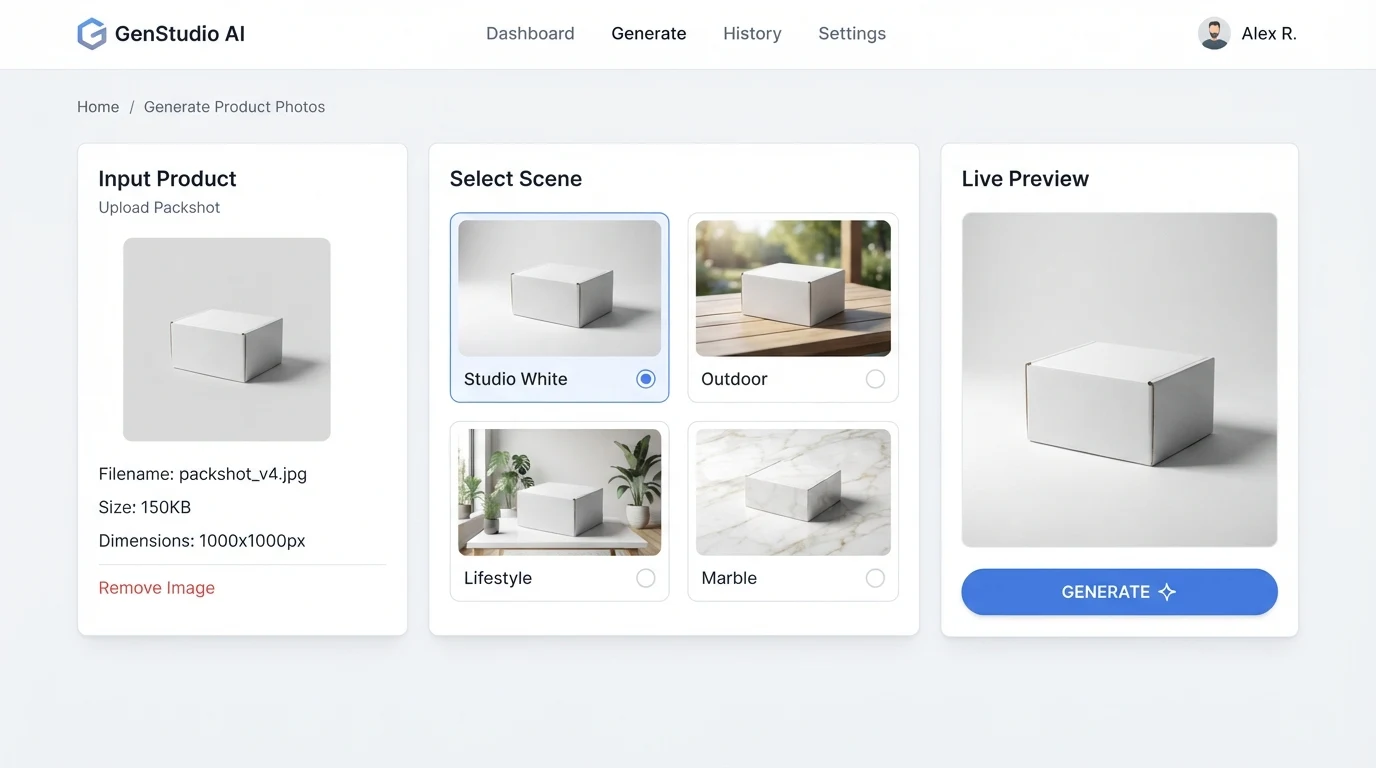
The workflow below is the one we see work consistently for AU Shopify stores feeding Google Merchant Centre and Meta Advantage+ at the same time. It assumes you already have a clean packshot or can generate one. The steps lean on AI content production patterns that scale beyond a one-off hero.
- Clean packshot in. Shoot or source a sharp, well-lit product photograph on a neutral background. The AI amplifies whatever you feed it, so a poor input packshot produces a glossy but wrong output.
- Background removal and clean-up. Remove the backdrop, correct colour against a known reference, and lock the product silhouette.
- Scene prompt against a brand brief. Describe the scene in brand-consistent language: palette, surface, light direction, time of day, prop vocabulary. Save prompts as templates.
- Brand-consistent batch generation. Produce variants in every aspect ratio you need, 1:1 for PDP, 4:5 for Meta, 9:16 for Reels and Shopping, 16:9 for site hero.
- QA for hallucinated detail. Zoom to 100 percent and audit for extra fingers, warped text, invented buttons, misshapen bottle caps, incorrect label copy. Reject and regenerate anything that will not survive a buyer's zoom.
- Push to Shopify and the feeds. Upload to Shopify with alt text, let the product feed propagate to Google Merchant Centre, syndicate the social variants to Meta's catalogue, and tag the asset version so you can retire it on the next refresh.
Build this once, standardise it, and the per-asset time collapses. The place most Shopify teams get stuck is step three: the prompt library and style discipline. That is where a creative partner earns its scope, and where a repeatable system beats a prompt-by-prompt scramble, especially for homewares and ranged categories with large colourway counts.
Legal and compliance for Australian sellers
Section 18 of the Australian Consumer Law prohibits misleading or deceptive conduct in trade, which includes product imagery. The ACCC has been publicly active on misleading representation of goods, and the test is not whether an image was generated, it is whether the representation misleads a reasonable consumer about the actual product. If your AI image shows a feature the product does not have, a size relationship that is wrong, a colour the customer will not receive, or a scene that implies a function the product does not deliver, that is exposure. For a legal position tailored to your catalogue, speak to your lawyers directly and brief us on the creative guardrails separately.
Google Merchant Center's image policy and Meta's commerce policies both require that images accurately represent the product being sold, with specific prohibitions on manipulated imagery that misrepresents core attributes. AI-generated people in on-figure imagery raise a second question, which is image rights for the synthetic model. The current working practice is to use models generated inside tools that provide usage terms you can show your legal team, or to use real talent and let AI handle only the scene and finish. An AI governance review for ecommerce is usually scoped as a short engagement rather than an ongoing cost.
Frequently Asked Questions
Is AI product photography legal in Australia?
Yes, as a general matter. The constraint is not the generation technology, it is Section 18 of the Australian Consumer Law and the ACCC's position on misleading representation of goods. If the image accurately represents the product the customer will receive, generation is treated the same as any other image production method. Platform policies at Google and Meta apply on top of the ACL and should be read alongside it.
How much does AI ecommerce photography cost in Australian dollars?
Pricing varies by tool, volume and how much creative direction the images need. Shopify Magic is included with Shopify plans, Google Product Studio is bundled with Merchant Center access, standalone platforms sell per-image credits or monthly subscriptions, and a creative studio quotes per scope. The more useful question for a mid-size catalogue is total pipeline cost across variants, refreshes and seasonal campaigns, not the per-image headline.
Does Shopify have a built-in AI photo tool in Australia?
Yes. Shopify Magic image editing is available in Australian Shopify admin and handles background replacement and basic scene edits natively. For catalogue-scale variant work or heavier brand direction, most stores pair it with a specialist tool or an external studio layer rather than relying on Magic alone.
Will Google penalise AI product images in Merchant Center?
Not for being AI-generated. Google's position, both through the Product Studio launch and through its public image policies, is that generated imagery is acceptable provided it accurately represents the product. The penalty risk is misrepresentation, not generation. The same logic applies to Meta's commerce surfaces.
When should I still shoot the hero photograph?
When the image is doing brand work rather than catalogue work. The hero that sits above the fold on your homepage, the campaign imagery for a product launch, the macro that answers the buyer's final zoom-in question before they add to cart. Those are worth art-directing properly, often as a hybrid of traditional capture and AI finish rather than one or the other.
Can AI generate on-figure fashion imagery for an Australian store?
Yes, and this is one of the fastest-moving corners of the category. The output is usable for secondary imagery, variant colourways and lifestyle context. For hero fashion imagery and anything a buyer will scrutinise for fit and fabric detail, assume a human review pass and expect to regenerate roughly a third of the output on first run.
If your catalogue is in the window where this stack starts to make commercial sense, the decision is less about tool choice and more about where the brand bar sits and how to protect it as volume scales. Absolutely AI works with Australian ecommerce teams on exactly that split, in-platform tooling for the variant and refresh workload, art-directed production for the imagery that defines the brand, and a workflow that keeps both honest to the product on the shelf.