AI Product Photography With Models: A 2026 Playbook
On-model AI shots are the hardest, highest-value corner of generative imagery, and the one most brands get wrong by chasing tools instead of workflow. This Absolutely AI playbook walks through what the category actually covers in 2026, when it beats a studio shoot, the four-step process that holds up under QA, disclosure rules you cannot skip, and a decision tree for choosing by product category rather than by whichever platform is loudest this quarter.
Most articles on this topic are thinly disguised tool pages. This one is not. The team at Absolutely AI builds on-model imagery across apparel, beauty and lifestyle every week, and the pattern is clear: the brands that win treat AI product photography with models as a workflow problem, not a software purchase. The decisions that matter are category fit, reference prep, model consistency and QA discipline, in that order.
What "AI product photography with models" actually means
The category sits a long way from generic background-swap tools. Background swaps take an existing product shot and relight the surroundings. On-model generation puts a synthetic human into the frame, wearing, holding, applying or using the product, with the product itself preserved pixel-accurate from the brief. The difference is the one that trips up buyers who thought they were comparing like for like, and it is exactly where ecommerce teams get the most leverage.
Three input types feed the workflow. Flat-lay inputs work for apparel and accessories where the garment can be inferred and draped onto a generated body. Ghost mannequin inputs give the model cleaner silhouette data and lift accuracy on structured pieces. Product-in-hand references are needed for anything a person interacts with: a serum pump, a can, a device, a tool. Pick the wrong input type for your category and no amount of prompt engineering saves the output.
When it beats a real shoot, and when it does not
Honest version: AI on-model work beats a traditional casting plus studio plus stylist chain for high-volume ecommerce, variant sets, seasonal refreshes, size and skin-tone diversity, and markets where you ship creative into ten regions and need the model to feel local in each one. It also beats a shoot when the concept lives somewhere a camera physically cannot reach, which is one of the arguments our brand photography practice keeps making.
It does not beat a real shoot everywhere. Fine jewellery macro, where the stone and setting carry the sale, still rewards a camera and a loupe. Complex garment drape (bias-cut silk, structured tailoring, technical outerwear with real seam language) is the current frontier and loses to a stylist more often than not. Hands holding small products remain the most reliable failure mode in the whole category. If any of those describe your hero asset, book the shoot and use AI for the surrounding campaign, not the centrepiece.

The four-step workflow that actually works
The brands shipping clean on-model AI consistently all run roughly the same sequence. It is boring, which is why it works.
- Prep a clean product cutout. Pure alpha, no residual background fringe, correct colour profile, labels and logos sharp. Garbage in, garbage out applies harder here than in any other AI discipline.
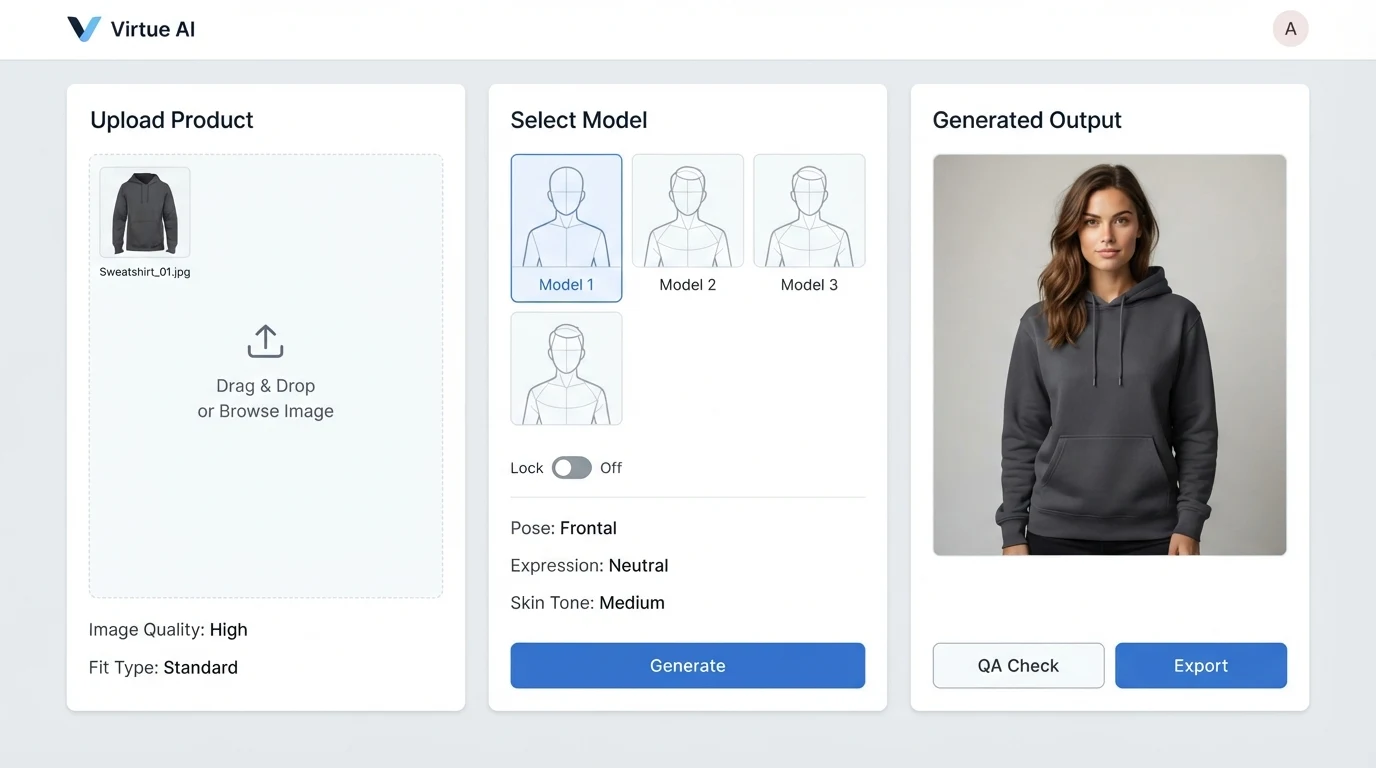
- Pick and lock a model identity. Define the face, body, skin tone, hair and vibe once. Lock it with a reference image, seed, or identity embedding depending on the tool. Treat this like casting, not prompting.
- Prompt the scene. Pose, light direction, lens character, environment, wardrobe context. Keep the product description minimal here, the cutout is doing that job.
- QA pass for artefacts. Walk every output through a fixed checklist: hands and fingers, logo integrity, fabric weight, eye symmetry, product scale against the body, shadow direction consistency, horizon continuity.
Teams that skip the QA pass end up with a library that looks great in thumbnails and falls apart in a product detail page zoom. We built our in-house approach to the same spine, and the underlying process is covered in more depth here.
Choosing a tool by product category
Tool-first thinking is the trap. Category-first is the way out. A rough map of what the market looks like in 2026:
| Category | Reasonable tool options | One-line verdict |
|---|---|---|
| Apparel (ecom scale) | Botika, Flair.ai, Blend (Blendnow) | Fast, cheap, variant-friendly, weak on structured drape. |
| Fine jewellery | Photta plus macro retouch | Workable for lifestyle context, not hero stone shots. |
| Skincare and beauty | Nano Banana Pro, Flux 2 Pro | Best current faces and skin, needs careful product compositing. |
| General ecommerce | Photoroom, Claid for bulk | Volume-first, mediocre human generation, strong at swaps. |
| Campaign hero | Agency studio pipeline | Taste and consistency across a set still beat any single tool. |
Nothing on that list is a recommendation forever. The models shift every quarter and the pecking order follows them. What stays stable is the question underneath: how structured is my product, how much human-product contact is in frame, how many variants do I need, and how much QA labour can I absorb. If you want a working comparison on a related slice of the market, our Pebblely vs Photoroom vs agency breakdown covers the trade-offs.
Keeping the model consistent across a campaign
Model consistency is the hardest unsolved problem in the field. A single beautiful image is easy. Twelve images of the same person, same face, same body, across different poses and environments, is where most pipelines break. The techniques that genuinely help in 2026: reference-locking with a strong identity image set, seed reuse within the same tool, LoRA-style identity training for high-volume brands, and keeping a small internal library of "brand models" with locked parameters per face.
The practical upshot is that the first shoot in a new identity is slow, and every shoot after that is fast. Brands planning a one-off campaign underestimate the setup cost. Brands planning a year of content underestimate how much leverage the identity library gives them once it exists, which is the main lever our social ad creative work runs on.
Platform rules and disclosure in 2026
This is the part nobody writes about honestly, and it will decide whether your campaign ships or gets taken down. Current state of play:
- Amazon main image. The hero image on a product detail page must still be the product on pure white, no props, no humans, no lifestyle context. On-model AI belongs in the gallery, not slot one. This has not changed with the AI wave.
- Meta and TikTok AI disclosure. Both platforms require labelling for photorealistic AI-generated imagery of people in advertising contexts. Enforcement is uneven but the policy is live. Build the disclosure into your asset metadata at generation time, not after a strike.
- EU AI Act labelling. Transparency obligations for synthetic media of real-looking people are in force. If you ship into the EU, the label requirement is not optional and the fines are not symbolic.
- Likeness and consent. Fully synthetic faces are the safe route. Face-swapping a real person without written consent is a legal problem waiting to happen, no matter how good the tool makes it look.
None of this is legal advice and your counsel should sign off on anything that touches disclosure or likeness.
Common failure modes and how to fix them
The usual suspects, in order of how often we see them:
- Melted hands and fingers. Inpaint the hand region with a dedicated pass, or regenerate with the hand further from the product. Rarely fixable in retouch alone.
- Warped logos. Composite the real product cutout back over the generated body. Do not trust the model to reproduce type.
- Wrong fabric weight. Regenerate, do not retouch. The model that got silk wrong will get it wrong again, so change the tool or the reference.
- Uncanny faces. Usually a reference quality problem, not a prompt problem. Improve the identity lock before touching the scene prompt.
- Product scale drift. Fixable by inpainting the product at correct scale after the body is locked.
The rule of thumb: faces and bodies get regenerated, products get composited, backgrounds get retouched.
Cost benchmarks and where the money actually goes
Public tool pricing in 2026 ranges from a few cents per image on volume plans to meaningfully more per hero asset on premium models. The headline per-image numbers are not the real cost. The real cost is QA labour, retouch time on failed outputs, consistency work across a set, and the hidden tax of asset management when you generate ten times more than a traditional shoot would have delivered.
Where AI genuinely saves money: large variant sets, size and ethnicity diversity, regional creative, iterative A/B testing, anywhere you would otherwise book a second shoot day. Where it just shifts the cost: hero campaigns with high QA bars, categories with difficult physics, brands without an internal reviewer who can tell good AI from mediocre AI. Our own pricing on this work is quoted per scope after a brief review, which is the honest answer whenever volume, category and consistency targets vary this much.
When to still book a real shoot
Short list, because it is a short answer. Book a studio for: hero brand campaigns where the imagery is the brand, tactile and texture-critical categories (fine jewellery, luxury leather, high-end knitwear), trust-sensitive verticals (medical, financial, food provenance), and any asset where a customer will zoom to 400 percent on a product detail page. Everything around those hero assets is fair game for AI, and the hybrid pipeline is where most sensible 2026 brands have landed.
Frequently Asked Questions
Is AI product photography with models legal?
Generally yes for fully synthetic people, with the caveat that disclosure obligations apply in the EU and on major ad platforms. Using a real person's likeness without written consent is a different question with a much worse answer. Get legal sign-off on your specific use case.
Will customers be able to tell the images are AI?
On a thumbnail, usually not. On a product detail page zoom, sometimes, particularly around hands, teeth, and complex fabric. The gap is closing every quarter but it is not closed. QA for the zoom case, not the thumbnail.
Can I use my own face as the model?
Technically yes, legally only with full consent in writing covering AI use, and practically only worth it if you are the brand's human face anyway. For most ecommerce catalogues, synthetic identities are cleaner.
Do marketplaces allow AI-generated model shots?
Most do in the gallery, with varying disclosure expectations. The main-image pure-white rule on Amazon is a separate constraint and applies regardless of how the image was produced. Check each marketplace's policy before you ship.
How many images do I need before AI is cheaper than a shoot?
Depends on category, consistency target and QA tolerance. For simple apparel ecommerce at high variant counts, the break-even is low. For hero beauty with a strict QA bar, a studio half-day can still beat the all-in AI cost. Numbers vary enough that any confident benchmark online is probably selling you something.
What is the single biggest mistake brands make?
Starting with the tool. The tool is the last decision, not the first. Category, workflow, identity lock and QA come first, and the right tool falls out of those answers.
Where this leaves you
On-model AI product photography in 2026 is a workflow discipline wearing a software costume. The brands getting usable output are the ones treating identity lock as casting, QA as a non-negotiable step, disclosure as a day-one metadata problem, and tool selection as downstream of category. If you want a partner that runs this spine across apparel, beauty and lifestyle without pretending the hard parts are easy, Absolutely AI is set up for exactly that. Pricing is quoted per scope after a short brief review, and the honest conversation about which assets to AI and which to shoot is part of the engagement.