AI Ecommerce Lifestyle Photography: The 2026 Playbook
Lifestyle imagery used to mean a location scout, a stylist, a model day rate, and a two-week edit. In 2026, most DTC brands are generating the same scenes from prompts in an afternoon. This is not a tool listicle. It is the workflow Absolutely AI uses to produce PDP and paid-social lifestyle imagery at scale: prompt anatomy, reference-anchored SKU fidelity, QA gates, disclosure rules, and the moments a real shoot still wins.
Lifestyle photography is the highest-leverage image on a product detail page and the first thing a paid-social algorithm rewards. It is also the most expensive and slowest asset a brand produces. Over the last eighteen months, the economics have flipped. Reference-anchored generation, product inpainting, and virtual try-on have matured to the point where a mid-size DTC brand can retire the seasonal lifestyle shoot and replace it with a repeatable prompt pipeline. This piece is the working playbook, not a survey. If you want the shorter version focused on marketplaces, our note on AI ecommerce photography on Shopify covers the storefront side.
What AI Lifestyle Photography Actually Means for Ecommerce
The category is loose, so it helps to split it. Product-on-white is table-stakes catalogue work: a clean subject, no environment, no story. Lifestyle scene generation places a product inside a plausible world (a linen-sheeted bedroom, a marble kitchen counter, a sun-bleached balcony) with the product as the anchor. Model-on-product goes further, adding a person interacting with the SKU: hands, faces, wardrobe, and the licensing complications that come with them. Each has a different failure mode, and treating them as one workflow is the first mistake most teams make. For the pure catalogue side, our breakdown of how AI product photography works covers the mechanics.
Lifestyle scene generation is where AI is now clearly winning. The model does not need to invent your product; it needs to inherit it from a reference and render a believable environment around it. Model-on-product is still the hardest bucket, and it is where 2026's virtual try-on tools have made the biggest leap. Get the taxonomy right before you pick a tool.
Why Lifestyle Wins on PDPs and Paid Social
Baymard's PDP research keeps landing on the same finding: shoppers scan for context before they read specs. A product on white tells them what it is; a lifestyle image tells them who it is for. Shopify's own merchant data reported a 73% reduction in listing time when generative imagery replaced traditional lifestyle sourcing, and the click-through lift on paid social is even sharper because the scroll-stop is a scene, not a SKU. Our piece on AI ecommerce product imagery at scale covers the operational side of running this across a full catalogue.
The downstream effect is a change in image ratio economics. A single shoot day used to yield six or seven usable lifestyle frames; a prompt pipeline yields fifty variants a day per SKU, which means you can finally A/B lifestyle imagery instead of committing to a hero frame for a season.
The Four Generation Approaches
There are four production patterns worth naming, because they solve different problems and belong in different parts of a catalogue. The Absolutely AI product photography service uses all four depending on the SKU category.
| Approach | Best for | Fidelity to SKU | Speed |
|---|---|---|---|
| Text-to-scene | Mood boards, campaign concepts, non-hero social | Low (invented product) | Fastest |
| Product inpainting / reference-anchored | PDP hero lifestyle, seasonal refreshes | High (real SKU preserved) | Medium |
| 3D-render-to-photo | Complex geometry, jewellery, tech hardware | Very high | Slower |
| Virtual model try-on | Apparel, accessories, cosmetics | High on garment, medium on face | Medium |
The mistake is defaulting to text-to-scene because it is fastest. If the SKU is visible in the frame and the shopper will compare it to the one that arrives in the box, you need reference-anchored generation. Our comparison of AI vs traditional product photography maps this decision by category.
The Working Workflow
The pipeline that actually ships every week looks like this, and it is deliberately boring. It exists so nothing slips through. If you want to see the pricing side of running this, we broke down AI product photography cost in Australia in a separate post.
- Brief. One-page: SKU, target audience, three mood adjectives, aspect ratios needed, disallowed cues.
- Reference pack. Three product photos (front, three-quarter, detail), three environment references, one lighting reference. This is the anchor set.
- Prompt. Written to the anatomy in the next section, with the product reference passed as an image input, not described in words.
- Batch generation. Twenty variants per prompt. Never one. The keeper rate is 15 to 25 percent.
- Retouch pass. Hands, reflections, product label alignment, brand colour drift.
- Upscale. To the largest ratio you need (typically 4:5 for PDP, 9:16 for Reels, 1:1 for grid), then crop down.
- Variant test. Two lifestyle frames into paid social for 48 hours before committing to the PDP hero.
Skip the reference pack and you get a beautiful image of a product that is not yours. Skip the retouch pass and you ship six-fingered hands to the checkout page. Both happen weekly to brands that treat generation as a one-click tool. Our roundup of AI product photography tools covers which platforms handle each stage.
Prompt Anatomy That Works for Lifestyle
Lifestyle prompts fail because they read like Pinterest boards. The structure that actually generates usable frames has seven slots, in this order, and the model treats them as descending priority.
- Subject anchor: the product, referenced as an image input plus a one-line description ("a matte-black ceramic mug, 350ml, straight-sided").
- Environment: one sentence, specific. "On a bleached oak kitchen counter beside a linen tea towel" beats "in a cozy kitchen".
- Lighting: direction, quality, time of day. "Soft morning window light from camera left, warm 4200K, gentle falloff".
- Lens: focal length and depth. "Shot on 50mm at f/2.8, subject sharp, background gently defocused".
- Mood: two adjectives, no more. "Calm, editorial".
- Aspect ratio: declared explicitly (1:1, 4:5, 9:16, 16:9).
- Negative constraints: the list of failure modes for your category. "No visible text, no additional products, no hands in frame, no reflections showing camera".
The order matters because generation models weight early tokens more heavily. Put the environment before the subject and the model will render a beautiful kitchen with a vaguely mug-shaped object in it. This is the single most common failure we see when brands hand us their existing prompt libraries.
The 2026 Tool Landscape
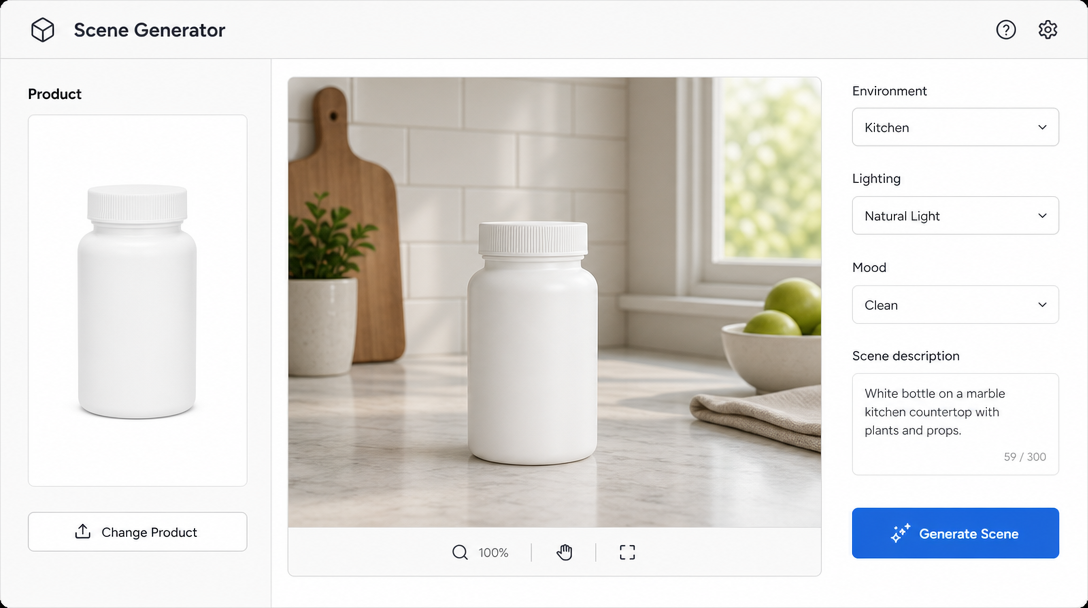
Ranking tools is a fool's game because they change monthly. Group them by job-to-be-done instead. The Absolutely AI content team uses different platforms for different SKU categories rather than defaulting to one.
- Reference-anchored PDP lifestyle: Flair.ai, Booth.AI, Rewarx Studio. Strong at preserving SKU geometry.
- Fast background swaps and batch catalogue: Pebblely, Photoroom. Good for the long tail, not for hero frames.
- Virtual try-on for apparel and accessories: WeShop AI, Fibbl. Fibbl leans into 3D-first workflows.
- General generative fill and inpainting: Adobe Firefly. Best when it sits inside an existing Creative Cloud workflow.
- End-to-end campaign pipelines: agency-run stacks combining reference generation, retouch, and delivery. Our head-to-head on Pebblely vs Photoroom vs agency unpacks the trade-off.
The right stack for a supplements brand is not the right stack for a fashion brand. Category matters more than tool preference; see our note on AI product photography for supplements for how narrow the category-fit question really is.
Quality Control Checklist
Every frame goes through the same seven-point gate before it leaves the studio. This is what a brand ops manager can hand to a junior producer and trust.
- Hands: correct finger count, believable joint bend, no fused digits.
- Product fidelity: label copy legible, geometry matches reference, brand colour within 5% delta.
- Brand palette: environment does not fight the SKU's colour story.
- On-model realism: skin texture varied, eyes symmetric, teeth not uncanny.
- Reflections: no camera, no crew, no impossible light sources in glass or metal.
- Scale: product size correct relative to environment (a 350ml mug should not look like a soup bowl).
- Licensing: reference imagery cleared, model likenesses either synthetic or contractually cleared.
Legal, Disclosure and Platform Rules
This is the section most competitor articles skip and it is the one that will get a brand fined. The EU AI Act's image disclosure provisions require clear labelling of synthetic imagery in commercial contexts from 2026, with different thresholds for photorealistic content depicting people. Meta's paid-social platforms now auto-detect and label AI-generated imagery, and Amazon's policy allows generative lifestyle imagery on PDPs provided the primary product photo is a true representation of the SKU. Talk to a lawyer, but the operating rule is: disclose synthetic model imagery, keep your primary PDP photo faithful to the physical product, and log which frames came from which pipeline.
When AI Still Loses to a Real Shoot
Honest failure modes, from the desk. Jewellery macro still favours a human macro photographer because the light play on faceted stones is where generation models produce uncanny artefacts. Fabric drape on hero campaign apparel, particularly silk and technical performance fabrics, is close but not quite there. Founder portraits and any hero image where a real, named human is on camera should be shot. Anything requiring genuine location authenticity (a specific storefront, a specific city) belongs to a photographer. If you need moving imagery instead of stills, our AI films work covers the video equivalent of this trade-off.
The 30-Day DTC Rollout Plan
A realistic sequence for a brand with 40 to 400 SKUs, run by an in-house ops manager with agency support on the pipeline design. This is the pace our consulting engagements tend to hit.
- Week 1: Audit the current lifestyle library. Score every image on brand fit, PDP performance, and reshoot cost. Identify the top 20 SKUs to pilot.
- Week 2: Build the reference pack for each pilot SKU. Write the first prompt library using the seven-slot anatomy. Set QA gate.
- Week 3: Generate, retouch, upscale. Two variants live per SKU, split-tested on paid social.
- Week 4: Winner selection, PDP hero swap, measure conversion delta. Document the winning prompts as templates for the next 100 SKUs.
Frequently Asked Questions
Will AI lifestyle imagery hurt my brand's credibility?
Not if the primary product photo is genuine and the lifestyle imagery is faithful to the SKU. The credibility risk comes from mismatch between the marketing image and the box that arrives, not from the pipeline used to make the image.
Can I generate imagery with real influencer likenesses?
Only with explicit contractual clearance for synthetic use. Most standard influencer contracts do not cover generative reuse, and this is where brands are getting sued in 2026. Renegotiate the clause or use fully synthetic models.
How many prompt variants should I generate per SKU?
Twenty per prompt. Keeper rate is 15 to 25 percent, so plan for three usable frames per twenty generated. Fewer than twenty and you are over-committing to the first idea.
What aspect ratio should I generate at?
Generate at the largest ratio you need (usually 4:5 for PDP) and crop down for 1:1 and 9:16. Do not generate 1:1 and try to extend upward, because reference-anchored fidelity degrades at the extended edges.
Do I need to disclose AI use to shoppers?
In the EU, yes, particularly for imagery depicting people. On Meta platforms, disclosure is increasingly automated but voluntary tagging is best practice. On Amazon, disclosure is not required if the primary product photo is real, but internal logging is a good idea.
What is the realistic cost delta versus a traditional lifestyle shoot?
A traditional lifestyle shoot day for a DTC brand runs several thousand dollars once you count studio, stylist, model, and post. A prompt pipeline is measured in operator hours and platform credits. The cost story is real, but the more interesting number is the variant velocity: you get to test dozens of frames per SKU instead of committing to one.
How do I stop the generated products from drifting off-brand?
Reference-anchored generation, negative constraints in every prompt, and a brand-palette QA check as part of the seven-point gate. Drift happens when teams skip the reference pack step and lean on text descriptions of the product.
Where should I start if I have never done this before?
Pick five SKUs that account for a meaningful share of your revenue, build one reference pack, run the four-week rollout in miniature, and measure the PDP conversion delta before scaling. Do not try to convert 400 SKUs at once.
Lifestyle imagery is the last big cost centre in DTC that has stayed stubbornly analogue, and 2026 is the year it stops being one. If you want a partner to design the pipeline, write the prompt libraries, and run the QA, Absolutely AI's commercial team builds this end-to-end for brands shipping between 40 and 4,000 SKUs. The playbook above is what we hand to every client on day one.