AI Product Images for Amazon Listings: A Compliance-First Guide
Amazon's image rules are strict, and a single misread of the main-image policy can get an ASIN suppressed overnight. AI generation finally makes a seven-slot listing stack affordable for small FBA brands, but only if the work respects pure-white backgrounds, honest scale, and the misleading-imagery clause. Absolutely AI has watched this shift closely, and this guide maps the policy, the tools worth using in 2026, and the prompts that keep your product recognisable.

Most FBA sellers hit the same wall. The listing needs seven images, each doing a different conversion job, and traditional product photography makes the maths painful for anything beyond a hero SKU. AI image generation collapses that cost structure, but it also introduces new risks: generated backgrounds that drift off pure white, fabricated certification badges, or scale cues that misrepresent the product. The teams getting this right treat compliance as a design input, not a final check, which is the same discipline that shapes AI product photography work generally.
What Amazon actually allows in 2026
Amazon's Seller Central image guidelines split the catalogue picture into two buckets. The main image, slot one, is tightly constrained: it must sit on a pure white background rendered at RGB 255-255-255, the product must fill at least 85 percent of the frame, and there can be no props, text, watermarks, borders, logos, or additional objects. The physical product must be the only thing in frame, photographed or rendered as it ships to the customer.
Slots two through nine are more forgiving. Lifestyle scenes, infographics, scale references, packaging shots, and A+ content modules can all live here, which is where AI generation does its real work. The ceiling across all slots is the misleading-imagery policy, which prohibits any visual that misrepresents the product's size, condition, inclusions, or capabilities. Those are the rails that keep a listing live, and ignoring them is the fastest way to end up with a suppressed ASIN and a reinstatement ticket.
The seven-slot image stack that converts
The buyers who are converting on your listing move through the gallery in roughly the same order every time, so the stack has to answer their questions in sequence. Image one earns the click. Image two establishes scale against a familiar reference, which is often where sellers lose trust by misjudging proportion.
Images three and four do the lifestyle lifting: the product in its intended environment, used by someone in the right demographic, in the context your reviews describe. These two slots carry the heaviest creative weight, and they are also the ones where AI-generated scenes outperform a one-day studio shoot in sheer variety. The thinking in AI ecommerce lifestyle photography applies directly here.
Image five is usually an infographic. Three to five product benefits, each with a short icon and a line of copy, laid over a brand-coloured background. Image six carries dimensions, pack contents, or variant comparison. Image seven is often the packaging or unboxing shot, closing the gap between a digital listing and a physical arrival. Each slot has a different job, and treating them as interchangeable is why so many listings read as noise.
Choosing an AI tool for each slot
Tool choice in 2026 is less about which model is strongest and more about which workflow fits your SKU count. Photoroom and Claid are built around high-volume catalogue runs, with batch background removal and templated scene generation that an ops team can push through in an afternoon. Flair sits a tier up, closer to editorial direction, which makes it useful for lifestyle slots where you want control over composition.
For hero creative work where you need millimetre control over how the product sits in the frame, image-editing models like Nano Banana Pro and Flux 2 Pro are stronger, especially when a brand colour has to render at a specific hex value. Dresma, Pic Copilot, and SellerPic are Amazon-tuned pipelines that bake the main-image rules into their presets, which is useful if your team is new to the policy. The teams building AI ecommerce product imagery at scale usually combine two or three of these rather than committing to one platform.

The workflow from product scan to live listing
A reliable pipeline starts with one clean reference photograph of the real product, taken on a flat background with even lighting. That reference is the anchor for every downstream generation, which is what keeps the product's geometry, label, and colour accurate across slots. Teams running AI ecommerce photography for Shopify use the same discipline.
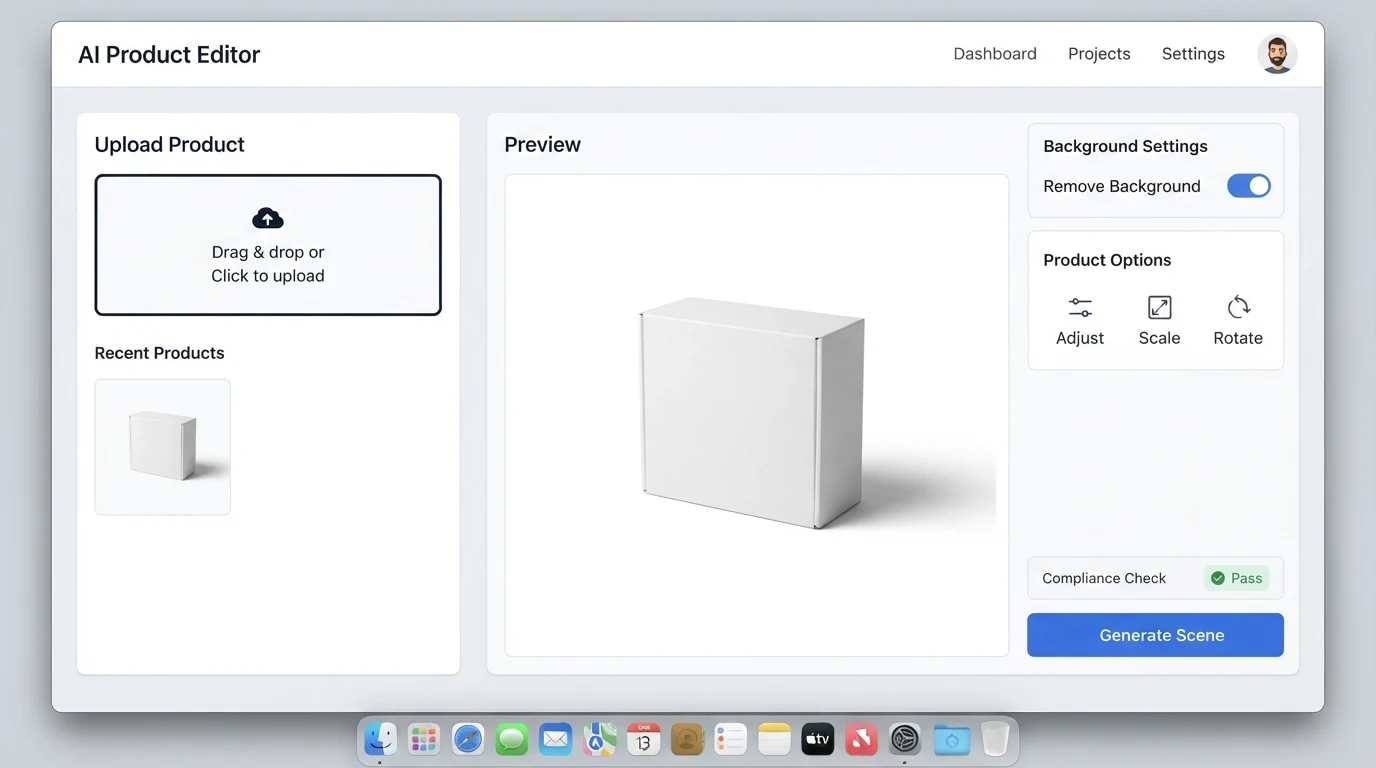
From there the sequence is cutout, scene, compliance check, and only then publish. The cutout step isolates the product on transparent background. The scene step composites that cutout into the generated environment, or regenerates the environment behind it, with the product itself held fixed. The compliance check reads every image against the slot it is destined for: slot one gets a white-background and frame-fill audit, slots two through nine get the misleading-imagery test.
- Capture one reference image of the real product under flat, even lighting.
- Remove the background and save a high-resolution transparent cutout.
- Generate scene variants with the cutout anchored, not re-drawn.
- Audit each render against Amazon's slot-specific rules.
- Launch two hero variants in Manage Your Experiments before rolling out catalogue-wide.
Prompt patterns that keep the product accurate
The failure mode in generated product imagery is almost always drift: the model subtly re-draws the label, warps a logo, or softens an edge. Reference-image anchoring with high input fidelity is the single most effective fix, because it instructs the model to treat the product as fixed geometry rather than a suggestion. Prompts that read "do not alter product geometry, label, or colour" and specify input_fidelity high outperform open-ended scene prompts every time.
Negative prompts carry the rest of the weight. Explicitly excluding warped text, duplicated limbs, fabricated logos, extra fingers on models, and reflections that imply a different product shape prevents most of the artefacts that fail a compliance review. The craft overlap with AI brand photography is deliberate: the same reference-anchoring discipline that keeps a brand look consistent is what keeps a product recognisable.
Three mistakes that get a listing suppressed
The three failures that show up repeatedly in suppression notices are all variations on the misleading-imagery clause. First, altered packaging text: the model regenerates the label and changes a word, a weight, or a certification mark, and the listing no longer matches what ships. Second, fabricated certifications or badges: the AI invents an organic, fair-trade, or safety-tested icon that was never on the product.
Third, inaccurate scale: a lifestyle scene shows the product in a hand or on a counter at a size the real item cannot reach, which trips both the misleading-imagery rule and the inevitable review complaints. Keeping a human in the loop for a scale and label pass before publishing is cheap insurance, and it is the step that most volume pipelines quietly skip. The AI catalog imagery operators who stay suppression-free almost always have an explicit label-and-scale checkpoint.
When a human photographer is still the right call
AI is not the right answer for every product. Highly reflective items, transparent packaging, liquid in glass, and anything with a complex refractive surface still render more reliably on a real set with real lights. Food, especially anything with crumb, steam, or sauce behaviour, is similarly stubborn. Apparel fit shots on real bodies, where the garment's drape and tension carry the sell, are usually still worth a studio day.
Everything else, which is the overwhelming majority of a mid-sized FBA catalogue, is comfortably in reach of a well-run AI workflow. The economics only make sense if the output clears the compliance bar every time, which is why teams considering the swap often price the shift against the volume thinking in AI ecommerce photography cost rather than against a single studio invoice.
Frequently Asked Questions
Is AI-generated product imagery against Amazon's terms of service?
No, Amazon does not prohibit AI-generated imagery as a category. What it prohibits is misleading imagery, regardless of how it was produced. A compliant AI image is treated the same as a compliant photograph.
Can AI generate the main image on slot one?
Yes, provided the output renders at pure white RGB 255-255-255, the product fills at least 85 percent of the frame, no props or text appear, and the product is depicted exactly as it ships. Most sellers use AI for the cutout and composite step rather than fully synthesising the main image, which keeps the product's real geometry intact.
Will Amazon detect that an image was generated by AI?
Amazon has not published a specific AI-detection enforcement mechanism as of 2026. Suppression actions almost always originate from the misleading-imagery policy or from customer complaints about mismatch between the listing and the delivered product, not from provenance checks.
How many hero variants should I test before rolling out?
Two is the usual starting point. Manage Your Experiments on Seller Central supports a controlled split between a current main image and a challenger, and running the test for the platform's recommended duration gives a cleaner read than a one-week sprint.
Do I need a different workflow for A+ content modules?
A+ modules have more creative latitude than the slot-one image but still fall under the misleading-imagery policy. Treat them like slots two through nine: lifestyle, infographic, and comparison imagery is welcome, as long as the product's capabilities and inclusions are represented honestly.
What should I keep as source material for every SKU?
At minimum, one high-resolution reference photograph on a flat background, a transparent cutout, and the final renders for each slot with the prompts and seed values logged. That archive makes variant generation, seasonal refreshes, and compliance appeals far faster.
The sellers who are getting this right in 2026 are treating AI product imagery as a disciplined pipeline rather than a prompt-and-pray exercise, which is exactly the operating model Absolutely AI brings to AI ecommerce photography work. Start with the compliance rails, anchor every render to a real reference, and the volume economics take care of themselves.