AI Ecommerce Product Imagery at Scale: The 2026 Operations Playbook
Scaling product imagery from a handful of hero shots to a 500-SKU catalog is not a tools problem, it is an operations problem. This playbook from Absolutely AI walks through the five-layer stack, the QA guardrails, the marketplace compliance traps, and the 90-day rollout that separates catalogs that convert from catalogs that get flagged.

Every ecommerce team hits the same wall around SKU number 200. The hero shots look beautiful, the PDPs convert, and then the backlog arrives: 800 new variants, six weeks of studio time, and a marketing calendar that will not wait. Most teams reach for a tool. The teams that actually ship consistent imagery reach for a system. At Absolutely AI we have watched brands try to bolt generation onto a broken pipeline and lose weeks to inconsistency, and we have watched others quietly ship 1,000-image catalogs in a fortnight because they treated the problem as operations from day one.
The shift matters because visuals do the heavy lifting on a product page. Roughly 93% of purchase decisions are driven by visual factors, and around 22% of returns trace back to a mismatch between the photo and the physical product. Miss on either axis and the unit economics collapse regardless of how clever the generation engine is.
Why 'at scale' is really a systems problem
A retoucher moves 20 to 30 finished images through a day. A well-tuned AI pipeline can push more than 1,000. That ratio is what makes founders reach for generation in the first place, but it is also what breaks their catalogs, because a 40x throughput multiplier turns every unfixed inconsistency into 40x the cleanup work downstream.
Scaling image production is a systems problem in the same way scaling a warehouse is. You need standardised inputs, deterministic transforms, exception handling, and a place for finished goods to land. When teams talk to us about AI product photography at volume, the first hour is almost never about models or prompts. It is about where the source assets live, who owns brand rules, and what happens when generation drifts.
The five-layer scaling stack
Every catalog that ships cleanly runs on the same five layers, stacked in this order. Skip one and the layer above it starts leaking.
- Source capture standards. A short specification for how the raw hero shot or product cutout is captured: resolution floor, lighting neutrality, angle set, colour reference card. Without this, downstream generation inherits your worst-lit SKU.
- Brand visual rules document. The single source of truth for how a finished image must look. Composition, palette, lighting direction, prop language, negative prompts. This document is the constitution of the pipeline.
- Generation engine. Diffusion models plus reference-image conditioning (IP-Adapter style), typically fronted by an orchestration layer that queues jobs from a CSV or SKU feed.
- QA and guardrails. Automated brand-drift scoring, hallucination detection, marketplace-compliance checks, and a human-in-the-loop sampling rate for the categories that matter.
- DAM and CMS push. Named, tagged, versioned delivery straight into your digital asset manager and Shopify (or equivalent), with rollback if a batch fails QA.
The layers are not optional. A team that skips the brand rules document ends up with 800 gorgeous images that fight each other on a category grid. A team that skips QA ships six-fingered hands to a marketplace and gets suspended. We covered the platform-specific side of this in our piece on AI ecommerce photography on Shopify, which is worth reading alongside this one if Shopify is your CMS.
One hero shot to full catalog: the reference-anchored workflow
The most important pattern in scaled AI imagery is what we call a production setup: a locked bundle of style, composition, background, lighting, and (for lifestyle) model. You capture the hero shot once, define the setup once, and then fan it out across the SKU range using the actual product as the reference image.
This is why the workflow works: diffusion models drift when they are asked to invent from a text prompt alone, but they stay coherent when they are given a real product image plus a reference production setup. A skincare brand with 60 SKUs and a signature marble-and-linen aesthetic does not need 60 shoots. It needs one setup, one QA pass on the setup, and then a batch job. The founder-focused breakdown in how AI product photography actually works walks through the mechanics of this reference-anchored approach in more detail.

Building your visual rules document
Most teams treat brand rules as a Figma page nobody opens. For a scaled image pipeline, the rules document is executable: it is fed into the generation engine, referenced during QA, and used as the ground truth when someone asks why an image got rejected.
A working rules document covers, at minimum:
- Lighting direction (single-source left, softbox overhead, natural window at 45 degrees)
- Camera angle set (front elevation, three-quarter, top-down, macro detail)
- Crop ratios and safe zones for each channel (PDP square, marketplace, social vertical)
- Background palette and texture library (approved surfaces, banned surfaces)
- Model demographics and styling rules for lifestyle imagery
- Negative prompt list: things that must never appear (competitor logos, seasonal props that will date, hands touching food, cluttered surfaces)
The negative prompt list is the one every team underinvests in. It is what stops a generation model from putting a wedding ring on a hand-model shot for a vegan brand, or a plastic-looking olive branch into a premium olive oil PDP. Teams that lean on AI branding systems build this list once and reuse it across every campaign, every category, every quarter.
Bulk pipelines that actually work
There are three shapes of pipeline in production right now, and the right choice depends less on price and more on how your ops team already works.
| Pattern | Input | Output | Best for |
|---|---|---|---|
| CSV in, ZIP out (PixBulk-style) | SKU sheet + reference images | Named ZIP of finals | Merch teams that live in spreadsheets, one-off migrations |
| Storefront sync (Atelier, Tolstoy) | Live Shopify catalog | Images written back to product records | DTC brands with continuous new-SKU flow |
| API-first (Photoroom, Claid) | Programmatic calls | URLs into your own DAM | Engineering-led teams building internal tooling |
None of these are a silver bullet. The CSV pattern is the easiest to audit but the slowest to iterate. The storefront-sync pattern is fastest but the hardest to roll back when a batch drifts. The API pattern gives you the most control and the most rope. For a comparison of the individual generation tools themselves, our teardown of Pebblely vs Photoroom vs an agency is a useful companion piece.
The hybrid rule: where to draw the line
The teams that ship cleanly do not scale everything with AI. They keep hero SKUs on traditional production and scale the long tail with generation. The dividing line usually sits at three factors: category risk, material complexity, and campaign weight.
- Jewellery, watches, transparent glass: stay traditional. Refraction and micro-detail still trip up generation models.
- Textiles with signature weaves: traditional for the reference shot, AI for the colourway variants.
- Regulated categories (supplements, food, medical): traditional for anything with an ingredient claim or a label reading requirement. We wrote about this constraint specifically in our supplements imagery guide.
- Long-tail SKUs, colourway variants, seasonal drops: AI wins outright.
The mistake to avoid is a binary choice. A well-run pipeline routes SKUs to the right lane based on rules, not on whichever tool the last agency sold in.
QA at scale: catching drift before the PDP
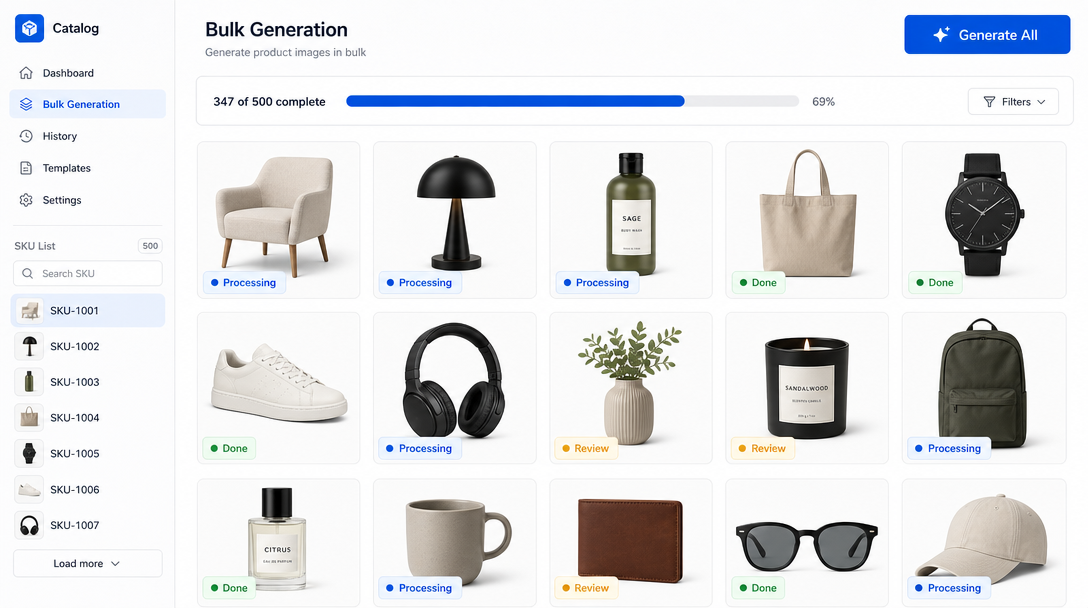
This is the layer competitors leave out of every listicle. When you are shipping 1,000 auto-generated images a week, manual eyeballing is not a QA strategy, it is a bottleneck disguised as one. A real QA layer runs four checks before an image is allowed near a product page.
- Hallucination detection. Anatomical checks on any human presence (fingers, teeth, eyes), texture consistency scoring on fabrics, and object-count validation against the input SKU.
- Brand-drift scoring. A CLIP-based similarity score against the approved reference production setup. Anything below a threshold gets flagged for human review.
- Marketplace compliance. Amazon's pure-white-background rule (RGB 255,255,255 across at least 85% of the frame), Google Shopping's no-promotional-text policy, aspect ratio validators for each destination.
- Human-in-the-loop sampling. Not every image, but a rotating 5 to 10% sample per batch, weighted toward high-revenue categories.
Teams that build this correctly catch brand drift on day one of a new production setup, not on day 30 when a customer complains. It is the layer where a proper AI consulting engagement pays for itself many times over.
Real cost math and the break-even point
Traditional studio production runs $50 to $150 per SKU when you amortise setup, model, retouching, and delivery, with a four-week turnaround for a mid-sized batch. A well-tuned AI stack runs $0.10 to $2 per SKU on compute, with delivery in hours. But those numbers hide the real cost of a scaled pipeline: tool subscriptions, QA labour, DAM integration, and the ongoing brand-rules maintenance.
The honest break-even math looks like this: fixed pipeline cost of roughly $8,000 to $15,000 to stand up (rules doc, generation setup, QA layer, integration), plus a marginal cost per SKU that trends toward zero. Break-even against a studio subscription lands somewhere between 200 and 400 SKUs per year for most brands. Below that number, keep booking the studio. Above it, the AI pipeline pays back inside two quarters. We break the numbers down further in our Australian cost analysis, which is worth reading if you are pricing this for the ANZ market.
The 90-day rollout
Teams that try to do this in a weekend end up with a broken pipeline and no political capital to try again. The rollout that actually works runs 90 days.
- Week 1: Audit. Catalog the current catalog. How many SKUs, how many categories, which are hero, which are long-tail, where the current imagery lives.
- Weeks 2 to 4: Rules doc and pilot. Write the visual rules document. Pick one category (usually a low-risk long-tail line) and run it end-to-end as a pilot batch.
- Weeks 5 to 8: Category-by-category migration. Migrate categories in ascending order of complexity. Every category gets its own production setup, its own QA sign-off, its own compliance check.
- Weeks 9 to 12: Automation. Wire the pipeline into the DAM and CMS. Set up the SKU-in, image-out job triggers. Retire the manual queue.
The single biggest determinant of success is whether one person owns the rules document across all 12 weeks. Ownership drift is the number one reason pilots stall.
Common failure modes
Every failed rollout we have audited shares one of these patterns. All of them are catchable if the QA layer is real.
- Inconsistent lighting across a PDP grid. Caused by drifting the production setup between batches. Fix: freeze the setup per category and version it.
- Model-face drift on lifestyle shots. Caused by not locking a face reference. Fix: use IP-Adapter face conditioning with an approved model library.
- Background-colour creep. Caused by relying on the model to interpret "white background" from a text prompt. Fix: composite onto a fixed RGB backdrop as a post-step.
- Texture hallucination on fabrics. Caused by low-resolution reference input. Fix: raise the source capture standard, or route the category back to traditional.
When NOT to scale with AI
The counter-take every playbook skips. There are three situations where scaling with AI is the wrong call, and being honest about them is what earns trust with a merchant team.
Regulated categories with ingredient claims, hero campaigns where a single image will define a season, and high-return SKUs where the accuracy risk outweighs the speed gain. In all three, the cost of a mismatch (a compliance strike, a brand-defining flop, a return spike) is higher than the cost of a traditional shoot. Keep those shoots. Scale everything else. If you want to see how the trade-off shakes out in a real category, our comparison of AI vs traditional product photography maps the decision more explicitly.
Frequently Asked Questions
How many SKUs do I need before AI imagery pays back?
The break-even lands between 200 and 400 SKUs per year for most brands, assuming you invest properly in the rules document and QA layer. Below that volume, a studio subscription is usually cheaper end to end.
Can AI-generated images pass Amazon's image policy?
Yes, but only if marketplace compliance is baked into your QA layer. Amazon requires a pure-white background (RGB 255,255,255 across at least 85% of the main image) and forbids promotional text. Most out-of-the-box generation tools violate one or both by default.
Do I still need a traditional photographer at all?
Almost always yes, for hero shots, regulated categories, and campaign imagery. The pipeline is hybrid, not replacement. AI scales the long tail; traditional production still owns the top of the catalog.
What is a production setup and why does it matter?
A production setup is a locked bundle of style, composition, background, lighting, and model reference that gets applied consistently across a SKU range. It is the unit of reuse that turns generation from a novelty into a pipeline.
How do I catch brand drift across 1,000 auto-generated images?
Automated CLIP-based similarity scoring against your approved reference production setup, plus a rotating 5 to 10% human sample per batch, weighted toward your highest-revenue categories. Manual review of every image is not viable at scale.
Which pipeline pattern should I pick: CSV, storefront sync, or API?
CSV for merchandising teams that live in spreadsheets and one-off catalog migrations. Storefront sync for DTC brands with continuous new-SKU flow. API for engineering-led teams building internal tooling. The right answer usually matches how your ops team already works.
How long does a 90-day rollout actually take in practice?
Ninety days is the honest number for a mid-sized catalog with real QA and CMS integration. Teams that promise a weekend rollout are either skipping the rules document or skipping QA, and both show up as expensive cleanup work later.
What is the single biggest reason rollouts fail?
Ownership drift on the visual rules document. When no single person owns the document across the 12 weeks, categories start drifting into their own dialects and the pipeline splinters. Assign one owner on day one.
Bringing it together
Scaling AI product imagery is not about picking the flashiest generator. It is about building the five-layer stack, writing a rules document that actually gets used, drawing the hybrid line honestly, and running QA that catches drift before it hits a PDP. Teams that treat it as operations ship consistent catalogs in weeks. Teams that treat it as a tools question ship inconsistent ones in months. If you are ready to build the pipeline for your catalog, the ecommerce imagery team at Absolutely AI designs, deploys, and operates it end to end.