AI Catalog Imagery for Ecommerce: A 2026 Playbook
Scaling product visuals across thousands of SKUs used to mean a choice between studio quality and studio timelines. In 2026, AI catalog imagery has collapsed that trade-off, but only for brands that treat it as a workflow decision instead of a novelty. Absolutely AI works with ecommerce teams shipping catalogs of 100 to 100,000 products, and this playbook covers what actually holds up in production.

Every ecommerce team hits the same wall between the 500th and 5,000th SKU: the catalog is growing faster than the studio can shoot, product managers are shipping listings with placeholder greys, and returns are climbing because the imagery doesn't match what shows up in the box. AI catalog imagery, done properly, resolves this without dropping the brand bar. The teams getting it right at scaled product photography pipelines aren't just buying a tool, they're rebuilding how imagery moves from concept to PDP.
This guide walks through what the category actually covers, when it pays off against a traditional shoot, the honest per-SKU economics, the five workflow stages every pipeline needs, and how to avoid the artefacts that make AI-generated imagery obvious to a shopper. It's written for creative directors, ecommerce leads, and heads of production evaluating whether to bring this in-house, hire an AI-native agency partner, or run a hybrid.
What 'AI Catalog Imagery' Actually Covers
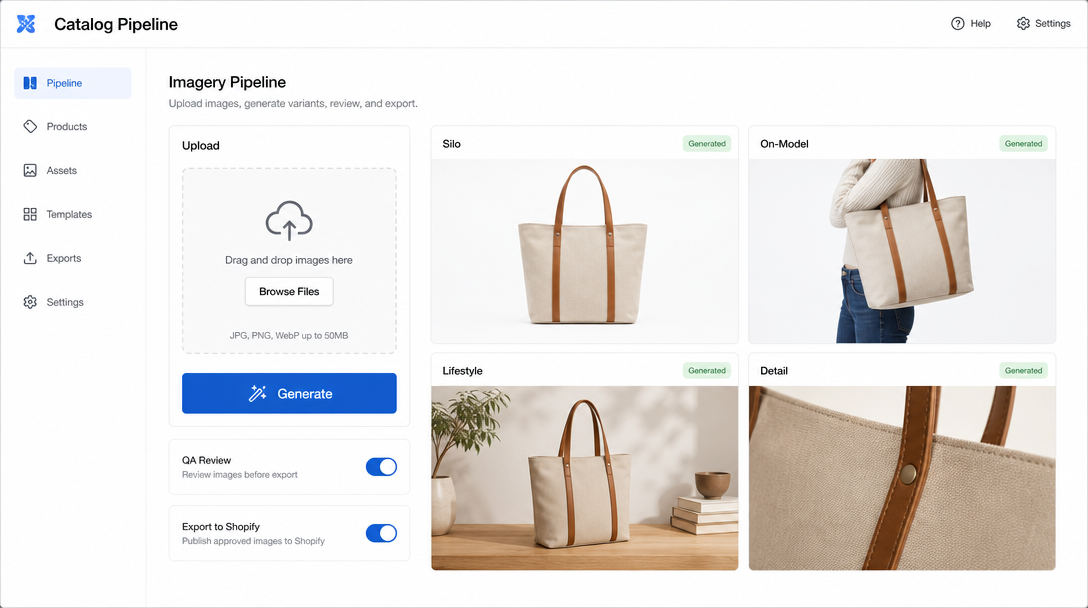
The phrase gets used loosely, so it helps to separate the four asset types a modern catalog needs. A silo shot (also called a packshot) is the isolated product on a clean background, usually white, that appears as the main image on Amazon, Google Shopping, and most marketplace listings. An on-model shot places the product on a person: apparel on a body, jewellery on a hand, headphones on a head. Lifestyle scenes put the product in an environment that signals use case and aspiration. Detail and hero shots are the tight crops and dramatic angles used for PDP galleries and paid social.
It's also worth separating generation from editing. Background removal, upscaling, colour correction, and compliance cropping are AI-assisted editing operations that any pipeline needs. Generation is the harder discipline: creating on-model or lifestyle imagery from a base photo, a 3D asset, or a text prompt. Most brands adopt editing tools first and generation second, which is the right order. The underlying mechanics of AI product photography matter because knowing which stage your problem lives in tells you which tool or partner solves it.
When AI Catalog Imagery Pays Off (and When a Studio Shoot Still Wins)
The break-even calculation isn't just SKU count, it's refresh cadence. A homewares brand with 400 SKUs that never change can amortise a traditional shoot over years. A fashion retailer with 400 SKUs per drop, six drops a year, cannot. The variables that push AI ahead are high SKU count, frequent seasonal refreshes, aggressive marketplace expansion (each channel demanding different aspect ratios and backgrounds), and long-tail categories where a single hero shoot per SKU is uneconomic.
Category matters too. Hardware, homewares, packaged goods, and beauty photograph well in AI pipelines because the product's material properties are stable and predictable. Fashion is harder because drape, fabric physics, and body variation break easily. Food is the hardest: gloss, translucency, and texture failures show up instantly. Jewellery sits somewhere in the middle, where reflection accuracy separates good work from junk. A pure studio shoot still wins for launch heroes, PR imagery, and any product whose material is genuinely novel, which is where a proper commercial imagery partner earns its rate.
The Economics: Cost per Shot, Speed, and Return-Rate Impact
Vague multipliers dominate this conversation, so here's the arithmetic. A traditional studio packshot in Australia runs roughly $80 to $150 per SKU including retouching, before rush fees or location work. On-model shots sit closer to $200 to $400 per look. AI-only workflows land between $8 and $25 per finished asset once you include prompt engineering time, QA, and the human retouch pass that any commercial-grade output needs. Hybrid pipelines, where a single base photo is shot and then extended into dozens of scenes and aspect ratios, land around $30 to $60 per finished asset.
| Catalog size | Traditional studio | AI-only | Hybrid (base photo + AI extension) |
|---|---|---|---|
| 100 SKUs | $10,000 to $15,000 | $1,500 to $2,500 | $4,000 to $6,000 |
| 1,000 SKUs | $100,000+ | $12,000 to $22,000 | $35,000 to $55,000 |
| 10,000 SKUs | Rarely viable | $100,000 to $200,000 | $300,000 to $500,000 |
The revenue side is where the case actually closes. Publicly discussed marketplace case studies point the same way: listing time falls sharply when AI pipelines replace manual shoot-and-edit workflows, and return rates improve when on-model imagery is generated for the exact garment on multiple body types rather than approximated with a fit model. The published figures vary by category and none of them are directly comparable, so treat the direction as the useful part, not the number. Faster time-to-listing on trend-driven categories can move the top-line more than the cost saving does, which is worth modelling before pitching this internally. Cost comparisons on AI product photography in the Australian market line up with these ranges for local brands.
The Five Workflow Stages Every AI Catalog Pipeline Needs
Every production-grade pipeline, regardless of tool, moves through the same five stages. Skipping any of them is where in-house builds fail. The structured content workflows that separate a hobbyist setup from a commercial one all have these stages named and staffed.
- Base-photo prep. Even fully generative pipelines run better when seeded from a clean reference: a phone shot on a neutral background, a 3D render from a product configurator, or a stock silo asset. Consistent input geometry means consistent output.
- Prompt and brief templating. Prompts get versioned like code. One template per scene type, per season, per channel, with variables for product name, colourway, and setting. Ad-hoc prompting doesn't survive contact with a 5,000-SKU catalog.
- Generation. The model call itself, usually in batches of 50 to 200 SKUs. Batch size is tuned to how much manual QA time you have per hour of generation time.
- QA and compliance. A human passes every asset before it hits the DAM. Compliance means checking marketplace policy (Amazon main image rules, Google Shopping synthetic imagery guidance), brand consistency, and physical accuracy against the source product.
- DAM and syndication. Approved assets flow into a digital asset manager (Bynder, Widen, Cloudinary) and then out to Shopify, Amazon, Salsify, Akeneo, or whichever PIM the catalog is managed in. Naming conventions and metadata carry through automatically.
Avoiding the 'Floating Product' and Other Giveaway Artefacts
The tells that mark AI imagery as AI are almost all fixable, but they need a QA rubric that names them. Shadow anchoring is the most common miss: the product is rendered without a shadow, or with a shadow that doesn't match the surface it sits on, and it visibly floats. Model hand and finger artefacts are the second: extra fingers, fused digits, or unnatural grips on the product. Reflection consistency is a jewellery and beauty killer, where the environment reflected in a bottle doesn't match the scene around it. Colour drift on hero SKUs is the sneakiest, because a subtle shift on a signature product colour is invisible in review but obvious next to the physical product.
The fix is a checklist, not better prompts. Every generated asset gets scored against shadow anchoring, hand and finger accuracy, reflection matching, colour delta against a master swatch, material physics (drape, gloss, translucency), and edge quality on the product silhouette. Anything failing more than one criterion goes back to regeneration or manual retouch. Comparing pipelines shows the same pattern: the difference between the top pages on this topic is documented in our AI vs traditional product photography breakdown.
Building an AI Style Guide So 10,000 SKUs Still Look Like One Brand
A conventional brand book covers logo usage, palette, and typography. An AI style guide adds reference imagery, seed locking, palette control, and model diversity rules. Reference imagery is the single strongest lever: a set of 20 to 40 hero images that define the brand's lighting, mood, and composition, fed into every generation call as visual reference. This is the difference between generic marketplace-looking output and imagery that reads unmistakably like your brand.
Seed locking (or its equivalent in modern models) keeps a scene consistent across a product family, so a full range of colourways sits on the same table under the same light. Palette control constrains the background and prop colours to a defined range, preventing the drift into generic AI teal-and-orange that plagues untuned pipelines. Model diversity rules matter both ethically and commercially: a defined set of body types, skin tones, and ages, applied consistently across the catalog, so on-model imagery reflects the actual customer base rather than the model's training bias. A strong AI branding foundation is what makes this coherent at scale.

Tool Landscape in 2026
The tooling market has consolidated around a handful of serious players. Hypotenuse is strong on volume silo and on-model workflows for fashion and general ecommerce, weaker on hero and lifestyle. WizStudio is the current pick for beauty and packaged goods, with better reflection and glass handling than most. ProductShots.ai is the fastest path for solo operators and small catalogs, though it struggles above a few hundred SKUs. ListingKit is built for Amazon-specific pipelines and handles the platform's main-image rules natively.
None of these replace the human layer. Agencies and in-house creative teams running these tools well are splitting work as follows: the AI produces 80 to 90% of the finished pixel, and human art directors define the style guide, set the reference set, own the QA rubric, and handle the top 10% of hero and campaign imagery manually. Teams that try to remove the human layer entirely end up with technically fine, brand-invisible catalogs. A proper look at the best AI product photography tools and the Pebblely vs Photoroom vs agency comparison covers this trade-off in more depth.
Image SEO and PDP Performance
AI-generated imagery lives or dies by the same PDP fundamentals as any other asset. Alt text needs to describe the product and scene, not just repeat the SKU name. Structured data (schema.org Product with image arrays) needs every asset URL registered, not just the hero. File naming carries weight for image search: descriptive-product-name-colour-angle.webp beats IMG_0472.webp every time. And Core Web Vitals will punish you if AI-upscaled hero images ship as uncompressed 4K PNGs, which is the default output of most tools.
The fix is a build step between generation and DAM: automated resizing to defined breakpoints, WebP or AVIF conversion, and Largest Contentful Paint budgets enforced per template. Teams building this from scratch usually underestimate this stage. It's worth reviewing how Shopify-native AI photography pipelines handle image delivery, because Shopify's image CDN masks a lot of these issues that hit self-hosted or headless stacks harder.
A 14-Day Rollout Plan
The teams that make this work don't try to convert the whole catalog at once. A sensible pilot runs across two weeks and 20 SKUs, chosen to cover the range of categories, colours, and shot types the catalog will need. Days 1 to 3 are style guide and reference set. Days 4 to 7 are pilot generation and QA rubric refinement. Days 8 to 11 are publishing the pilot to live PDPs with tracking in place. Days 12 to 14 are measurement and go/no-go decision.
The metrics that matter are CTR from category pages to the pilot PDPs, add-to-cart rate, and (over the following 30 to 60 days) return rate on the pilot SKUs versus a matched control group. Volume metrics (assets shipped per hour) are useful for capacity planning but shouldn't drive the go decision on their own. Brands running this against a matched cohort and finding no lift usually have a style guide problem, not a tooling problem. Teams looking at broader ecommerce product imagery at scale tend to follow this same pilot-then-expand pattern.
Frequently Asked Questions
Can we legally use AI-generated models in our catalog imagery?
Yes, with caveats. AI-generated model likenesses that don't resemble identifiable real people are generally usable, though some jurisdictions (California's AB 2602, EU AI Act provisions) require disclosure. Contracts with generation tool vendors should confirm you own commercial rights to the output, which is standard for enterprise tiers and not always standard for consumer tiers.
Is AI catalog imagery compliant with Amazon and Google Shopping policies?
Amazon's main image rules (pure white background, product fills 85% of frame, no props) apply to AI imagery the same as photographic. Google Shopping updated its synthetic imagery guidance in 2026 to require that AI-generated imagery accurately represent the physical product, which effectively bans the aspirational-but-inaccurate output that plagued early AI catalogs. Both platforms are enforcing accuracy, not banning the technique.
Who owns the imagery generated from our brand training or fine-tuning?
This is contract-dependent. Ask any generation vendor for written confirmation that: (1) you own the output, (2) they don't use your product photos or brand references to train models for other customers, and (3) you can export your fine-tuned model weights or reference set if you leave. Any vendor unwilling to commit to those three is a risk.
What about lifestyle scenes with recognisable locations or copyrighted objects?
Generic lifestyle backgrounds are safe. Recognisable landmarks, branded interiors, or copyrighted artwork in the background create the same rights issues they would in a traditional shoot. QA should flag these.
How do we handle product colour accuracy when the AI drifts?
Master swatch reference in every generation call, plus a colour delta check in QA using the actual hex or Pantone reference from the physical product. Anything above a delta E of around 3 goes back for regeneration or manual colour correction.
Should this run in-house or through an agency?
Catalogs under 500 SKUs with stable categories are usually cheapest in-house with one tool subscription and one operator. Catalogs above 2,000 SKUs, or brands with high creative bars, tend to run better through an agency that has already built the style guide, QA rubric, and DAM integration once before. The middle is a judgment call based on internal creative capacity.
How do we measure whether the AI catalog imagery is actually working?
Matched cohort testing on live PDPs, tracked across CTR, add-to-cart, conversion, and 30 to 60 day return rate. Output volume alone doesn't tell you whether the imagery is winning shoppers or just filling slots.
Where This Goes Next
AI catalog imagery in 2026 is past the novelty stage and into the operational stage. The brands doing it well have named their workflow stages, written their style guide, defined their QA rubric, and integrated the pipeline into their DAM and PIM. The brands doing it badly are still treating each generation as a one-off. If you're evaluating where your catalog sits between those two, Absolutely AI runs catalog audits that map your current workflow, identify the highest-return SKUs to pilot, and outline the style guide and QA rubric you'll need before scaling.