AI Food Photography for Restaurants and Menus: 2026 Guide
Menu imagery is now the single biggest lever on a delivery listing, and the gap between a tile that converts and one that gets rejected is narrower than most owners realise. Absolutely AI breaks down what DoorDash, Uber Eats and Grubhub actually allow, where AI editing stops and generation begins, and how to roll out a consistent 60-item menu refresh without a studio shoot.
Menu photography sells plates. Delivery platforms have publicly reported that listings with images materially outperform text-only tiles, and Google Business Profile users click menu photos before they click a restaurant's website. The question for independent operators and multi-location groups is no longer whether to shoot the menu, it is whether AI food photography can hit the brand bar without triggering a listing takedown. Absolutely AI builds menu-ready imagery for restaurants that need consistency across dozens of dishes and five aspect ratios, and this guide covers what the delivery platforms actually allow, where AI editing stops and AI generation begins, and how to measure the revenue lift once your tiles go live.
Why menu photography moves revenue
According to Uber Eats' 2025 Merchant Impact Report, menu items with photos receive significantly more orders than items listed as text alone, and the uplift is largest on items that sit mid-menu where the eye is already scanning for a visual anchor. DoorDash has publicly discussed similar patterns in its merchant guidance, framing photo coverage as one of the strongest predictors of a store's conversion rate on the marketplace. The direction of the data is consistent across platforms: a photographed dish beats an unphotographed dish, and a well-styled dish beats a dim phone snap.
Cart behaviour tells the same story from a different angle. On Google Business Profile, menu photos tend to be among the most-viewed assets for a food business, often outpacing exterior shots and even review carousels. For operators building towards a coherent brand look across delivery apps, GBP, Instagram and in-store QR menus, the imagery is doing double duty as discovery and as conversion.
Enhancement versus generation: what each delivery platform allows
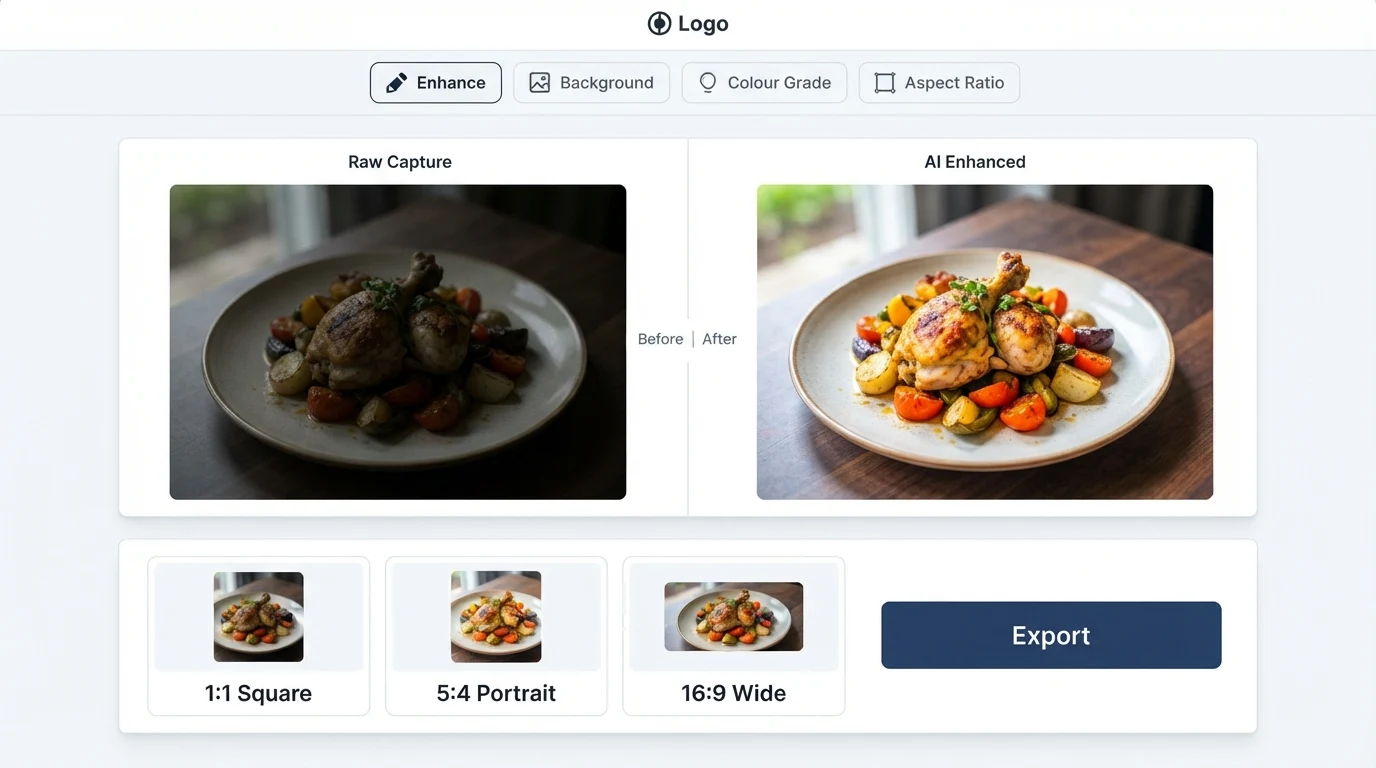
The compliance line almost every operator gets wrong is the difference between enhancing a real photo of a real dish and generating a dish that was never cooked. Uber Eats has rolled out an AI photo tool inside its merchant portal that cleans up a phone photo of the actual plate: background, lighting, colour. That is enhancement, and it stays inside their listing accuracy policy because the plate, portion and ingredients in the image are the ones the customer receives.
DoorDash's photo guidelines read similarly. The platform expects the photo to represent the item as served, with accurate portion size, visible ingredients and no misleading garnish or props. An enhanced phone capture of the actual dish passes. A fully prompt-generated burger that looks nothing like what leaves the pass risks a takedown and, repeat offences, a listing suspension. Grubhub's rules sit in the same place: accuracy of ingredients and portion, consistent framing, no stock imagery misrepresented as the restaurant's own dish. If you want a deeper comparison of the editing-first versus generation-first approach, our write-up on AI versus traditional product photography covers the same split as it applies to physical goods.
The safe operating rule across all three platforms is the same plate, same portion test. The AI can relight, declutter the background, swap the surface, correct the colour balance and reframe for the required aspect ratio. The AI should not add ingredients that are not in the dish, change the protein, or invent a presentation style that the kitchen does not actually plate.
The AI food photography workflow in seven steps
- Capture a clean reference photo of the actual dish, plated the way it leaves the kitchen, under window light or a single soft overhead source.
- Correct lighting and white balance so the proteins read true and the sauces are not blown out.
- Remove the background or surface cleanly, isolating the plate for compositing.
- Swap surface and props to the brand's agreed palette: a specific linen, a specific stone or timber, repeated across the menu.
- Colour-grade to a house look, warmer for comfort menus, cooler and crisper for seafood or raw bars, consistent across every dish.
- Export every required aspect ratio: Uber Eats item tiles at 5:4, DoorDash store header at 16:9 and item tiles at 1:1, Grubhub at 4:3, plus 1:1 and 4:5 for Instagram and GBP.
- QA against the real plate, side by side, before anything goes live.
Generators versus editors: which tools fit which job
There are two shapes of AI food photography tool on the market, and operators keep mixing them up. Prompt-to-image generators (type a description, receive a plate that never existed) are the ones most likely to trip platform compliance. Photo enhancers (upload the real dish, receive a cleaner version of the same plate) are the ones that keep listings in good standing. A deeper comparison of this split sits in our review of the best AI product photography tools.
| Approach | What it does | Platform risk | Best for |
|---|---|---|---|
| Prompt-to-image generators | Creates a dish from a text description | High on DoorDash, Uber Eats, Grubhub | Hero banners, marketing campaigns, out-of-platform social |
| Photo enhancers (FoodShot, FoodPhoto.ai, MenuPhotoAI, PlatePhoto) | Cleans a real photo of the real dish | Low, inside enhancement rules | Delivery tiles, GBP, QR menus |
| Hybrid studio workflow | Real reference capture, AI compositing, art-directed output | Low, with brand controls | Full menu refreshes, multi-location brand systems |
| Traditional food photographer | Shoot day, food stylist, retoucher | None | Hero shots, PR launches, award menus |
Styling consistency across a 60-item menu
The hardest part of a menu-wide refresh is not making one dish look good, it is making 60 dishes look like they belong to one restaurant. That means a defined plate language (two or three plate shapes, no more), a surface palette (one timber, one stone, one linen), a single lighting direction, and a repeatable negative-space ratio on every tile. The same principles that govern ecommerce product grids apply here: the eye reads inconsistency faster than it reads the subject.
Operators running multiple venues or ghost-kitchen brands under one roof have a harder constraint. Each brand needs its own visual system, and the AI pipeline has to switch cleanly between them without bleeding a timber tabletop from the Italian concept onto a dish from the Mexican concept. The fix is a short, written style guide per brand (one page, with reference images) that the pipeline runs against before export.
Costs and timelines compared
A traditional food shoot for a full menu refresh typically runs across two to four weeks: a scoping call, a styling day, a shoot day or two, selection, retouching rounds, final delivery. A photo enhancer run in parallel across the same number of dishes delivers in a fraction of the calendar time, because the bottleneck shifts from scheduling a studio to capturing clean reference photos in your own kitchen. Pricing on either side depends on scope and brand ambition, so operators comparing options should request a scoped quote rather than relying on headline figures.
The hidden cost on the traditional side is reshoots. A new seasonal menu, a dish rename, a plating change, each triggers another shoot day. The hidden cost on the AI side is QA time: if nobody is checking the output against the real plate, drift creeps in and ingredients start to shift. A good pipeline bakes that QA step in and treats it as non-negotiable.
The platform compliance checklist
- The photographed plate matches the plate the customer receives: same protein, same sauce, same visible ingredients.
- Portion size on screen is honest, no inflated stacks, no doubled-up garnishes that never ship.
- Props and surfaces are consistent with the restaurant's actual service, not stock-image fantasy.
- No fully generated dishes on delivery platforms; enhancement only.
- Aspect ratios are correct per platform (5:4 Uber Eats, 1:1 and 16:9 DoorDash, 4:3 Grubhub).
- Resolution clears each platform's minimum, no upscaled-and-smeared tiles.
- Allergen-visible ingredients are not hidden under garnish in the image.
- Dish name on the menu matches the dish in the photo.
- Dark-mode preview checked, especially for sauces and dark proteins.
- A sign-off trail exists in case of a takedown appeal.
Measuring the lift
Attribution on a delivery platform is not perfect, but it is better than most operators use. The clean approach is a staggered rollout: swap the imagery on a defined cohort of items (say, the ten lowest-ordered dishes), hold the rest as a control for two weeks, and compare orders per impression and cart-add rate before and after. DoorDash's merchant portal exposes impression and conversion data at item level, which is enough to detect a meaningful swing. The same principles sit behind our broader take on how AI product photography works when deployed against conversion-first channels.
GBP is a looser measurement surface, but photo views, direction requests and website clicks are all available in the dashboard and together make a reasonable proxy. Instagram is the softest, treat the imagery as brand coverage rather than a measured conversion channel.
When to still hire a human photographer
Hero shots for a new venue opening, press-kit imagery for a chef launch, award-season menu books, cookbook work: these are jobs where the ceiling is taste and the deliverable will outlive the menu it came from. A human photographer with a stylist is still the right call for that work. Daily specials, delivery tiles, QR menus, loyalty app imagery, seasonal rotations, these are high-volume, high-churn jobs where an AI content pipeline earns its keep and keeps the human photographer's time for the shots that matter.
Frequently Asked Questions
Is AI food photography allowed on DoorDash and Uber Eats?
Yes, provided the image represents the real dish the customer receives. Both platforms permit enhanced photos of actual plates. Fully prompt-generated dishes that do not match what ships are a listing-accuracy violation and risk takedown.
What is the difference between enhancement and generation?
Enhancement starts with a real photo of the real plate and improves lighting, background and framing. Generation creates a dish from a text prompt. Delivery platforms accept the first and penalise the second.
What aspect ratios do I need for a full menu refresh?
5:4 for Uber Eats item tiles, 1:1 for DoorDash item tiles, 16:9 for the DoorDash store header, 4:3 for Grubhub, plus 1:1 and 4:5 for Instagram and GBP. Exporting all of them from the same source saves hours of rework.
Will AI editing make my food look fake?
It can, when the pipeline is pushed too hard. The fix is a brand-level style guide (plate shapes, surface palette, lighting direction, saturation ceiling) and a QA step that checks every output against the real plate before export.
How do I handle a takedown or listing rejection?
Keep a sign-off trail: the reference capture of the real dish, the edited export, and a short note on what was changed. If a platform flags the listing, the appeal is faster when you can show the before-and-after against the actual plate.
Can one pipeline handle multiple restaurant brands under one group?
Yes, with discipline. Each brand needs its own one-page style guide and its own reference set. The pipeline switches between them per export batch; the risk is cross-contamination between brand looks if the guides are not enforced.
Should I still book a food photographer for anything?
Yes, for hero and PR work: a new venue opening, chef launches, cookbook imagery, award menu books. Daily specials, delivery tiles and seasonal rotations are the volume work where AI pays off.
Menu-wide imagery is a brand problem before it is a tooling problem: 60 dishes have to look like one restaurant, and every tile has to clear a platform's accuracy bar. Absolutely AI builds that pipeline end to end, from capture guidance in your own kitchen to compliant, art-directed delivery across every aspect ratio your channels need. If you are planning a menu refresh, a new venue launch, or a multi-brand rollout, start with a scoped brief and we will shape the pipeline around your plates.