How AI Product Photography Works: The Real Tech Stack
AI product photography has moved from novelty to production line, but most explainers stop at the marketing layer. This guide goes one level deeper into the models, masks, and pipelines that turn a flat packshot into a polished campaign frame. Written by the team at Absolutely AI, it is vendor neutral, honest about failure modes, and built for brand managers who want to know what they are actually buying.
AI product photography has quietly become one of the highest leverage tools in modern ecommerce, yet most articles about it read like thinly veiled tool ads. The team at Absolutely AI spends every week pushing these pipelines in production for real brands, so this guide skips the hype and explains what is actually happening when a flat packshot becomes a finished campaign frame.
If you only have sixty seconds, here is the short version. AI product photography does three things in sequence: it isolates the product from its original background, it understands the product's shape, materials, and surface, and it renders that product into a new scene with new light. Everything else is plumbing. The rest of this explainer walks through how each step works and where the failure points live.
What AI Product Photography Actually Is
The phrase gets used loosely, so it helps to draw clean lines. AI product photography means generating a new photographic image of a real, existing product, with the product itself rendered faithfully and the surrounding scene generated or recomposed by a model. It is closer to a virtual photoshoot than to a graphic edit, and it sits at the heart of modern commercial production for ecommerce brands.
It is distinct from AI photo editing, which tweaks an existing photograph with tools like generative fill or background removal but does not re render the subject. It is also distinct from AI generated stock, where the entire image, including the product, is hallucinated from a text prompt. And it is different again from AI virtual try on, which warps clothing or makeup onto a body. Knowing which job you actually need is half of choosing the right creative workflow.
The Four Step Pipeline Behind Every AI Product Shot
Almost every serious AI product photography system, whether it is an off the shelf SaaS tool or a bespoke pipeline built by an agency partner, follows the same four stages under the hood. The interfaces differ, but the underlying mechanics are remarkably consistent.
- Segmentation. The model finds the exact pixel boundary of the product and separates it from its original backdrop.
- Product understanding. A second pass extracts the product's geometry, edges, depth, and material cues so the renderer knows what it is dealing with.
- Scene and prompt conditioning. A creative brief, reference image, or text prompt is converted into structured guidance for the diffusion model.
- Diffusion render and relighting. A diffusion model paints a new scene around the product and re computes the light so the subject sits inside it convincingly.
Think of it as a small assembly line: cut, measure, brief, build. Skip any one of these stages and the output looks wrong in a way that buyers can sense even if they cannot articulate why, which is why production grade brand work almost always uses all four.
The Models Doing the Heavy Lifting
Here is where most explainers wave at a fog labelled "AI" and move on. In reality there is a specific stack, and the same names keep recurring across studios and SaaS tools alike. Understanding them is the difference between buying creative content production and buying a black box.
- Stable Diffusion, Flux.1, and Imagen are the generative engines. They take a prompt and a noise field and iteratively denoise it into a coherent image.
- Segment Anything, known as SAM, is the workhorse for cutting the product out of its original photo. It produces pixel perfect masks with a single click or bounding box.
- ControlNet conditions the diffusion model on structural inputs such as edge maps, depth, or pose so the new scene respects the product's silhouette and geometry.
- IP-Adapter conditions the model on a reference image rather than just text, which is critical for matching style, palette, or brand mood.
- Depth and normal maps drive the relighting pass so highlights and shadows fall in physically plausible places.
The art is in how these are wired together. A well tuned stack can ship hundreds of on brand frames in a week, while a sloppy one produces uncanny output that any reviewer working in premium creative will reject on sight.
Why Product Fidelity Is the Hard Part
Generating a beautiful scene is the easy half of the problem. Keeping the product looking exactly like the product is the part that breaks careers and contracts. Diffusion models love to hallucinate, and they have no inherent respect for a brand's hard won packaging design, which is why senior brand teams stay close to this step.
Common failure modes include warped logos where the typography subtly bends, hallucinated label text where the model invents legible looking nonsense, melted bottle caps where the geometry collapses, and ghosted reflections on glass and metal that no real light could produce. Reviewers flag these instantly even when they cannot name them, and they tank trust faster than any other artefact in commercial work.
The fix is a combination of techniques. Reference image conditioning through IP-Adapter pins the product's appearance to the original photo. Inpainting masks lock the product pixels and only allow the model to repaint the surrounding scene. ControlNet edge maps keep silhouettes honest. The best AI product photography pipelines combine all three, layered on top of a clean SAM segmentation.
A Walk Through: Turning a Packshot Into a Lifestyle Scene
To make this concrete, here is the journey a single product photo takes from flat packshot to lifestyle hero. The same five steps repeat for every frame in a campaign and underpin most modern visual production workflows.
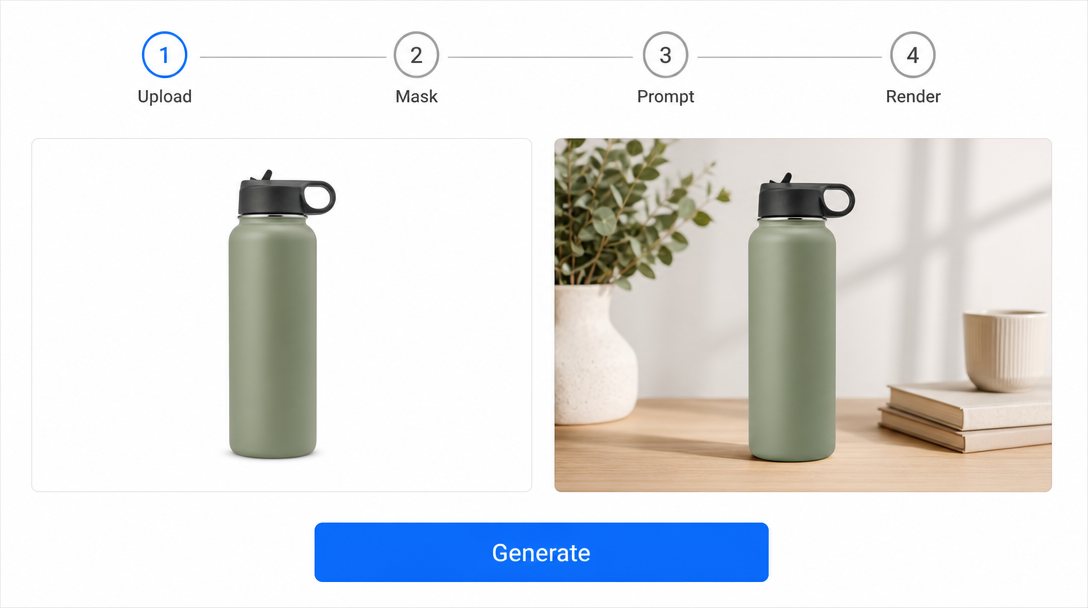
- Upload. You start with a clean, sharp studio packshot. The better the source, the better the result.
- Mask. SAM, or a manual refinement on top of it, isolates the product to the pixel.
- Prompt and reference. You describe the target scene in words and supply mood reference images for palette and lighting.
- Render. Diffusion, guided by ControlNet and IP-Adapter, paints the new environment around the locked product layer.
- Refine. A relighting pass uses depth maps to add scene appropriate shadows and reflections, followed by targeted inpainting on any remaining flaws.
Done well, the final frame is indistinguishable from a real studio shoot at a fraction of the wall clock time, which is why brands working with an AI native agency can refresh creative in days rather than quarters.
Where AI Still Loses to a Studio
Honesty matters here, because the wrong category will burn budget. Several product types still favour traditional photography or a hybrid approach, and a good creative partner will tell you so before you commit.
| Scenario | AI product photography | Traditional studio |
|---|---|---|
| Solid opaque products, soft goods, electronics | Excellent, the sweet spot | Slow and expensive by comparison |
| Reflective glass and metal at hero scale | Improving fast, still risky | Reliable but costly |
| Transparent liquids with refraction | Often unconvincing | Reliable |
| Complex regulated label text | Legal risk if hallucinated | Captures verbatim |
| Seasonal volume catalogue refreshes | Dominant choice | Cost prohibitive at scale |
Regulated categories such as cosmetics, supplements, and alcohol deserve a flag of their own. If the model invents a claim, a dosage, or a percentage on a label, the brand carries the legal exposure, not the tool vendor. Any responsible production process bakes in a final human review against the approved master artwork.
How Brands Are Using It in Production
The use cases that are paying for themselves right now are unglamorous and high volume. They are the unsexy backbone of modern content operations and they compound quickly.
- Batch catalogue refreshes across hundreds of SKUs for a seasonal relaunch.
- A/B creative testing where ten variants of the same hero ship in an afternoon.
- Seasonal contextualisation, dropping the same product into summer, winter, festive, or back to school scenes without a reshoot.
- Marketplace compliance, generating spec compliant white background images for Amazon alongside lifestyle assets for paid social.
What unites them is repetition. The first frame is the interesting one. The next ninety nine are where the economics work, especially when paired with a disciplined automation layer that handles renaming, resizing, and routing into ad platforms.
Choosing a Tool by the Job
The market splits into three rough categories, and matching the right one to your workload saves both money and frustration. A short conversation with a working creative team usually shortens this evaluation by weeks.
- Generators such as Flux based pipelines focus on producing scenes from scratch and shine for ideation and lifestyle frames.
- Editors such as Photoroom and Claid.ai focus on cleanup, background swaps, and quick variations on existing assets.
- Enterprise pipelines stitch SAM, ControlNet, IP-Adapter, and a generation model into a custom flow tuned to a brand's exact rules.
For one off social posts, an editor is enough. For a quarterly catalogue across thousands of SKUs, the enterprise pipeline pays back inside the first campaign, especially when it plugs into a broader brand system rather than living as an island.
Frequently Asked Questions
Is AI product photography legal to use in advertising?
In most markets, yes, provided the product itself is rendered faithfully and any factual claims on labels match the approved artwork. The legal risk lives in hallucinated text and invented claims, which is why a final human review against the master artwork is standard inside any serious commercial workflow.
Will it replace my studio photographer?
For volume catalogue and seasonal refresh work it already has. For reflective glass at hero scale, transparent liquids, and category defining campaign imagery, a skilled studio remains the safer bet, often complemented by AI for the variants downstream.
How faithful are the renders to the original product?
With a clean source packshot, SAM segmentation, and IP-Adapter plus ControlNet conditioning, fidelity is high enough that buyers cannot tell the difference. Cut any of those steps and the product starts to drift in subtle ways that reviewers feel before they see.
What source files do I need to start?
A sharp, well lit packshot of each SKU on a clean background, ideally with a few angles. Brand guidelines, palette references, and mood imagery make the prompt and reference stage faster and more accurate.
How long does a typical project take?
A single hero frame can be ready inside a day. A full catalogue refresh across hundreds of SKUs typically takes one to two weeks end to end, including review cycles.
Can the output match my existing photography style?
Yes. IP-Adapter conditioning on a small set of your existing hero shots is usually enough to lock palette, lighting, and composition cues so the new frames sit beside the old ones without standing out.
What about transparent or reflective products?
These remain the hardest category. Some hybrid workflows photograph the tricky glass or metal traditionally and use AI only for the surrounding scene, which combines reliability with speed.
Where does this technology go next?
Video is the next frontier. The same segmentation, conditioning, and relighting techniques are moving into motion, which will collapse the gap between product stills and full film production over the next eighteen months.
Conclusion
AI product photography is not magic and it is not a black box. It is a four step pipeline of segmentation, understanding, conditioning, and rendering, executed by a stack of specific models that anyone briefing a creative partner should be able to name. Used on the right categories, with reference image conditioning and a final human review, it produces work that sits comfortably beside a studio shoot at a fraction of the wall clock time. If you want to see what that looks like for your catalogue, the team at Absolutely AI builds these pipelines for brands every week.