AI Storyboards for Instagram Ads: The Playbook
Instagram ad teams burn days sketching frames and re-briefing agencies for Reels that get scrolled past in three seconds. Generic AI video tools spit out beautiful frames that ignore the hook-retention-CTA arc every 9:16 unit lives or dies by. This is the playbook Absolutely AI uses to storyboard Instagram ads that actually stop the thumb, before a single second of video gets generated.

An AI storyboard for an Instagram ad is not a mood board and it is not a finished Reel. It is a frame-by-frame plan, generated from a written brief, that shows you the shot, the on-screen copy, the camera move and the pacing beat before you commit to a video generation. When done properly, it becomes the tightest possible prompt for whatever tool renders the final motion. The teams shipping the most consistent Instagram creative right now are the ones treating this middle layer as the real craft, not the final render. It is the same discipline our AI video team applies to every campaign that leaves the studio.
What an AI Storyboard Actually Is for an Instagram Ad
An Instagram ad storyboard is a numbered sequence of frames, usually six to ten, that specifies what the viewer sees, hears and reads at each second of the spot. Each frame carries a visual, a shot description, on-screen text, a voiceover line and a duration. The AI part is that the visuals are generated from a brief, so you can iterate ten variants of a hook frame in the time it used to take to sketch one. Our deeper piece on AI storyboards for brand videos covers the general form; this article narrows the lens to Instagram ad units.
The distinction that matters: a mood board sets a vibe, a storyboard sets a plan, and a generated video sets the final asset. Skipping the storyboard is why so many AI Reels look expensive and convert like a placeholder. The frame plan is where the ad is actually made or lost.
Why You Storyboard Before You Generate the Video
Video generation with Veo 3, Runway or Sora is cheap compared to a live shoot, but it is not free, and it is slow when you are running twenty variants for a paid social test. Storyboarding first kills bad concepts at close to zero cost, aligns stakeholders on the actual beats instead of the vibe, and gives the video model a tighter prompt to work from. It also lets you A/B hooks against each other on paper before you spend any generation credits. This kind of front-loaded thinking is exactly what our AI pre-production process is built around.
The other quiet benefit is legal and brand review. It is much easier to get a compliance sign-off on a storyboard PDF than on a rendered video with a voiceover already baked in. Fixing a frame is a re-prompt; fixing a finished Reel is a re-shoot.
The Instagram-Specific Structure Every Storyboard Needs
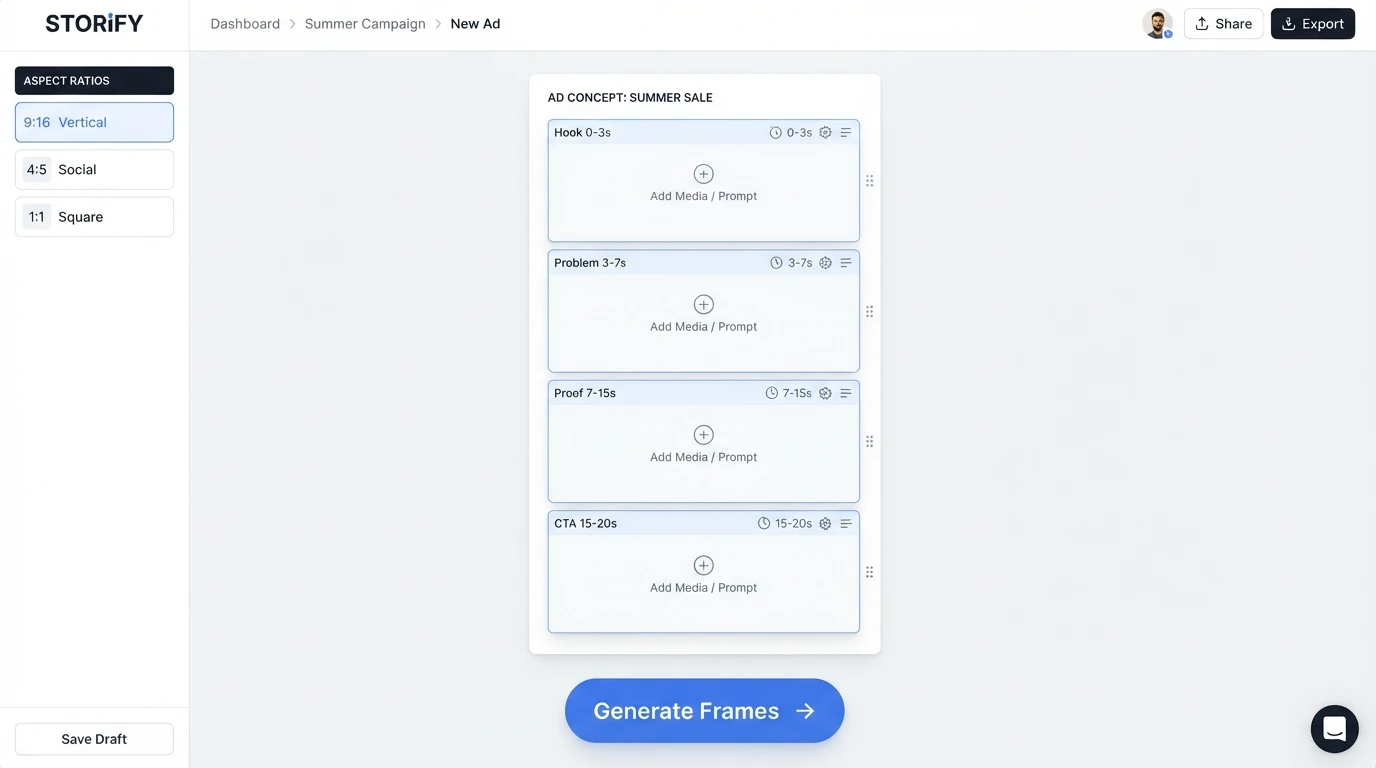
Instagram ads live and die in the first three seconds. Every frame plan we build maps to a fixed narrative arc, because the platform behaviour is fixed: users scroll fast, sound is off by default, and the CTA lives inside the video, not around it. The structure that works for our performance content clients looks like this:
- 0 to 3 seconds — pattern-interrupt hook. One frame, maximum. A visual anomaly or a bold text overlay that stops the thumb. This is where hook rate is won.
- 3 to 7 seconds — problem or promise. One or two frames that name the tension the product resolves.
- 7 to 15 seconds — proof or demo. Two to four frames of the product doing the thing, in context, with captions.
- 15 to 20 seconds — CTA frame. A hard, unambiguous action: shop, learn more, download. Text on screen, not just voiceover.
Every frame in the storyboard gets tagged with its role. If you cannot label a frame as hook, problem, proof or CTA, it should not be in the ad.

Aspect Ratio and Safe-Zone Rules
Instagram serves three ad shapes and each one crops differently. Reels and Stories are 9:16, Feed video is best delivered at 4:5, and carousel ads use 1:1. On 9:16 the top and bottom of the frame are eaten by the profile handle, the caption, the CTA button and the audio ticker. If you prompt an AI storyboard tool for a beautifully composed shot with the product centered, the UI chrome will slice through it in the live ad.
The fix is to prompt for the safe zone explicitly. For 9:16, keep every critical element between roughly 250 pixels from the top and 400 pixels from the bottom of a 1080x1920 frame. Push subjects slightly upper-middle, never dead center. On-screen text should sit in the top third or the middle band, never the bottom fifth. Our AI films team bakes these rules into every storyboard brief so the finished video renders correctly the first time.
Tool Comparison: What Actually Works for Instagram Storyboards
Most articles on this topic are thinly disguised landing pages for one tool. Here is the honest side by side we use internally when picking a stack for a client project. Pricing is qualitative because per-seat tiers change constantly and none of these are cheap at scale.
| Tool | Output | IG Format Support | Character Consistency | Best For |
|---|---|---|---|---|
| LTX Studio | Storyboard plus video | 9:16, 1:1, 16:9 | Strong within a project | End-to-end IG ad concepts |
| Kapwing | Storyboard and editor | All IG ratios | Limited | Fast text-on-frame mockups |
| HeyGen | Avatar video | 9:16 native | Excellent for one avatar | UGC-style talking-head Reels |
| Dilogs | Storyboard frames | All ratios | Moderate | Dialogue-driven concepts |
| Storyboards.ai | Still frames only | Configurable | Moderate | Pre-viz for hand-shot ads |
| Pixelplot | Storyboard plus shot list | All ratios | Good with reference images | Structured briefs for external video teams |
No single tool wins on every axis. The pattern that works for us is one tool for the frame plan, a separate tool for the final motion render, and human review at every handoff. Pricing across all of these is quoted per seat or per generation credit; scope pricing for a full campaign is best handled through a brief review.
The Step-by-Step Workflow
- Brief. One page. Product, audience, single offer, hero benefit, three tone words, brand colours as hex codes, three visual references.
- Concept variants. Write three to five different hooks as text before touching an image tool. Choose the two strongest to storyboard.
- Storyboard generation. Generate frames for both concepts at the correct aspect ratio, with the safe-zone rules baked into the prompt.
- Review and edit frames. Regenerate any frame that drifts off-brand or breaks the narrative arc. Lock the shot list.
- Export to video. Hand the locked frames and shot descriptions to Veo 3, Runway or Sora as structured prompts. Alternatively, hand the shot list to a human crew for a live shoot.
- Assemble and caption. Cut, add sound-off captions, and export at the delivery spec for each placement.
The whole loop should take a small team one to two days for a first concept, and hours for variants after that. Speed comes from the discipline of the brief, not from skipping steps.
Prompting Patterns That Actually Work
Character consistency across frames is the single hardest problem. The trick is to build a locked character description at the top of every prompt, including hair, clothing colour, age range, and lighting, and to feed a reference image on every subsequent generation. The same principle applies to product accuracy, which is where a technique borrowed from how AI product photography works pays off: build a reference sheet of the product from three angles before you generate any storyboard frame that contains it.
For brand palette, name the hex codes in the prompt and repeat them per frame. For a UGC feel, prompt for a handheld camera, natural window light, and a phone-camera lens. For a cinematic feel, prompt for a specific lens length, a colour grade reference, and controlled studio lighting. Never mix the two in one ad.
Common Failure Modes and Fixes
- Character drift. The person in frame 3 looks different from frame 1. Fix by locking a reference image and re-generating with a stronger character prompt.
- Off-brand colour. The AI defaults to teal and orange. Fix by naming your palette in every prompt and rejecting any frame that drifts.
- Hook that does not stop the scroll. The first frame is too clean, too on-brand, too expected. Fix by adding visual contrast, a bold text overlay, or an unusual composition.
- On-screen text collisions. Captions land under the IG CTA button. Fix by moving all critical text into the middle band of the frame.
- Hallucinated product details. The bottle has the wrong number of stripes. Fix by using an image-to-image workflow with a real product photo as the reference.
When AI Storyboarding Is the Wrong Choice
AI storyboards are a strong tool, but they are not universal. For hero brand films where every frame needs to hold up on a cinema screen, the ceiling is still traditional pre-production with a director. For regulated categories such as prescription health, financial advice or alcohol in restricted markets, the compliance overhead of AI-generated visuals often outweighs the speed win. For any campaign involving a real celebrity or a named public figure, do not use AI likeness generation at all, ever. When brand equity is the whole point, our AI branding practice handles the crossover between AI craft and traditional production.
Quick-Start Checklist
- Written one-page brief with product, audience, offer, tone, palette and references
- Three to five hook variants written as text before any image work
- Aspect ratio locked per placement: 9:16 Reels and Stories, 4:5 Feed, 1:1 carousel
- Safe zones respected: top 250px and bottom 400px kept clean on 9:16
- Frame arc labelled: hook, problem, proof, CTA
- Character reference image locked and reused across every frame
- Brand hex codes named in every prompt
- Final shot list exported before any video generation runs
Frequently Asked Questions
How long should an Instagram ad storyboard be?
Six to ten frames for a 15 to 20 second Reel. Fewer frames for a punchy Story ad, more for a longer educational Reel. Every frame should have a role in the hook, problem, proof or CTA arc.
Can I skip the storyboard if I am using Veo 3 or Sora?
Technically yes, and the results will show. Video models produce their best output when given a structured shot-by-shot prompt, which is exactly what a storyboard is. Skipping the storyboard is why the first draft from any video tool almost never lands.
What aspect ratio should I storyboard at?
Whichever placement the ad is running in. Do not storyboard at 16:9 and then crop; the composition breaks. Storyboard at 9:16 for Reels and Stories, 4:5 for Feed and 1:1 for carousel.
How do I keep the same character across frames?
Lock a reference image early, feed it into every subsequent generation, and write a detailed character description at the top of every prompt. Character consistency is the single biggest weakness in AI storyboard tools right now, so this is where the manual discipline matters most.
Should the CTA be voiceover or on-screen text?
Both, but on-screen text is non-negotiable. The majority of Instagram viewers watch with sound off, so a voice-only CTA is invisible to most of your audience.
Can I use AI storyboards for a UGC ad?
Yes, and it works well as a shot list you hand to a real creator, or as a full generated Reel with a handheld, natural-light prompt. The key is picking a lane and staying in it, not blending cinematic and UGC in one spot.
How many hook variants should I test?
Three to five per concept, minimum. The whole point of AI storyboarding is that variant cost is low, so use it. Kill the losers on paper before you spend any generation credits.
What is a realistic turnaround for a full storyboarded Instagram ad?
A day or two for the first concept including brief, storyboard and locked shot list. Hours per variant after that. The bottleneck is almost always brief clarity and stakeholder review, not the generation itself.
Bringing It All Together
The teams shipping the best Instagram ad creative in 2026 are not the ones with the best video model access. They are the ones treating the storyboard as the real work and the render as the last mile. If you want a partner who runs this playbook end to end, from hook variants to final Reel delivery across every IG placement, that is exactly what Absolutely AI's video practice is built for.