AI Script to Storyboard: The 2026 Workflow That Keeps Characters Consistent
Most AI storyboard tools promise a finished board from a pasted script. Then the lead character's jaw shifts between frames, the wardrobe shuffles, and the whole sequence reads like disconnected stock art. At Absolutely AI we build boards that survive director review, and the difference is almost never the tool. It is the order of operations.
Script to storyboard is the pre-production step where a written scene becomes a visual plan: panels, framing, lens choice, blocking, and timing. Done well, it is the document a director, DP, and client all argue over before anyone spends real money. The AI tools that have flooded this space in 2026 can collapse weeks of board artist time into an afternoon, but only if you understand what the pipeline is actually doing. Teams who treat it as a one-click job end up with pretty panels that cannot be cut together, which is why we rebuilt our own AI films pipeline around a stricter sequence.
What "script to storyboard" actually means in an AI pipeline
In a traditional shop the chain runs: script, scene breakdown, shot list, thumbnail sketches, finished boards, animatic. AI does not replace this chain. It inserts into specific links and leaves others untouched. The scene breakdown and shot list are still a human reading comprehension task, because a model that invents coverage will invent coverage you do not want. The frame generation step is where diffusion models earn their keep, turning each shot description into a composed panel in seconds.
The animatic sits at the end, where panels get stitched to timing, scratch VO, and sound effects. This is also where most AI boards fall apart, because panels that look fine in isolation reveal eyeline mismatches and broken blocking once you cut them together. The useful mental model, which maps closely to how we approach AI brand film production, is that AI compresses the drawing time and leaves the thinking time exactly where it was.
The five-step workflow we actually use
This is opinionated and tool-agnostic. The order matters more than the software you pick, and skipping a step is the single most common reason AI boards look amateurish.
- Prep the script in Fountain or scene-numbered format. Plain prose scripts confuse scene extractors. Fountain is a simple plaintext spec that marks sluglines, action, and dialogue unambiguously. Scene numbers let you reference INT. KITCHEN - 03 later without ambiguity.
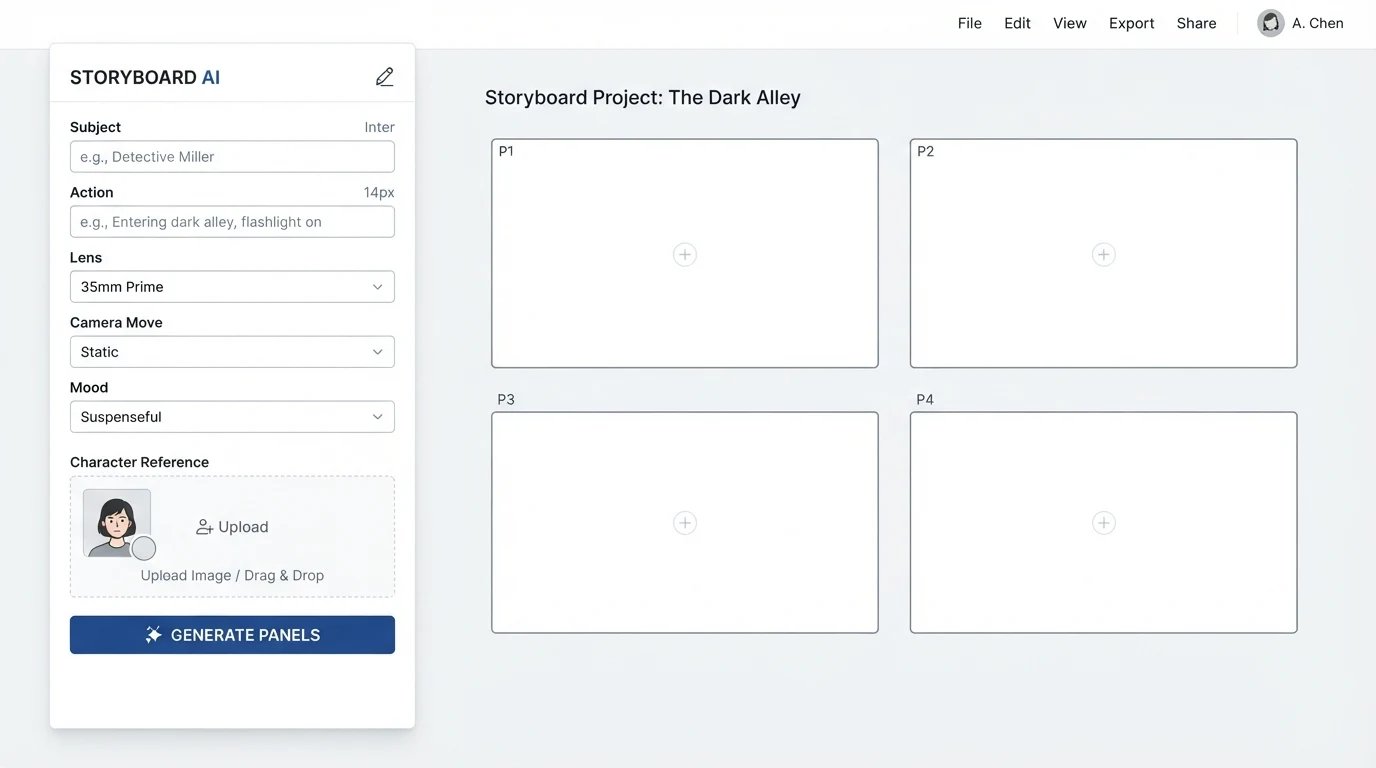
- Extract visual beats, not just scenes. A single scene can be one shot or fifteen. For each beat note subject, action, framing, lens, camera movement, and mood. This is the shot list, and it belongs in a spreadsheet before any image generation.
- Lock a character reference sheet first. Before you render a single panel, generate and approve a reference sheet for every recurring character: front, three-quarter, profile, full body, close-up. This becomes the anchor for every subsequent panel.
- Generate panels anchored to references, plus alternate-world explorations. For each shot generate two anchored variants that strictly follow the reference, and two looser explorations that let the model propose a stronger composition. Pick per shot.
- Assemble an animatic with scratch VO and timing. Export panels at the correct aspect, drop them on a timeline, record scratch dialogue, add rough transitions. The animatic is the deliverable, not the panels.
Tool landscape, honestly scored
The ranked listicles that dominate the search results are almost all written by one of the vendors on the list. We have shipped boards through most of these this year. Scores reflect hands-on use for commercial work, not demo reels.
| Tool | Script ingestion | Character consistency | Shot-level control | Animatic export | Client review |
|---|---|---|---|---|---|
| LTX Studio | Strong | Decent with locked chars | Medium | Yes | Shareable link |
| Katalist | Strong | Good with ref sheet | High | Yes | Comment threads |
| Boords | Manual | N/A, you supply art | High | Yes | Mature review flow |
| StudioBinder | Manual | N/A | High | Yes | Production-grade |
| Atlabs | Strong | Mixed | Medium | Yes | Basic |
| Morphic | Medium | Variable | Medium | Partial | Basic |
| Storyboard That | Manual | Preset library | Low | Export only | Basic |
| Invideo AI | Strong | Weak | Low | Video out | Minimal |
The honest read: Katalist and LTX Studio are the strongest end-to-end AI options for commercial work, Boords and StudioBinder remain the production-grade review tools if you are bringing your own art, and Invideo plus Storyboard That are solving a different problem than directors mean when they say storyboard. For regulated or pitch-sensitive briefs we often lean on the review flows of the traditional tools and generate panels upstream, a hybrid we also use on commercial projects.
The character consistency problem
Diffusion models drift because every generation samples a fresh point from a vast latent space. Even with identical prompts the model has no memory of yesterday's panel. The fixes, roughly in order of control:
- Reference image conditioning. Pass a single image alongside the prompt and ask the model to match. Works for 60 to 70 percent of panels, breaks on extreme angles or lighting changes.
- IP-Adapter. A plug-in that injects image features deeper into the generation. Holds identity through larger pose and lighting shifts, costs some prompt adherence.
- LoRA fine-tuning. Train a small weight patch on 15 to 30 images of the character. Expensive to set up, bulletproof once trained, correct choice for any character you will reuse across projects.
The prompt pattern that holds across 20 or more panels is boring and works: lead every shot prompt with an identical character block (name, age bracket, build, hair, wardrobe, two or three distinguishing features), then append the shot-specific description. The identical lead block keeps the model inside the same identity cluster even when the scene changes radically.
Shot grammar prompts that work
Natural language prompts are where boards go to die. A structured schema gives the model something it can actually parse, and gives you something you can diff when a panel misses. Use this JSON pattern per shot:
{
  "subject": "Mara, mid-30s, cropped auburn hair, charcoal field jacket",
  "action": "turns slowly toward the window, hand still on the kettle",
  "lens": "50mm",
  "framing": "medium close-up",
  "camera_move": "static",
  "light": "low-key, single practical from window-right",
  "mood": "held tension",
  "aspect": "2.39:1"
}
Three worked examples. Dialogue scene: two singles at matching 50mm, over-the-shoulder reverses, consistent eyeline height, same key light direction across the pair. Action beat: wider lens (24 to 35mm), explicit camera_move value (whip pan, push in, handheld), motion blur cue in the prompt. Establishing shot: name the time of day and weather, specify foreground/midground/background layering, drop the character block entirely if no cast is in frame.
From storyboard to animatic to previz
A storyboard is a plan, an animatic is a timed cut, and a previs is a moving version of the animatic with actual camera work. AI now reaches into all three. Static panels export to any editor. For animatic motion, Runway, Veo, and Hailuo can each take a panel and generate a short clip of implied movement, which is often enough to communicate pacing without committing to full previs. For a 60-second commercial board, a mixed timeline of 70 percent static panels and 30 percent short motion clips usually reads clearly to clients and keeps costs in the low hundreds of dollars of compute rather than the thousands a full previs would run.
Stay static when the shot is about composition or dialogue. Add motion when the shot is about movement itself, a reveal, or when timing is the question being asked. The handoff to full production is cleaner too, because the animatic becomes the reference the DP shoots against, mirroring how we structure handovers on larger AI film production briefs.
Where AI still loses to a human board artist
Four failure modes we check on every board before it goes to a director. Continuity: props, costume, and set dressing drift between panels even with locked characters, so run a continuity pass with the shot list as a checklist. Eyelines: AI models have no idea where character A is looking relative to character B in the next panel, and will happily have both looking screen-left in a conversation. Blocking: models cheerfully place two characters in positions that make no sense given the previous shot's geography.
The 180-degree rule is the one AI breaks most often and most invisibly. If character A was screen-left in the master, every subsequent coverage shot must keep her screen-left unless you cross the line on purpose. Models do not know this rule exists. A five-minute pass with the shot list and a hand-drawn overhead diagram catches almost all of these before the director does.
Frequently Asked Questions
Are there genuinely free options?
Storyboard That has a free tier for personal use and Boords offers a limited free plan. For AI generation specifically, running Stable Diffusion locally with ComfyUI costs nothing beyond the GPU you already own, though the setup time is real. Everything else gates meaningful output behind paid tiers.
What is best for commercials versus narrative film?
Commercials reward speed, client-review polish, and a short shot count: Katalist or LTX Studio with a Boords review layer. Narrative film rewards character consistency across hundreds of panels, so lean into LoRA training early and treat whichever generation tool you use as a renderer behind a proper shot list.
Can these tools read a PDF script?
Most will ingest a PDF but will do a much better job on a Fountain or scene-numbered text file. Convert first. The ten minutes you spend reformatting saves hours of wrong-scene panels downstream.
Do agencies accept AI boards for client approval?
Increasingly yes, but label them clearly as AI-generated boards in the deck, especially on first delivery. Most clients care that the board communicates the idea, not that every panel was drawn by hand. The pushback we see is almost always about surprise, not about the medium.
Should I use a one-shot video tool, a dedicated board tool, or a canvas tool?
Decision tree: if the deliverable is a timed animatic and the project is small, a one-shot tool like LTX Studio or Katalist is fastest. If multiple reviewers need to leave frame-level comments, a dedicated board tool wins. If the project is unusual or the look is bespoke, a canvas tool like ComfyUI or a direct model API gives you the control the hosted products do not.
How many panels per minute of finished video?
For dialogue-driven commercial work, roughly 12 to 20 panels per minute. For action or montage, 25 to 40. Boards much sparser than this leave too many questions for the shoot day.
Script to storyboard is one of the clearest wins AI has delivered in production, and also one of the easiest to do badly. The workflow above is what we hand to new team members on their first week, because the tools will keep changing and the sequence will not. If you want this pipeline run end to end against a real brief, Absolutely AI builds boards, animatics, and finished films from a single script, with character consistency locked before the first panel renders.