AI Storyboard Examples: 10 Boards That Actually Work
An AI storyboard is a shot-by-shot visual plan generated or assisted by AI, used to lock pacing, framing and direction before a frame of real production is shot. At Absolutely AI we build these boards every week, and we have seen which examples hold up in a client meeting and which fall apart. This piece shows the boards, the prompts behind them, and the trade-offs you only learn by shipping.
Most galleries of AI storyboard examples hide the thing that matters: the prompt or script snippet that produced the board, and an honest read on whether the output is client-ready or just pretty. We work in this space daily at Absolutely AI, so this piece leads with the boards themselves, captioned with the choices behind them, and only names tools in service of the output. No vendor bias, no generic tool list.
What an AI storyboard actually looks like
Three formats dominate the output you will see from current tools. The first is line art: pencil or marker-style frames with loose composition and heavy annotation. The trade-off is clarity. A line-art board strips lighting and texture so the director can argue about blocking, eyelines, and camera moves without a client being distracted by whether the hero product looks shiny enough.
The second is cinematic reference imagery: fully rendered frames that read like concept art or film stills. The trade-off is mood over function. These boards win pitches and lose shoot days, because a crew cannot interpret a glossy frame as blocking instructions. The third is the hybrid grid, a Boords-style layout with rendered panels alongside shot notation, timing, and dialogue. This is what most agencies default to for script-to-storyboard work, and it is usually the right call.
Pick the format for the audience. A DP wants line art. A client wants cinematic. A producer wants the hybrid.
10 AI storyboard examples by use case
The gap in most published galleries is that they organise by tool, not by deliverable. A board that works for a 30-second TVC is useless for a 9:16 social vertical, because the frame is thinking about different problems. Here are ten examples from recent commercial and brand work, grouped by what they were made for.
- 30-second TVC. A 12-panel board for a car brand, 2.39:1, cinematic reference style. Prompt backbone: "wide establishing of coastal highway, golden hour, hero vehicle entering frame left, lens flare, 50mm." What makes it work is the discipline of writing lens and time-of-day into every frame.
- Social vertical, 9:16. A six-panel board for a social ad, framed so the subject sits in the top third and leaves room for captions. Prompt discipline: every frame specifies "9:16, subject centred upper third, lower third empty for overlay."
- Product demo. Eight panels for a kitchen appliance, orbit camera, three-quarter view, matte sweep backdrop. Built from the same reference logic as our product photography boards, where the hero stays locked and the lighting evolves.
- Music video. A 16-frame beat-mapped board for an artist, each frame tagged to a bar. The script snippet is lyrics, not action lines. Line art under cinematic colour overlays.
- Indie short film. A 40-panel pre-vis for a two-hander dialogue scene, line art, with camera notation ("OTS, push in, 2s on reaction"). Loose on styling, tight on blocking.
- Pitch deck proof of concept. Four hero frames rendered to final-film polish, used to sell a campaign. The honest read: this is a sales tool, not a shoot tool. Different artefact entirely.
- Animated kids piece. Twelve panels in flat vector style, character turnarounds pinned to the top of the board. Character consistency is the whole game here.
- Documentary scene. A six-panel reconstruction board for a historical sequence, closer to the approach in our historical storytelling work. Period accuracy drives the prompt more than style.
- Agency client approval board. A 20-panel hybrid grid with timing, VO, and SFX columns. Built to be printed and marked up in a Teams call.
- VFX pre-vis. Eight panels blocking a composite shot, 3D-rendered grey models for the digital element and photographic plates for the environment. The storyboard is the brief for the VFX supervisor.
Styles you can generate
Four styles cover almost every brief. Line art is the workhorse: it keeps the conversation on composition and blocking rather than lighting, which is why directors and DPs default to it. Storyboard-realism, the pencil-with-tone look, adds just enough rendering for a client to read mood without mistaking the board for a finished frame. Cinematic concept art is the Midjourney-and-Flux end of the spectrum: beautiful, dangerous, oversells. 3D blocked boards, grey-model renders of the whole scene, are the right tool for pre-vis on any shot that involves camera moves a human eye cannot pre-imagine.
The rule we apply across content briefs is to match the style to the decision the board needs to unlock. If the decision is blocking, go line art. If the decision is tone approval, go cinematic. If the decision is "will this shot actually be possible," go 3D.
How these examples were built: script to panels in five steps
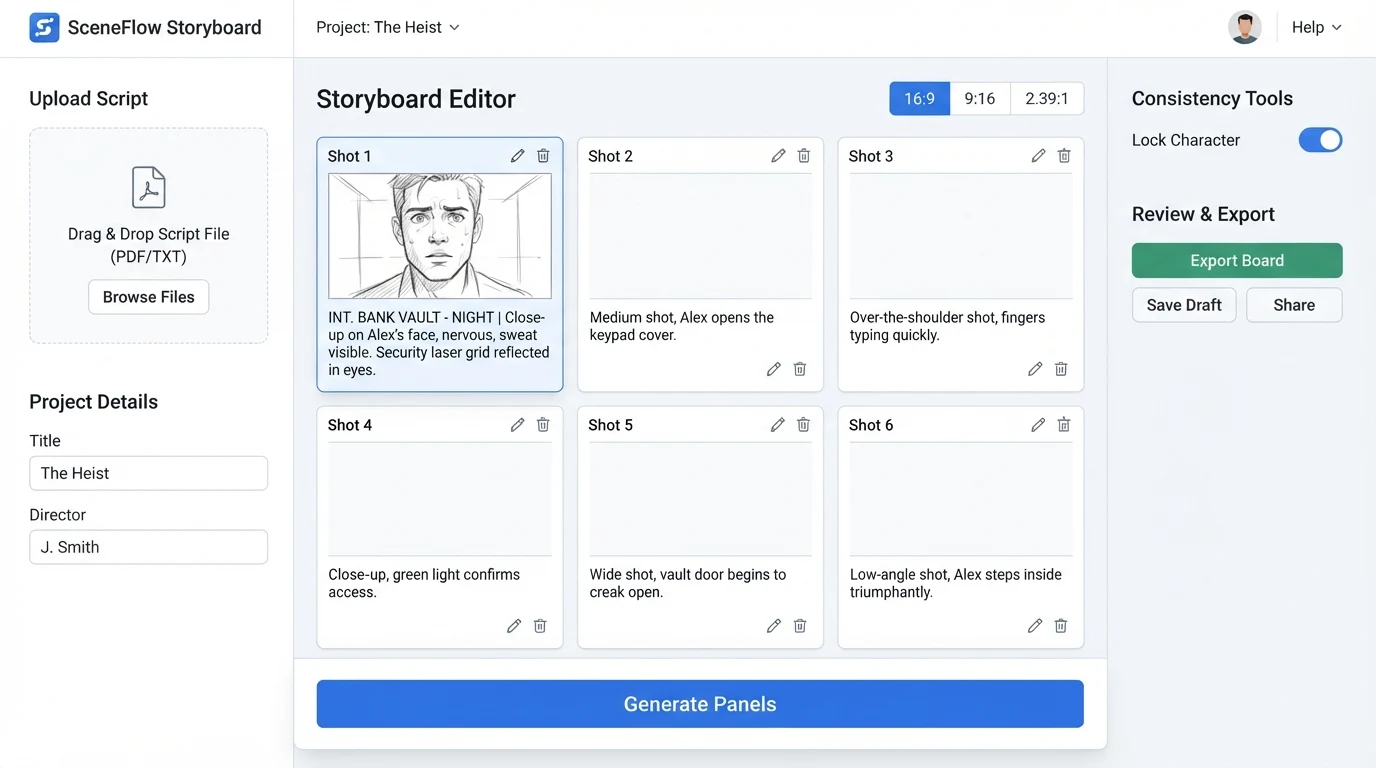
- Upload or paste the script. Every usable board starts from a locked script or a tight treatment, not from a vibe. The script becomes the shot list.
- Pick the style and the aspect ratio. Lock these before generating a single frame. Changing aspect ratio mid-board is the single most common reason a storyboard has to be redone.
- Describe the scene with camera language. Prompts that specify lens, height, movement, and time of day produce boards you can shoot. Prompts that specify mood only produce boards you can post.
- Lock the characters. Build the reference library before you build the board. Every main character gets a turnaround and a wardrobe pin before frame one.
- Export in two formats. A printable PDF for the client meeting, and a sequenced grid for the production team. Same panels, different artefact.
The character-consistency problem and how the best examples solve it
Character consistency is where most AI storyboards fall over. One character across six frames is manageable with the current generation of tools if you pin a reference image and keep wardrobe notes in every prompt. Two custom characters in one scene is still fragile. Three or more is where boards start to drift into the uncanny.
The examples in our gallery that hold up share three habits. First, they build a character sheet before the storyboard, a turnaround plus three outfits and three expressions per character. Second, they generate difficult frames by compositing: render the environment first, render the characters separately, and bring them together in a final pass. Third, they accept that some frames need a human finish, a quick overpaint to fix a face or a hand before the board goes to the client. The same discipline shows up in our brand film production work, where a single hero character needs to stay recognisable across dozens of frames.
Tools behind these examples
The tools worth knowing right now cluster into three groups. Script-first platforms like Boords, Katalist AI and Storyboarder.ai turn a screenplay into a sequenced grid, strong on structure and shot notation. Image-first platforms like LTX Studio and Atlabs lead with cinematic frames and layer in the shot logic afterwards, strong on mood and client appeal. Hybrid studio stacks, which is what we run for most films work, combine a Flux or Midjourney base for frames, a separate character pipeline for consistency, and a layout tool to assemble the final grid.
Vendor-published "best of" lists almost always rank their own product first. Ignore the ranking, read the feature list. The honest question is which tool matches the deliverable you are briefing, not which has the most badges on its homepage.
Frequently Asked Questions
What is an AI storyboard?
An AI storyboard is a shot-by-shot visual plan where frames are generated or assisted by AI image models, usually from a script or treatment, used to lock pacing, framing and direction before production begins.
Which style is best for client approval?
The hybrid grid with cinematic rendered panels, timing and dialogue columns is the format most clients approve fastest. It reads like a comic page they can mark up in a meeting.
Which style is best for the crew?
Line art. Lighting and texture are decided on set, so a board that strips them out keeps the crew conversation on blocking, lenses and camera moves.
How many panels does a typical AI storyboard need?
Six to twelve for a 30-second commercial, 16 to 24 for a one-minute piece, 40 or more for a short film. The number is driven by scene changes and camera moves, not by duration alone.
Can AI storyboards keep the same character across every frame?
Yes for a single hero character with a pinned reference. For two or more custom characters in the same frame, expect to composite or do a light manual finish on the trickiest panels.
How do AI storyboards translate to real production?
The board becomes a shot list for the AD, a reference deck for the DP, and the base of an animatic for timing. The best boards are the ones a crew can shoot without a translation layer.
What script format produces the best boards?
Standard screenplay format with explicit action lines. Prose treatments produce mood boards. Shot-lists with lens, height and movement produce production-ready boards.
How long does a professional AI storyboard take?
Faster than a hand-drawn board, and the real gain is iteration speed: a round of client notes that used to take days can turn around in a sitting. Numbers depend on scope.
Where to go next
The point of a storyboard is to make a decision before the money gets spent. The examples that work are the ones built with that in mind: the right style for the audience, the right level of finish for the question being asked, and a character pipeline that holds up across the board. If you want a storyboard built this way for a brief you are working on, Absolutely AI runs these end to end, from script to shot-ready panels.