AI Storyboards for Brand Videos: The Workflow That Works
AI storyboards have moved from novelty to a genuine pre-production tool for brand video in the last 18 months. At Absolutely AI we've watched the winning workflow settle into a clear shape: strategic brief in, sequenced frames out, director review, then handoff to shoot or generative video. This guide covers the process, the brand-consistency problem, and when to skip AI boards entirely.
Most articles on this topic rank tools. This one leads with the workflow, because the tool matters less than the process wrapped around it. A brand team that nails the brief-to-board loop will out-produce a team with better software and no discipline. If you're evaluating AI video capabilities for your brand, storyboarding is where the quality bar is set.
What an AI Storyboard Actually Is in a Brand Context
An AI storyboard is a sequenced set of shot frames generated from a written brief or script, with camera notes, aspect ratio, and brand style locked in from the first frame. Unlike a mood board, it's shot-specific: frame one is the opening beat, frame six is the sign-off, and every frame between them carries continuity of character, palette, and setting. It's the same artefact a traditional storyboard artist would deliver, produced in hours instead of days.
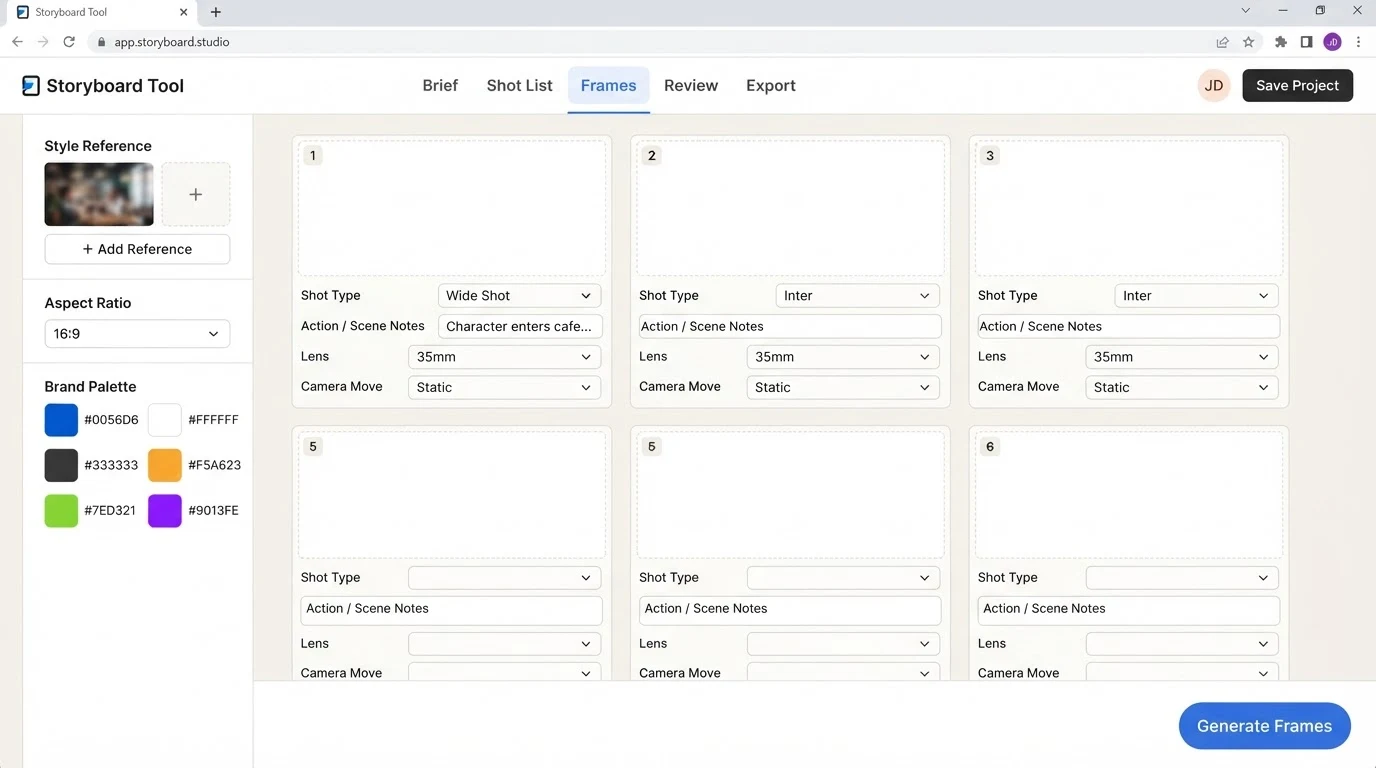
The inputs are a script or shot list, reference images for style and character, and a set of brand guidelines covering palette, type, and tone. The outputs are frames ready for client review, with the option to iterate on any single shot without redrawing the whole board. Teams building out AI commercial work use these boards as the bridge between strategy and production.
Why Brand Teams Are Adopting Them
Four things have changed the calculus. Client approvals are faster because the board looks close to the final film, not like a rough sketch. Concepting is cheaper, so pitches include three routes instead of one. Variations per idea go up, which means creative directors can test a serious tone against a playful one before committing. And alignment between strategist, creative director, and production tightens because everyone is reacting to the same visual, not their own mental picture of the brief.
For in-house brand teams, the second-order effect is bigger: pre-production stops being the bottleneck. A social campaign that used to take three weeks of concepting can enter production in a week. Agencies running AI content creation at scale have restructured around this compression.
The Workflow That Works
The pattern that consistently ships good brand video looks like this:
- Strategic brief. One page. Audience, message, tone, deliverable format, aspect ratio, must-includes.
- Shot list. Six to twelve shots for a 30-second spot. Written in plain language, one line per shot.
- AI frame generation. Each shot rendered with the brand's reference imagery attached as style input.
- Style and brand lock. Palette, character, and setting reviewed across the full board. Frames that drift get regenerated.
- Internal review round. Creative director signs off before the client sees anything.
- Client review. One consolidated round of changes, applied frame by frame.
- Production handoff. Board goes to live-action shoot or to generative video tools for animation.
The critical step is number four. Style drift across a six-frame board is the single most common failure mode, and it's the reason a lot of AI storyboard output still feels amateur. Locking references early and regenerating aggressively is what separates a usable board from a curiosity. Our AI films practice treats this as the non-negotiable checkpoint.
The Tool Landscape for Brand Use
The tool market splits into script-first platforms and image-first platforms. Neither category is finished, and the winners in 18 months may not be the winners today.
| Tool | Brand consistency | Reference image support | Script ingestion | Team review | Best for |
|---|---|---|---|---|---|
| Boords | Manual | Yes | Basic | Strong | Agency teams already using shot lists |
| LTX Studio | Character presets | Yes | Full script | Moderate | Narrative-heavy brand films |
| Storyboarder.ai | Style prompts | Limited | Yes | Basic | Fast concepting rounds |
| Higgsfield | Motion-first | Strong | Shot-level | Basic | Camera-move driven boards |
| Shootsta | Template-driven | Moderate | Brief-level | Strong | In-house teams with recurring formats |
| MockFlow | Manual | Yes | Limited | Strong | Cross-functional review |
Pricing across these tools sits in a wide band and shifts often; evaluate on capability fit first and cost second. Boards typically hand off to Runway, Sora, Google Veo, or LTX for animation, or straight to a live-action shoot if the board is being used as a director's reference. Teams pairing storyboards with AI animation production often skip the tool question entirely and build a custom pipeline.
Getting Brand Consistency Right
Brand consistency is the hard problem. A six-frame board needs the same character wearing the same outfit, the same palette across every shot, and the same setting logic frame to frame. The techniques that actually work:
- Style references. Attach three to five reference images that define the visual world. Reuse the exact same references for every frame in the board.
- Palette locking. Specify hex codes in the prompt. Generic colour words drift; hex codes hold.
- Character consistency. Use a single character reference image across all frames. Some tools now offer character presets that make this trivial; others require manual regeneration until the face matches.
- Tone matching. Match lighting and grade across frames. A warm-lit frame next to a cool-lit frame reads as two different films.
Logos and typography almost never render cleanly in AI frames. The professional workflow leaves logo placement to post-production overlay, marked on the board with a placeholder box. This is standard practice in serious AI branding work.
Honest Limitations Brand Teams Should Know
AI storyboards are not neutral. Hands and fine text still fail regularly. Character drift across shots is the default, not the exception. And the training data question is real: some generators are trained on scraped imagery with unclear licensing, which matters for anything that will run as paid media. Brands publishing at scale should read our note on rights and IP for AI imagery, which covers the same terrain for still image work.
The other limitation is subtler. AI boards look finished. That polish can seduce a client into approving a concept that a hand-drawn sketch would have flagged as underdeveloped. Discipline is required to review the idea, not the render.
A Worked Example: 30-Second Social Ad
Brief: a skincare brand launching a new serum, thirty seconds, vertical, aimed at women 25 to 40, tone confident and calm. The shot list is six frames: opening product beat, hand pouring serum, close-up of skin texture, model turning to camera, wide of model in bathroom setting, sign-off with logo. Each frame is generated with the same three references (product shot, model reference, bathroom lighting reference), palette locked to warm neutrals, and reviewed as a full board before any single frame is refined. Total time from brief to client-ready board: under a day. Teams doing similar work for beauty and wellness should also read our guide to AI imagery for supplement and beauty brands.
When to Skip AI Storyboards
Not every project benefits. Hero TVCs with a named director attached should storyboard traditionally, because the director's hand in pre-production is part of what the brand is buying. Documentary-style work depends on real moments that can't be pre-visualised. And anything requiring specific talent likeness carries legal risk that isn't worth the speed benefit. A useful benchmark: if the film's value is in its craft signature, storyboard by hand. If the value is in message clarity and speed to market, AI boards earn their place. Comparing this against traditional production echoes the same trade-off we cover in AI vs traditional production for stills.
Evaluation Checklist
When comparing tools for your team, work through these questions rather than a feature list:
- Does it accept multiple reference images per frame, and do those references actually influence the output?
- Can it maintain a single character across six or more frames without manual patching?
- Does it support the aspect ratios your channels need, natively?
- Can non-technical reviewers comment frame by frame without a training session?
- Does the export format hand off cleanly to your production or animation pipeline?
- For agencies: does the licensing cover client work and paid media use?
- For in-house teams: does the pricing model scale with output volume or team size?
Frequently Asked Questions
How long does an AI storyboard take to produce?
For a six-frame board with locked references, a competent operator can produce a client-ready draft in half a day. A full revision round adds another few hours.
Do AI storyboards replace human storyboard artists?
For high-volume commercial and social work, largely yes. For hero campaigns and director-led work, no. The artist's judgment on composition and beat is still the ceiling.
Can I use AI storyboards for pitches without licensing issues?
Internal pitch use is generally low risk. Publishing frames as final creative or paid media is where licensing and training-data questions matter. Check each tool's commercial-use terms.
What's the difference between an AI storyboard and an animatic?
A storyboard is static frames. An animatic adds timing, transitions, and often rough audio. Some tools now blur the line by generating short motion clips per frame.
How do I keep a character consistent across every frame?
Use a single reference image of the character in every frame's generation, and use a tool that supports character presets. Regenerate any frame that drifts rather than accepting it.
Should in-house teams build this capability or hire an agency?
In-house makes sense if you're producing weekly video content on repeatable formats. Agency support makes sense for launches, hero work, and any project where the creative bar is higher than the internal team can hit.
Can AI storyboards work for live-action shoots?
Yes, and this is one of the strongest use cases. Directors and DPs use them as pre-vis references on set. The board tells the crew exactly what the frame should look like before the camera rolls.
What happens after the board is approved?
Two paths. Live-action: the board becomes the shoot reference. Generative video: each frame becomes a prompt or seed for tools like Runway, Sora, or Veo, producing motion clips edited together into the final film.
Where This Goes Next
The gap between storyboard frame and finished film is closing every quarter. Within a year, the same brief that produces a board today will produce a first-cut film. That doesn't remove the need for the workflow above; it makes it more important, because the quality of the brief and the discipline of the review round will be what separates good brand video from AI slop. For brand teams looking to build this capability with senior creative direction from the first frame, Absolutely AI runs AI video and storyboarding as an integrated service.