AI Ad Creative for Meta: The 2026 Operator's Playbook
Meta's ad stack is now creative-first. Advantage+ Creative, Meta AI Studio, and generative video have shifted the winning skill from prompt tricks to briefing and quality-controlling AI outputs at pace. At Absolutely AI we run this workflow daily for brands scaling on Facebook and Instagram, and the pattern is clear: the operators who write tight briefs, lock brand elements, and test in structured matrices are pulling ahead of teams still hand-cutting one hero asset a fortnight.

Meta's advertising platform in 2026 rewards volume, variety, and speed of iteration in a way it never has before. Advantage+ Creative will now expand your image, rewrite your headline, reimagine your video, and shuffle placements automatically, which means the creative you upload is a starting point rather than a finished asset. The teams winning on ROAS are the ones treating AI ad creative as a production line with a strong editorial bar, not a one-shot generation.
What AI Ad Creative for Meta Actually Means in 2026
The phrase covers two very different things. First, there are Meta's native AI features baked into Ads Manager: Advantage+ Creative optimisations, Image Expansion, Text Variations, Video Expansion, and the Meta AI Studio surface announced at Cannes Lions 2026. Second, there are third-party generators that produce the source assets you feed in, from Madgicx and AdCreative.ai to Pencil by Brandtech and newer agentic tools like Ryze. A capable AI social ad creative team uses both, because each layer solves a different problem.
Native Meta tools optimise for delivery: they resize, restyle, and rewrite so a single concept can run across Feed, Reels, Stories, and Audience Network without you cutting each placement by hand. Third-party generators optimise for concepting: they produce the raw ideas, brand-consistent imagery, and product-in-scene renders that native tools then adapt. Treat the two as separate stages and the workflow becomes obvious.
The Four Ad Formats AI Generates Well Right Now
Not every format is equally solved. Based on what we ship for clients each week, four formats are production-ready today, and one still needs heavy human hands. The vertical video format in particular has jumped forward in the last twelve months.
- Static feed (1:1 and 4:5): the most reliable format. AI-generated lifestyle and product-in-scene imagery holds up at feed scale, especially with a locked packshot composited in post.
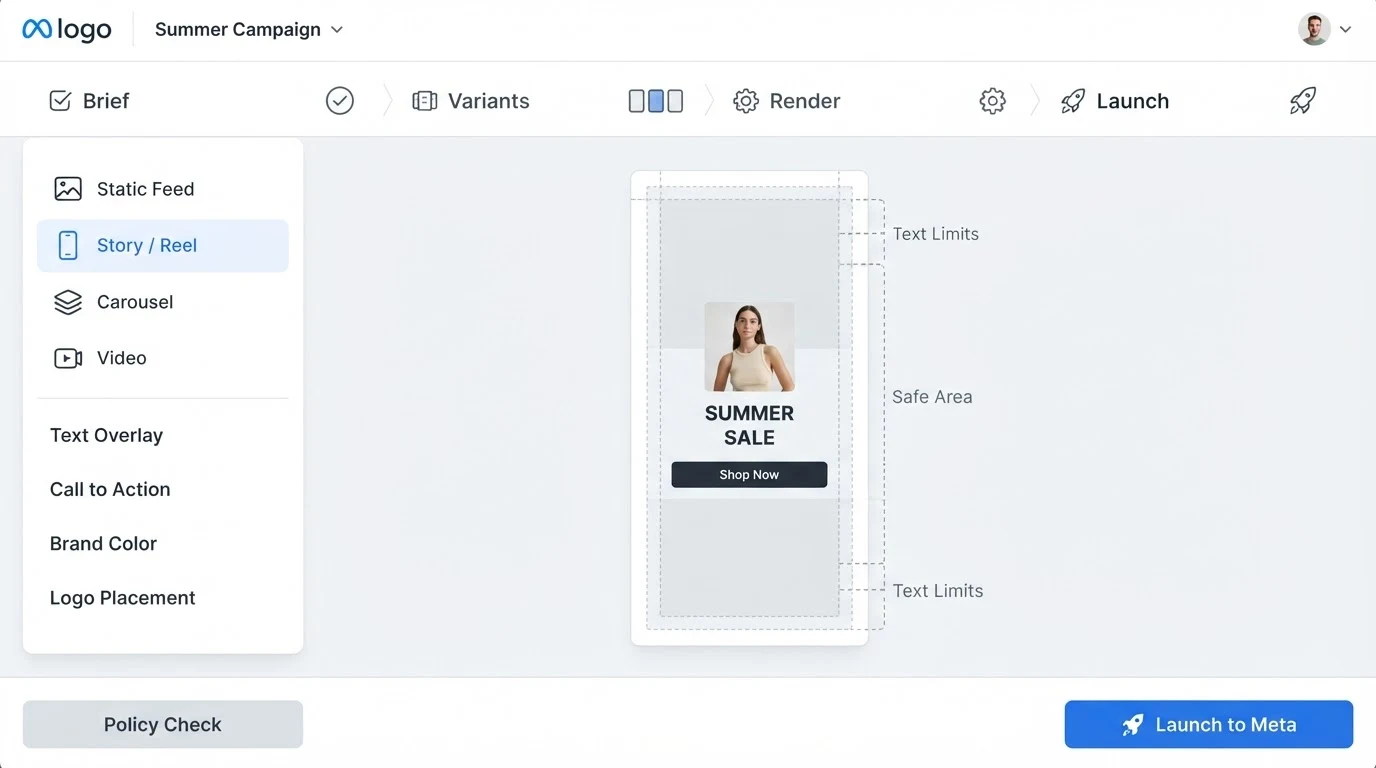
- Story and Reel (9:16): works well for lifestyle and mood, with safe zones for UI chrome at the top and bottom. Keep the hero subject inside the middle 60% of the frame.
- Carousel: excellent for step-throughs, before-and-after, and feature breakdowns. Consistency across cards is the hard part, which is why an Instagram carousel workflow matters more than any single prompt.
- AI-assisted UGC video: the fastest-growing format. Synthesised presenters, voiceovers, and b-roll are now viable for testing, though true UGC-style content still benefits from a real creator in the loop for the hook.

A Repeatable AI Creative Workflow
This is the week-in-the-life competitors rarely publish. The workflow has six stages, and each one has a definition of done. Skipping stages is where AI creative starts to look generic, so treat this as a checklist rather than a suggestion.
- Brief: one page per concept. Product, audience, single-minded promise, hook, tone reference, and three visual references. Vague briefs produce vague AI output; this is the highest-leverage stage.
- Concept variants: generate six to twelve rough concepts from the brief before committing to a direction. Cheap, fast, low fidelity. Kill 80% of them.
- On-brand render: take the surviving two or three concepts and render them at final fidelity with brand elements locked. This is where AI brand photography discipline earns its keep.
- Placement resize: cut 1:1, 4:5, and 9:16 versions with the hero subject correctly positioned for each safe zone. Do not rely on Meta's Image Expansion for hero product shots; use it only for backgrounds.
- Policy check: run every asset against Meta's synthetic-content disclosure rules, prohibited-content list, and text-over-image guidance before upload.
- Launch and label: upload with the correct AI-content disclosure flag where required, group into a creative testing matrix, and set a two-week review cadence.
Prompting Patterns That Survive Meta's Auto-Modification
Advantage+ Creative will happily crop your logo out of the frame, replace your background with a stock beach, or rewrite your headline into something bland. There are four practical ways to keep control while still benefiting from Meta's optimisations.
First, composite your logo and packshot in as the last step in your own pipeline, not baked into the generated background. Meta's Image Expansion only extends the edges, so a centred hero product survives. Second, use Advantage+ Creative on backgrounds and secondary variants only, and switch it off for your hero locked-brand asset. Third, upload three to five headline variations you have actually written so Text Variations has strong material to remix rather than inventing weak alternatives. Fourth, tag each asset with clear internal naming so you can trace which auto-generated variant is actually spending. Teams running structured ad creative testing at scale live and die by this labelling discipline.
Testing and Iteration: The Creative Matrix
The point of AI ad creative is not to make one perfect ad. It is to make enough disciplined variants that Meta's algorithm can find the winners quickly. Structure your tests as a matrix of hook by visual by format, then read the results at the axis level, not the individual ad level.
| Axis | Typical variants | What you learn |
|---|---|---|
| Hook | Problem, benefit, curiosity, social proof | Which message angle earns the thumb-stop |
| Visual | Product-only, lifestyle, UGC-style, illustrated | Which world your audience buys into |
| Format | Static, carousel, 9:16 video, 4:5 video | Where attention and conversion actually land |
Read Meta's Opportunity Score as directional, not gospel. The signal that matters is week-over-week CTR and CPA movement on your winning axis, then feeding those learnings back into the next brief. A well-run scaled AI creative programme refreshes the matrix every two to three weeks so fatigue never has a chance to set in.
Guardrails: Brand Safety and Meta's Disclosure Rules
Meta's 2026 policy requires advertisers to disclose photorealistic AI-generated or AI-altered imagery in social, political, and certain regulated categories, and encourages disclosure more broadly. The safe posture is to label anything that depicts a person, place, or event in a way that could mislead. Non-photorealistic illustration and clear product renders generally do not require the flag, but check the current Ads Manager prompt every quarter because Meta is tightening this quickly.
Brand safety guardrails matter just as much. Lock your colour palette, typography, logo placement, and packshot angle into a written spec before any prompt is written. Reject any generated asset that drifts on those four elements, no matter how strong the composition. This is the discipline behind good AI creative that reads as brand rather than stock.
Tool Comparison: Native, Third-Party, and Bespoke Pipelines
There is no single right stack. Choice depends on your volume, your brand consistency requirements, and how much control you want over the source assets. Here is how the main options actually compare in practice.
| Option | Best for | Control | Output quality | Pricing model |
|---|---|---|---|---|
| Meta Advantage+ Creative (native) | Placement resizing, headline variants, background expansion | Low | Good for optimisation, weak for hero | Included in Ads Manager |
| Madgicx | Small to mid DTC teams wanting an all-in-one | Medium | Solid for static, average for video | Subscription |
| AdCreative.ai | High-volume static output | Medium | Template-flavoured but fast, per this comparison | Subscription |
| Pencil (Brandtech) | Enterprise brand teams | High | Strong when configured properly | Enterprise, quoted per scope |
| Bespoke agency pipeline | Brands needing on-brand hero at scale | Highest | Editorial-grade, matches brand book | Project-based, quoted per scope |
Three Case-Style Examples
The abstract playbook lands better with concrete shapes. Three shapes of client we see most often, and how the workflow adapts to each, are worth mapping out.
DTC skincare: hero is the packshot, secondary is lifestyle. Lock the bottle render, generate a dozen background scenes per week, run a hook matrix across benefit vs ingredient vs before-and-after. Static and 9:16 video carry most spend. See how this plays out for DTC brands specifically.
B2B SaaS: hero is the interface screenshot or a founder-led talking head, secondary is metaphorical illustration. Text Variations does heavy lifting here because the value prop is verbal. Carousel and static outperform video. A good AI marketing partner will refuse to generate stock-y office photography for this segment.
Local service: hero is a trust-signal image (real premises, real team), secondary is problem-state illustration. UGC-style video works surprisingly well. Keep AI generation confined to backgrounds and b-roll; leave the hero human.
Frequently Asked Questions
Does Meta penalise AI-generated ad creative in delivery?
No. Meta actively encourages it through Advantage+ Creative. What Meta penalises is misleading synthetic content and undisclosed manipulation in sensitive categories. Compliant, well-labelled AI creative delivers on the same terms as any other asset.
Should I use Advantage+ Creative on every campaign?
Use it on backgrounds, headlines, and secondary variants. Switch it off for your hero locked-brand asset so your primary creative stays on-brand. Review auto-generated variants weekly and pause any that drift.
How many creative variants should I run per week?
Enough to give the algorithm real signal without diluting learnings. As a directional guide, aim for 8 to 12 fresh variants a week at low spend, 20 to 40 at mid spend, and 40 to 80 or more at high spend. Structure them into a hook by visual by format matrix.
Do I need to disclose AI-generated ads to viewers?
Yes for photorealistic imagery in social, political, and certain regulated categories, and increasingly recommended for anything that depicts a person, place, or event in a potentially misleading way. Meta's disclosure toggle is inside Ads Manager at upload.
What is the difference between Meta AI Studio and Advantage+ Creative?
Advantage+ Creative sits inside the ad delivery flow and modifies assets you upload. Meta AI Studio is a broader generative surface for building AI-powered experiences, including creator agents and conversational ads. They complement each other rather than compete.
Can AI replace my creative agency?
It replaces the mechanical parts of production. It does not replace concepting, brand strategy, or editorial judgement. The winning model is a small senior creative team using AI as leverage, which is how a modern AI content creation studio is structured.
How do I keep my logo and packshot from being distorted?
Composite them in as the final step outside the generator, and do not rely on Image Expansion or Video Reimagination to preserve them. Treat brand elements as untouchable overlays.
How quickly can I ship a full test wave?
With a tight brief and a working pipeline, a wave of 12 to 20 on-brand variants across three formats is a two to three day turnaround. The bottleneck is almost always the brief, not the generation.
The Monday-Morning Checklist
- Write one-page briefs for the concepts you want to test this week.
- Generate six to twelve rough variants per concept, kill most of them.
- Render the survivors at final fidelity with brand elements locked.
- Cut 1:1, 4:5, and 9:16 versions with correct safe zones.
- Check every asset against Meta's synthetic-content and prohibited-content rules.
- Upload into a hook by visual by format matrix with clean naming.
- Review week-over-week CTR and CPA at the axis level, feed learnings into next week's brief.
If you want a partner to run this pipeline end-to-end, Absolutely AI builds and operates on-brand AI creative programmes for Meta as part of our AI social content practice. The playbook above is the same one we run internally; the difference is the senior creative team on top of it.