AI Storyboards for Photoshoots: Pre-Visualise Before the Shoot
The cost of walking onto a photoshoot without a shared visual plan shows up fast: hours burned on lighting that gets re-done, art directors and photographers talking past each other, re-shoots that eat the budget. AI storyboards fix the problem before the studio is booked. At Absolutely AI, pre-visualisation is treated as the highest-leverage hour of any shoot, and this is how to run it well in 2026.
The cost of walking onto set without a shared visual plan shows up fast: hours burned on lighting that gets re-done, an art director describing one frame while the photographer is building another, and a shot list that drifts from the brief by mid-morning. AI storyboards close that gap before the studio is booked. Absolutely AI treats pre-visualisation as the highest-leverage hour of any shoot, because every call made in a mood board is a call that does not need to be made under a softbox with a crew waiting.
Why photo shoots need storyboards more than most teams admit
Film production has treated storyboarding as non-negotiable for a century. Each shot costs enough that nobody rolls a camera without knowing what the frame should look like. Photoshoots, oddly, often skip the step. Teams arrive with a mood board and a shot list in a spreadsheet, then burn the morning aligning on tone over Slack while the lighting team waits.
The irony is that photo days have less margin, not more. A film shoot amortises a day's crew cost across minutes of final content. A stills shoot delivers maybe twenty hero frames from the same crew call, and every hour lost to indecision eats a measurable chunk of the deliverable. A clear visual plan agreed with the client in advance is where the real savings live, and it is also where AI content creation workflows earn their keep.
What an AI photoshoot storyboard actually is
The phrase gets used loosely, so it is worth splitting it into three layers that do different jobs on different days of pre-production. Each layer uses a different kind of tool and answers a different question for the crew. Our thinking on how AI storyboards differ from the traditional kind covers the broader shift in detail.
Mood and reference boards
These are the earliest layer. They set the emotional register: palette, lighting direction, the kind of reference the shoot is reaching toward. AI tools help here mostly as a search and recombination step, pulling adjacent references and letting an art director iterate on mood faster than scrolling through folders.
Shot-list storyboards
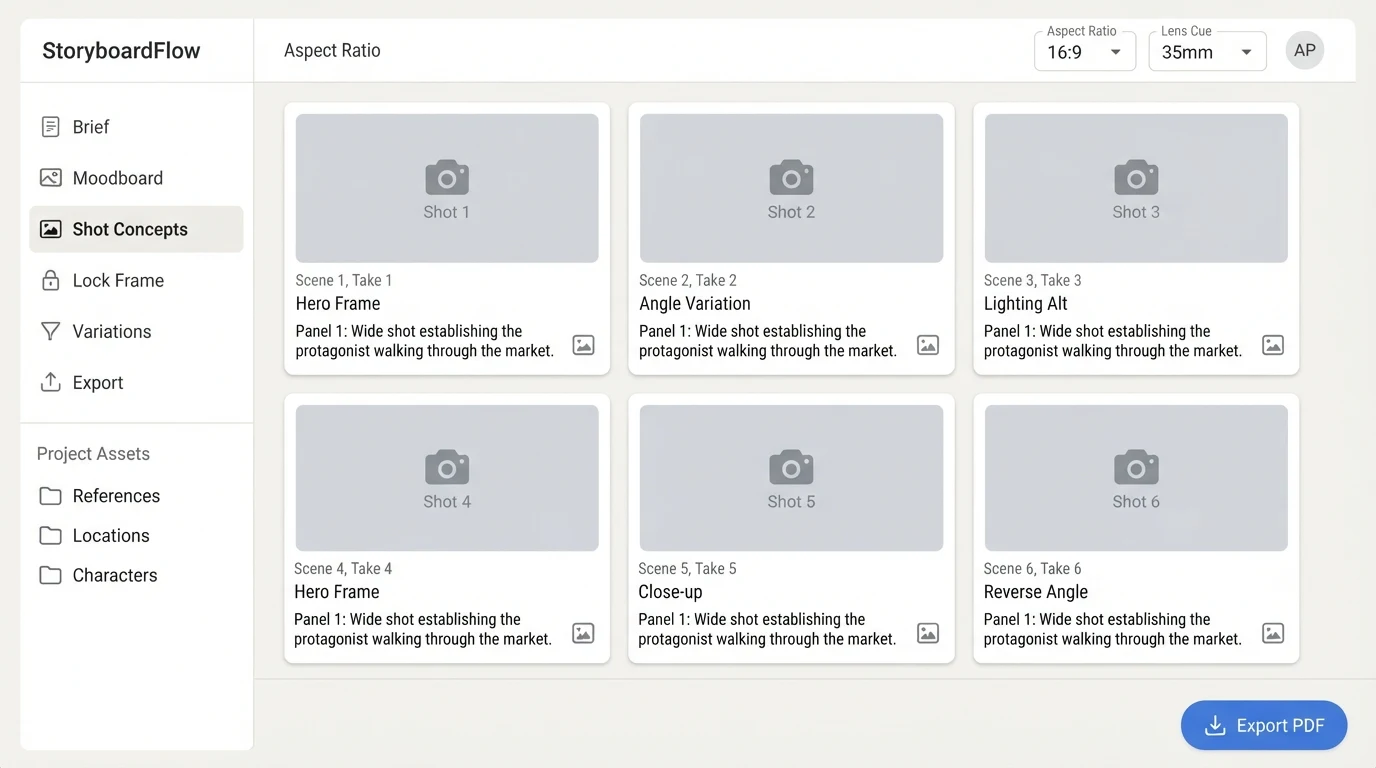
These are the middle layer. They describe each frame as a plan rather than a picture: subject, angle, lens, lighting direction, aspect ratio, action beat. The output is often a numbered grid the whole crew can read on the day.
Concept frames
Concept frames are the richest layer. They are fully rendered pre-viz images that approximate what the final shot will look like. A client can sign off on a hero frame from a concept render, which is the moment pre-visualisation turns into real production insurance.
The 2026 tool landscape
The space moves fast and no single tool wins at every layer. The useful question is which tool does what job well inside a producer's workflow. The grid below is drawn from how each product positions itself publicly in 2026, and our longer comparison of generators against agency pre-production expands on the trade-offs.
| Tool | Strongest layer | Reference-image support | Aspect-ratio control | Crew-ready export |
|---|---|---|---|---|
| Adobe Firefly Boards | Mood and shot-list | Strong | Flexible | Native to Creative Cloud |
| Imagen AI Photo Storyboard | Shot-list | Moderate | Preset photo ratios | |
| Midjourney with ChatGPT | Concept frames | Strong via character reference | Flexible | Manual |
| Krea and Storyboarder tools | Shot-list | Varies by model | Flexible | |
| PixVerse Director Shots | Concept frames, film-leaning | Moderate | 16:9 bias | Manual |
| Shootsta | Shot-list, video-first | Moderate | Flexible | Call-sheet integration |
| Wireflow | Concept frames and crew export | Strong, brand-locked | Any aspect | Shoot-day PDF |
A six-step workflow from brief to shot list
The tools matter less than the sequence. Producers running real client shoots tend to follow the same shape, regardless of which image model they prefer this quarter.
- Lock the brief and deliverables first. Decide the final asset list, hero frames, lifestyle supporting, detail shots, vertical social cuts, horizontal web cuts, before touching an image prompt. Every downstream decision inherits from this count.
- Build a reference moodboard. Pull existing imagery that captures the register. Use AI tools here to generate adjacent references, not final concepts. The purpose is alignment, not finished output.
- Prompt shot concepts with lens and aspect-ratio cues. A board that specifies 85mm portrait, soft key from camera left, 4:5 crop will produce a usable render. A board that says beauty shot will produce stock.
- Lock a hero frame. One image the whole shoot is designed around. This is the frame the client approves, and the one the lighting setup is built for on the day.
- Generate variations for lighting, wardrobe and angle. Keep subject consistency with reference images or character-lock features so the variations are legibly the same scene.
- Export the storyboard as a shoot-day PDF with crew notes. Lens, aspect, lighting diagram, wardrobe reference. A sheet the 1st AC and the stylist can both read at seven in the morning.
Prompting patterns that actually work for photography
Most AI tutorials online are written for film and short-form social video. They over-weight motion and under-weight the still-photography grammar that actually produces usable boards. A few patterns matter more than the rest.
Lens language. Specify focal length. 85mm portrait, shallow depth of field produces a different render than 35mm environmental, deep focus, and both are different from macro, 100mm, shallow. Being explicit about lens is the single highest-leverage prompt detail in photo pre-viz.
Lighting language. Soft key from camera left, hair light, white seamless backdrop is a brief a photographer can read. Cinematic lighting is not. Reach for the terms the gaffer uses, and the render will reach for the images the gaffer is used to building.
Reference images for consistency. If a brand has a face, a product, a packaging look or a palette, feed those as reference images to anchor the renders. This is where ecommerce photography workflows start to look professional rather than generic.
Aspect ratios decided up front. Choose 4:5, 1:1, 9:16 or 16:9 at the prompt level, not in post-crop. Rendering a hero at the wrong aspect means re-rendering, and renders are cheaper than reshoots but not free.
Where AI storyboards break, and the calls you still have to make
Honesty about failure modes keeps the workflow trustworthy. Four places still need the human eye and the human judgment, and pretending otherwise is how producers lose client trust the first time a render misleads a brief.
Hands and anatomy. Models have improved, but hero frames featuring close-ups of hands on a product are still where renders drift. Flag those shots to be shot blind rather than boarded, or board them loosely and leave the detail for the day.
Product fidelity. If the product is bespoke, intricately labelled or structurally distinctive, no model will render it faithfully from prompt alone. Either skip the pre-viz for that frame or use a reference image lock with manual review before the board goes to the client.
Brand-safe styling. AI tools default to generic aspirational imagery. Without a tight reference pack and an art director with a strong point of view, the output will look like every other brand's board, which is the exact failure the storyboard is supposed to prevent.
Client approval moments. A concept frame is a conversation starter, not a contract. Clients should sign off knowing the final shot will differ in detail. Experienced AI consulting teams handle this handoff carefully, approving the register and composition rather than the pixels.
Frequently asked questions
Is AI storyboarding replacing photographers?
No, and the question slightly misses the point. Storyboarding is a pre-production task, not a capture task. A photographer still shoots the final frame, directs the subject and judges the light in the room. The storyboard is the shared language that gets everyone on set agreeing on what the frame is before the first exposure.
Can a client approve a shoot from AI frames alone?
Clients can and often do approve the direction from a concept render, with the explicit understanding that the final image will differ in detail. The approval is of register and composition, not pixels. Written sign-off should say so, and the shoot-day PDF should carry a note to the same effect.
What file format should the storyboard reach the crew in?
A single PDF per shoot day, one frame per page, with the shot number, lens, aspect, lighting notes and wardrobe reference laid out plainly. Call sheets slot into the back. On the day, the 1st AC and the stylist should be able to read it without a laptop open.
How is this different from a mood board?
A mood board captures tone. A storyboard captures intent. Mood boards answer what does this feel like. Storyboards answer what is in the frame, from what angle, at what lens, under what light. A shoot needs both, in that order.
Which AI tool should a producer start with?
Start with whichever tool the art director already uses for mood references, and extend from there. The sequence matters more than the tool. A producer who runs a tight six-step workflow in a single model will produce better boards than one with every subscription and no process.
Does AI storyboarding add time to pre-production?
Less than most teams expect once the workflow is in place. The real saving is downstream, in a shoot day that runs to plan because the plan actually existed on paper before anyone touched a camera.
The point of pre-visualisation is not to replace the shoot. It is to make the shoot a confident execution of a plan everyone has already agreed on. The producers who adopt AI storyboarding treat it as the moment the brief becomes a frame, which is where misalignment gets resolved or gets expensive. Absolutely AI runs this layer as a standard part of pre-production on brand photography engagements, because the hour spent boarding is almost always the hour that saves the day.