AI Pre-Viz for Commercials: A Practical Agency Playbook
AI pre-viz has quietly become the most useful tool in the commercial director's kit, collapsing the gap between a scribbled storyboard and a rough cut into a single afternoon. At Absolutely AI we use it on almost every TVC and social spot that comes through the door, not to replace craft, but to lock creative before a single light gets rigged. Here is how the workflow actually runs in 2026.
AI pre-viz has quietly become the most useful tool in the commercial director's kit, collapsing the gap between a scribbled storyboard and a rough cut into a single afternoon. At Absolutely AI we use it on almost every TVC and social spot that comes through the door, not to replace craft, but to lock creative before a single light gets rigged. Here is how the workflow actually runs in 2026.
What pre-viz means when the deliverable is a 15-second ad
Feature pre-viz is about staging complexity: crowd blocking, VFX plates, stunt geography. Commercial pre-viz is a different sport. You have six, fifteen, or thirty seconds to land a brand message, and every frame has to work in 9:16, 1:1 and 16:9 for CTV, social and OLV cutdowns. The pre-production discipline for campaigns is closer to graphic design than filmmaking: composition, hierarchy, and ad-safe framing come first, story second.
That constraint is exactly why AI pre-viz suits commercials so well. A thirty-second spot is usually six to twelve keyframes. You can generate, iterate and approve all of them inside a day, in every aspect ratio the media plan requires, without waiting for a storyboard artist's second pass.
Why AI pre-viz is not just faster 3D pre-viz
Traditional 3D pre-viz and animatics are throwaway. You build a rough version of the scene, get sign-off, then rebuild it properly for the shoot. AI pre-viz is different: the approved keyframe becomes the literal first frame the video model animates. Planning and production collapse into one loop, which is a genuine shift in how commercial work gets made.
That has a knock-on effect on how you brief. Every frame you generate in pre-viz is a candidate for final delivery, so the brand profile, product references and lighting logic have to be locked before you start, not bolted on afterwards. Loose briefs produce loose frames, and loose frames produce loose films.
The pipeline, step by step
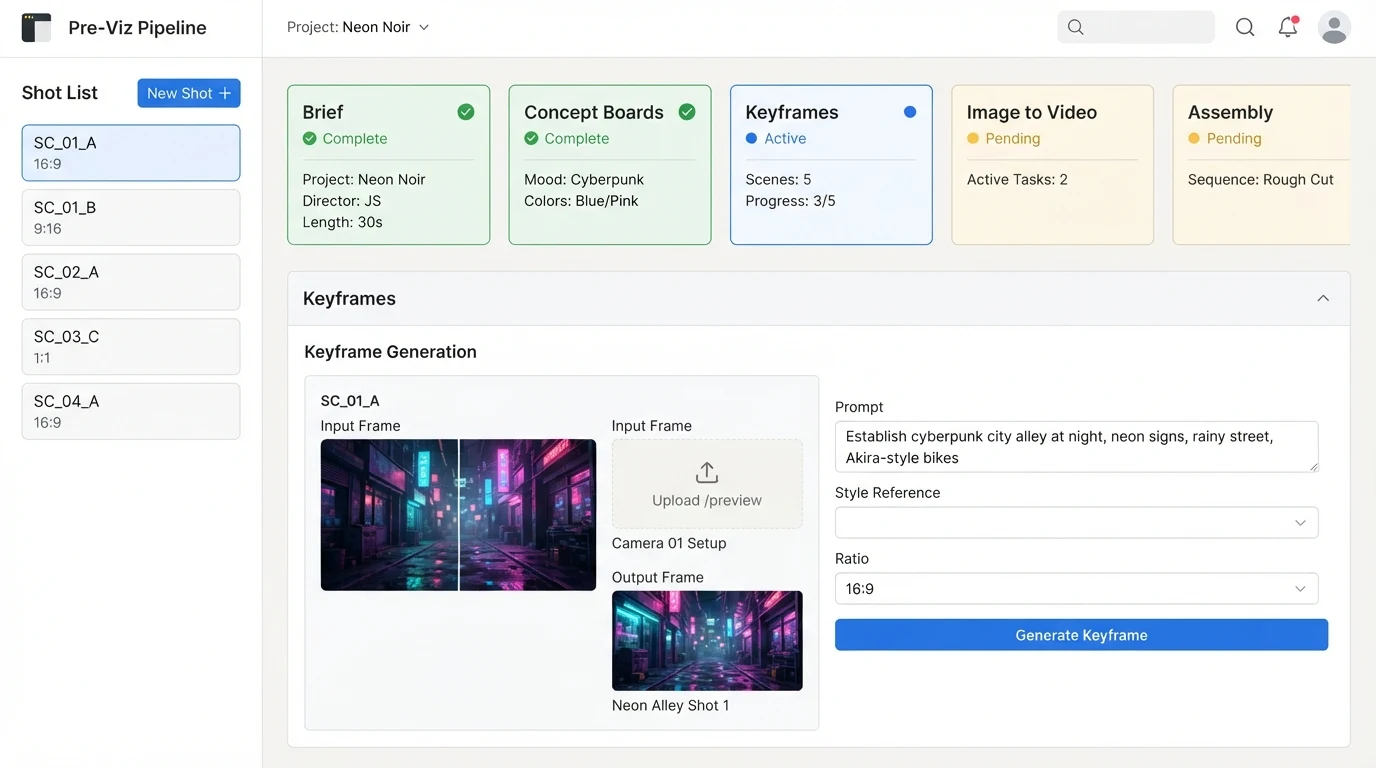
A commercial AI pre-viz job at our end runs through roughly the same seven stages every time, whether it is a hero product film or a social-first campaign. The storyboard stage for brand video is where most of the strategic thinking lands.
- Brief intake. Creative brief, brand guidelines, product photography, competitor references, media plan (durations and aspect ratios).
- Brand profile. A structured document the models can actually read: audience, tone, visual direction, key messages, restrictions. This is the single biggest lever on output quality.
- Concept boards. Image models generate wide exploration around the brief, usually 4 grids per deliverable, two anchored to references and two more exploratory.
- Shot list. Human-written. Camera height, lens, movement, lighting direction, blocking, on-screen message per shot.
- Keyframe generation. Locked shot list drives specific keyframes at final aspect ratio, brand-accurate.
- Image-to-video. Each approved keyframe becomes a 5 to 10 second clip via a video model.
- Assembly. Cutdown to 6/15/30, VO and SFX layered in, delivery masters exported per channel.
Which models to reach for in 2026
Model choice depends more on the deliverable type than on personal preference. The matrix we work from on video projects looks roughly like this:
| Stage | Best for product | Best for talent | Best for environment |
|---|---|---|---|
| Concept boards | Flux Kontext | Nano Banana Pro | Ideogram, Recraft |
| Keyframes | GPT-Image-2, Flux Kontext | Nano Banana Pro | GPT-Image-2 |
| Image-to-video | Veo 3, Kling | Veo 3, Sora 2 | Seedance, Runway |
| Audio | ElevenLabs SFX | ElevenLabs VO | ElevenLabs ambience |
Nano Banana Pro currently leads for talent likeness and skin tone; Flux Kontext holds product geometry better than anything else; Veo 3 handles physics and camera motion with the least drift. None of them cover every job, which is why stack selection is half the work.
The things models still can't infer
Blocking, camera and lighting are the parts of directing that no prompt has ever fully replaced. A model will happily generate a beautiful frame with the hero product lit from the wrong side, the talent's eyeline breaking the 180, or the logo drifting off the ad-safe area on the vertical cut. Human shot planning is what keeps brand consistency intact across a spot.
Our rule of thumb: if a decision would need a director on set (camera height, lens, key light angle, actor eyeline), it needs to be written down before generation, not after. The models are collaborators, not directors.
Cost and timeline, honestly
Traditional pre-viz on a mid-budget TVC used to sit somewhere in the range of two to six weeks of specialist time, with 3D pre-viz on the higher end and hand-drawn storyboards on the lower. AI pre-viz on the same brief typically runs in days rather than weeks, at compute costs measured in hundreds of dollars per finished minute rather than thousands. The cost dynamics of AI pre-production shift the maths on which jobs are worth pitching for in the first place.
The interesting unlock is not the saving on any single job, it is the pitch and bid deck. Being able to walk into a chemistry meeting with moving frames rather than a static board changes the conversation entirely, and often decides who wins the account.
Client approval, the part everyone underestimates
The biggest failure mode of AI pre-viz is not technical, it is expectation-setting. Show a brand marketing team a beautifully rendered pre-viz frame and they will assume that is what the final film looks like. Frame the presentation carefully: pre-viz frames are directional, not final. They exist to lock composition, tone, pacing and messaging so the shoot or the final generation pass can deliver against an approved target.
Done well, this workflow collapses revision rounds from four or five down to one or two, because the client is signing off on something concrete rather than describing a feeling. That is where the real project economics live.
Where AI pre-viz still breaks
- Hands. Still the giveaway. Frame around them, cut on the wrist, or hide them behind the product.
- Product geometry. Any hero product with sharp edges, symmetry or embossed branding will drift. Use reference-anchored generation and be ready to composite the real product back in.
- Talent likeness. Getting a specific person is easier than it was; getting them consistent across six shots is not. Rights and consent processes should be locked before you generate.
- Continuity. Wardrobe, hair, background dressing and lighting will drift between clips. Treat every shot as its own micro-brief.
A practical starter workflow
If you are an agency or in-house team building this capability for the first time, the shortest path to a usable output looks something like this. It mirrors how our agency workflow is structured internally:
- Write a one-page brand profile per client, in the format the models will read.
- Start with a single deliverable, ideally a 15-second social spot in 9:16.
- Generate concept boards wide, then narrow ruthlessly to one direction before touching keyframes.
- Lock the shot list on paper before generating keyframes.
- Generate keyframes at final aspect ratio, not at 1:1 with a plan to crop later.
- Animate only approved keyframes. Never animate a frame the client has not signed off.
- Present with context: this is pre-viz, here is what will change at delivery.
Frequently Asked Questions
Is AI pre-viz replacing storyboard artists?
Not on serious jobs. The best commercial pre-viz workflows we see still have a storyboard artist or director shaping the shot list; the AI just executes the frames faster. What is disappearing is the animatic specialist role, where a human traced rough frames onto a timeline. That job has largely folded into the pre-viz workflow itself.
Do networks and platforms accept AI pre-viz for finals?
Pre-viz is not the finished asset, so the question is really about the final film. Broadcast networks and CTV platforms accept AI-generated video where rights, likeness and music clearances are properly documented. Meta and TikTok have their own disclosure rules for AI content. Get legal sign-off on the specific deliverable before you promise a client anything.
Who owns the frames the AI generates?
Contract-dependent. Most current model providers assign commercial rights to the paying user, but training-data cases are ongoing and could change the picture. Bake IP indemnity language into your client agreements and keep records of the prompts and references used for each frame.
How do I stop the client thinking the pre-viz is the final film?
Label everything as pre-viz on the frame itself, walk them through what will and will not change at delivery, and show one or two examples of past pre-viz next to the final film so they can calibrate expectations. Setting this up front is worth an hour of your time and saves days later.
Can I use real product photography as a reference?
Yes, and you should. Product-anchored generation is dramatically more accurate than text-only prompts, especially for packaging, hero angles and colour. If you do not have clean product shots already, that is worth solving first.
How long does an AI pre-viz turnaround actually take?
A single 15 to 30 second spot from brief to first-round frames is realistic in two to three working days, assuming the brand profile and references are ready. Revision rounds add roughly a day each. Complex multi-talent spots take longer.
What is the biggest mistake teams make when they start?
Skipping the shot list. Generating pretty frames without a locked plan produces a beautiful mess that does not cut together. The shot list is the part that makes the finished spot feel directed rather than assembled.
AI pre-viz is not a shortcut, it is a planning tool that happens to produce most of a finished film as a by-product. Used properly, it lets a small team pitch bigger, approve faster and ship work that would previously have needed a much larger production footprint. If you want a hand building this into your own campaign workflow, Absolutely AI runs the pipeline end to end on commercial jobs every week.