AI Mood Board Generation: The 2026 Agency Workflow Guide
Mood boards used to eat a full day of Pinterest scrolling and Milanote wrangling before a pitch. In 2026, prompt-to-board tools compress that into fifteen minutes without losing the taste layer. This guide, written by the creative team at Absolutely AI, walks through how AI mood board generation actually works, when to use it, the seven tools worth your time, and the prompt craft that separates a usable board from a Pinterest-scrape lookalike.
Mood boards are the first artefact a client sees, which means they carry disproportionate weight in whether a campaign gets greenlit. The shift to AI-generated boards is not about replacing taste, it is about compressing the mechanical part of visual research so creative directors spend more time editing and less time scraping. At Absolutely AI, we now build mood boards inside the first client call rather than promising them by end of week.
What is an AI mood board generator?
An AI mood board generator is a tool that takes a written brief, sometimes paired with reference images or a brand kit, and returns a composed board of imagery, palettes, typography suggestions, and layout ideas. Traditional workflows using Pinterest, Milanote, or Are.na are retrieval-based: you find images that already exist. AI generators synthesise new imagery on demand using diffusion models, then arrange it against extracted palettes.
The practical difference is specificity. If a brief calls for "cold-pressed skincare shot in a brutalist Tokyo apartment at golden hour," a Pinterest search returns close approximations. A prompt-to-board tool renders exactly that scene, in the exact aspect ratio, matched to a supplied brand palette. That is the wedge for brand kickoff work where the visual direction has to feel bespoke from slide one.
How AI mood board generation actually works
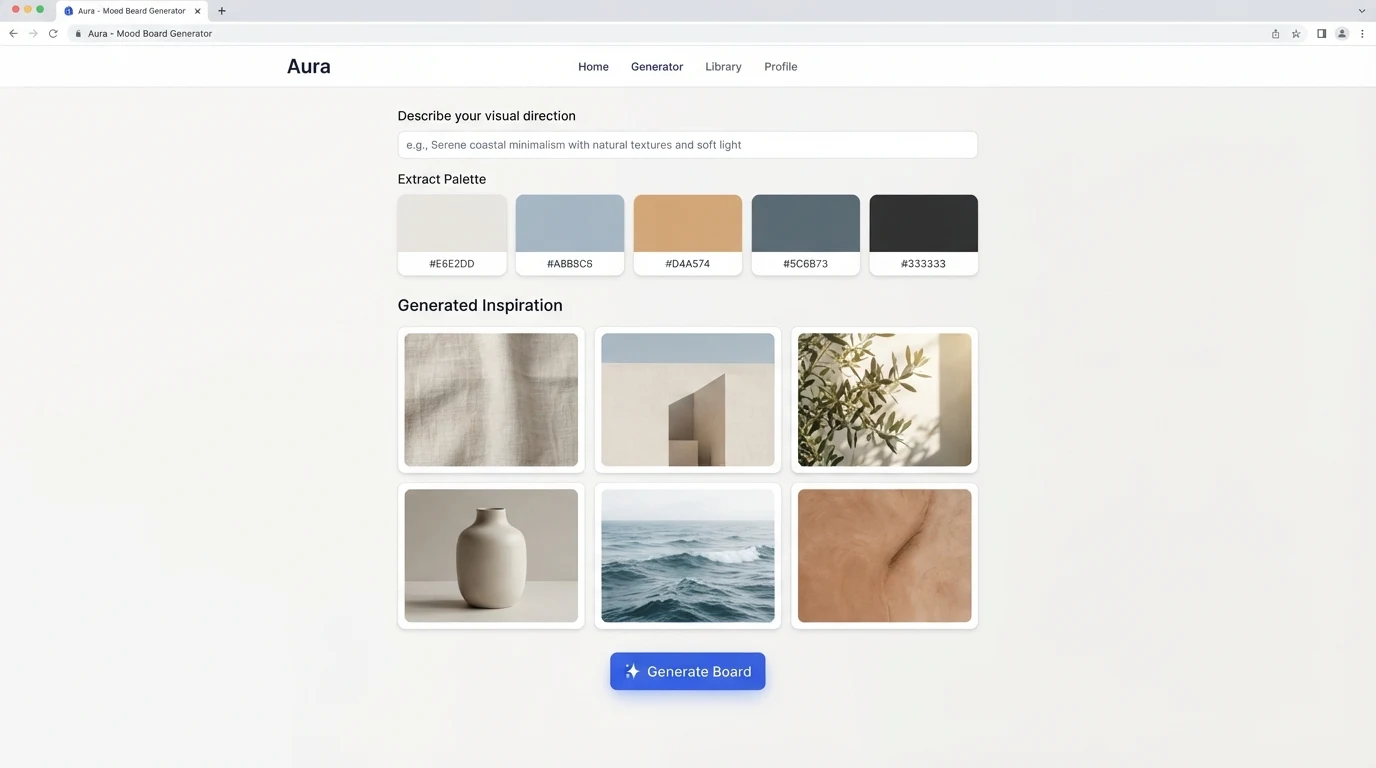
Under the hood, most 2026 tools stitch together three components. A diffusion model (usually a fine-tuned Stable Diffusion, SDXL, or Flux variant) generates the imagery from your prompt. A CLIP embedding layer matches your reference uploads to visually similar generations so the board stays coherent across tiles. A palette extractor samples dominant colours from the generated set and returns hex values ready to drop into Figma.
The layout composer is the newest piece. Tools like Miro AI and Adobe Firefly Moodboard now use lightweight vision-language models to decide tile hierarchy, whitespace, and typographic pairing based on the mood you specified. The output is a designed board, not a grid of thumbnails. For teams running integrated creative production, this is what makes boards deck-ready without a designer polishing them.
When to use AI mood boards vs hand-curated ones
AI boards win when speed and specificity matter, and when the visual direction is exploratory rather than locked. Hand-curated boards still win when you need real-world proof (existing campaigns, editorial tearsheets, product references the client can touch). The honest answer for most agencies is a hybrid: AI for the exploratory phase, curated references for the final direction lock.
| Scenario | AI-generated | Hand-curated |
|---|---|---|
| Brand kickoff, week one | Best | Slow |
| Pitch deck, unbriefed prospect | Best | Overkill |
| Locked campaign direction | Risky | Best |
| Client alignment on abstract mood | Best | Ambiguous |
| Physical product reference | Poor | Best |
| Photographer or DOP brief | Good | Best |
For fast-turnaround work like retainer content programs, AI boards let a strategist align creative direction with the client before a shoot day is booked, which is where most budget overruns start.
The 7 best AI mood board generators in 2026
We tested each of these on the same brief: a launch campaign for an Australian skincare brand, coastal minimalist, warm neutrals, quiet luxury. Notes below come from that same-brief comparison, not vendor marketing.
- Miro AI Moodboard. Best for teams already living in Miro. Standout: real-time collaboration on the generated board. Limitation: image quality lags Firefly and Midjourney-based tools. Pricing: from $10/user/mo.
- Adobe Firefly Moodboard. Best for agencies inside Creative Cloud. Standout: clean commercial licensing on outputs. Limitation: palette extraction is basic, layouts feel templated. Pricing: bundled with CC or $9.99/mo standalone.
- Kittl. Best for typography-forward boards (fashion, editorial, packaging). Standout: font pairing suggestions with live previews. Limitation: image generation is less photorealistic. Pricing: from $10/mo.
- Moodboard.ai. Best for pure prompt-to-board with no learning curve. Standout: exports directly to Figma with palette tokens. Limitation: fewer style controls than Firefly. Pricing: free tier, pro from $15/mo.
- Venngage AI. Best for pitch-deck boards where the board itself is the slide. Standout: brand kit sync. Limitation: generic diffusion imagery. Pricing: from $19/mo.
- Invideo AI. Best for boards that need motion references and animatic thumbnails alongside stills. Standout: video-native workflow. Limitation: still-image quality is secondary. Pricing: from $20/mo.
- Pixazo. Best for photorealistic product-adjacent boards. Standout: fine-tuned SDXL models for commercial photography aesthetics. Limitation: no live collaboration. Pricing: from $12/mo.
Most agencies end up running two of these in parallel: one for photorealistic imagery (Pixazo or Firefly), one for collaboration and handoff (Miro or Moodboard.ai). We break the full stack down in our studio comparison guide.
A step-by-step agency workflow
The tool matters less than the workflow. Here is the sequence we use on every brand kickoff, refined across the last two years of client work.
- Write the prompt properly. Structure: subject, setting, lighting, palette, camera or medium, mood adjective, negative prompt. Skip any of these and the board drifts.
- Choose aspect ratio first. 16:9 for pitch decks, 4:5 for social-first campaigns, 1:1 for exploratory work. The aspect changes composition, not just crop.
- Load the brand kit or reference set. Three to five reference images anchor the CLIP layer and prevent generic outputs. Skip this step and you get stock-photo mood.
- Generate three variants per tile. Never present the first output. Cherry-pick from three passes minimum.
- Extract the palette and lock it. Copy hex values into your Figma tokens before the client sees the board, so palette and imagery ship as one system.
- Export to Figma or FigJam. Present in the tool the client already uses, not the AI generator's native viewer.
- Bridge to shot list. Every board tile becomes a numbered shot reference for the DOP, photographer, or AI product photography brief. This is where boards stop being decoration and start driving production.
Prompt library: 10 copy-paste starters
Prompt craft is where most teams underperform. These are structured prompts we have used across live client work, adapt the bracketed variables for your brief.
- Skincare, coastal minimalist: "Cold-pressed skincare bottle on limestone plinth, soft diffused morning light, warm neutral palette (bone, oat, terracotta), medium-format film aesthetic, quiet luxury mood, negative: harsh shadows, saturated colour."
- Fashion, Y2K revival: "Editorial fashion portrait, low-rise denim, chrome accessories, saturated magenta and chrome palette, flash photography, 2003 magazine aesthetic, negative: modern minimalism."
- SaaS brand, calm technical: "Abstract 3D render of soft geometric forms, cool blue-grey palette with single accent, matte finish, soft studio lighting, calm technical mood, negative: gradient mesh, neon."
- Hospitality, dusk warmth: "Boutique hotel courtyard at dusk, terracotta walls, warm tungsten lighting, olive and clay palette, cinematic wide shot, Mediterranean mood."
- Editorial food, seasonal: "Autumn harvest still life on linen, north-facing window light, muted ochre palette, overhead composition, Kinfolk aesthetic."
- Interiors, Japandi: "Minimalist living room, oak and paper materials, single ceramic vessel, natural diffused light, warm off-white palette, wabi-sabi mood."
- Automotive, cinematic: "Sports car parked on empty desert road, magic hour lighting, dust particles in air, warm amber palette, anamorphic lens flare, cinematic wide."
- Beauty, high-gloss: "Lipstick macro shot, wet reflective surface, saturated red and black palette, ring-light reflection, glossy commercial beauty aesthetic."
- Wellness, botanical: "Herbal infusion bottle in eucalyptus grove, dappled morning light, sage and cream palette, botanical apothecary mood."
- Tech launch, monolithic: "Single hardware product on infinite black backdrop, hard rim light, minimal palette, product-hero composition, Apple-launch mood."
Save your best prompts as a team library. The prompt IS the asset now, and it compounds across projects the way a good photographer's shot list does.
Limitations, copyright, and brand safety
The unglamorous part. Most diffusion models were trained on scraped internet imagery, which means outputs can echo copyrighted styles or, occasionally, recognisable artist signatures. For internal mood boards this is low-risk. For anything client-facing or included in a paid deliverable, you need cleaner ground.
Adobe Firefly is currently the only major generator with a clear commercial indemnity, because it was trained on Adobe Stock. Everything else lives in a grey zone that clients with legal teams will flag. Our internal rule at Absolutely AI: AI mood boards are direction, not deliverable. Final imagery is either shot on set, generated with licensed models, or run through a rights-cleared pipeline. If you are commissioning AI creative work, ask your agency to spell out their IP position before the SOW is signed.
Brand safety is the other consideration. Never upload a client's unreleased product imagery to a free-tier tool that trains on user inputs. Read the terms. Every serious tool now offers a private workspace or enterprise tier that opts out of training, and it is worth the upgrade for any client work.
Frequently Asked Questions
Is AI mood board generation free?
Most tools offer a free tier limited by generations per month, watermarks, or resolution. Moodboard.ai and Kittl have the most usable free tiers. For agency work, expect to pay $10-20/mo per seat to remove watermarks and unlock commercial licensing.
Can I use AI mood boards commercially?
For internal client presentation, yes, universally. For inclusion in deliverables (decks, published work, campaigns), only Adobe Firefly currently offers explicit commercial indemnity. Other tools depend on your subscription tier and jurisdiction. Read the terms.
What is the best AI mood board tool for fashion?
Kittl for typography-forward editorial work, Pixazo for photorealistic garment references, Firefly for anything that needs commercial licensing. Fashion boards benefit from strong CLIP reference uploads, so pick a tool that lets you seed with 5+ reference images.
How is AI mood boarding different from Pinterest?
Pinterest retrieves existing imagery. AI tools synthesise new imagery matched to your exact prompt, aspect ratio, and palette. The Pinterest workflow is faster for real-world reference (existing campaigns, products, locations). AI wins for specific, unbriefed, or hard-to-find visual concepts.
Do AI mood boards replace creative directors?
No. They compress the mechanical research phase so creative directors spend their time editing and directing rather than scraping. The taste layer, brief interpretation, and client conversation are still human work.
How do I hand off an AI mood board to a photographer or DOP?
Export the board with numbered tiles, extracted palette hex values, and one-line direction per tile (lens, lighting, mood). Treat each tile as a shot reference. This is the same handoff document you would build from a traditional board.
Can AI mood boards match an existing brand identity?
Yes, if you upload the brand kit and 5+ reference images as CLIP anchors. Tools without reference-image support will drift toward generic diffusion aesthetics regardless of prompt.
How long does an AI mood board take to produce?
A polished, client-ready board takes 15-45 minutes for an experienced operator, versus half a day to a full day for a traditionally researched board. The speed gain compounds across a pitch cycle.
The takeaway
AI mood board generation is now a baseline agency capability, not a novelty. The teams winning with it are the ones treating prompt craft as a skill, layering it onto existing creative workflows rather than replacing them, and being disciplined about IP. If you want to see how this fits into a full creative pipeline (from board to shot list to final asset), the team at Absolutely AI builds this workflow into every client engagement, and we are happy to walk you through a live example on a real brief.