AI Food Photography for Brands, Explained
AI food photography covers tools that create, enhance or modify food images without a traditional shoot. For brand teams it splits into two workflows, with one shared hard problem: keeping the label and pack true to what sits on the shelf. Here is what the main vendor pages do, what still fails, and the checks to run before a pilot ships.

AI food photography, for brand teams, covers two workflows and one recurring problem. Typeface's food guide, dated 31 August 2026, defines the category as using AI to create, enhance or modify images of food products without a traditional shoot, drawing on text descriptions, reference images or product specs. Enhancement tools start with a real photograph of a dish or pack and change the world around it. Generative and hybrid tools compose a scene around an uploaded product. The problem that shows up in both, visibly and often, is keeping the label, shape and finish of the real pack intact in the final image.
This piece walks through the main categories of tool, the label fidelity problem that still catches brands out, the scale options that make a real difference for a large catalogue, and the transparency and legal checks to route a pilot through before any image ships. It is general information for brand, ecommerce and category teams in food and beverage, not a review of any one vendor.
Two workflows, not one
The clearest way to split the market is by what the tool starts with. The outputs can look similar; the compliance profile does not. For a brand team working on a pilot, the first question before any tool test is which of these two the brief needs.
On the enhancement side, Photoroom's food page says the tool can place existing food photos in realistic, styled settings such as wooden tables, plates or clean surfaces that fit a brand aesthetic. The same page describes a single workflow that combines background cleanup, lighting correction and realistic styling, with branded templates and exports sized for web, social and delivery apps. A separate Photoroom page says the tool can generate consistent visuals for missing menu items, matching the style of existing photos so a catalogue stays cohesive.
Pebblely sits in the same enhancement band for drinks. Its beverage photography post, dated May 2024, says the tool generates a background from a single photo of the beverage, a description, and an optional reference image. It offers two generation modes: a regular-quality pass of about five seconds and a higher-quality mode that takes longer.
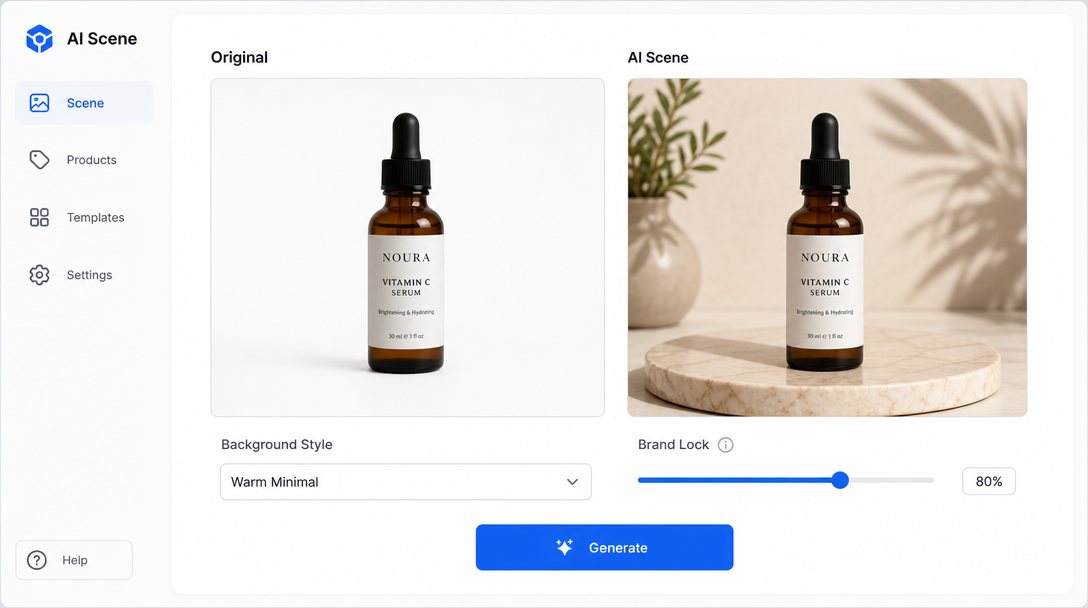
The generative and hybrid group works differently. Pixelcut's food page says Pixelcut Templates keep the item's shape, color, label text, and logo faithful to what you upload, so a bottle, jar or snack pack still looks like the real thing on the shelf, and that users are dropping a genuine product into a styled scene rather than inventing a fake dish. Its Product Studio page describes the same idea more directly: it treats the uploaded product as the fixed part of the image, so the shape, label text and colours stay true to the original.
Typeface makes similar claims in its own words. Its image quality page says the system represents logos, shapes, colors, and 3D angles accurately in generated marketing, and that image harmonisation adapts a product's lighting, transparency, reflections and orientation to each scene rather than simply overlaying it on a background. Typeface's food guide adds that Flux-based blending matches textures, lighting and shadow to place the product in the scene naturally, so packaging, labels and finish details stay accurate in every generation.

Label and packaging fidelity is the hard problem
Vendor pages talk about label fidelity because it is where this category fails most visibly. PetaPixel's piece dated 6 September 2026 documents the kind of failure brand teams fear: New York pizzerias selling cheese pies ended up with pictures of sweet dessert pies filled with melted mozzarella, and other menus got burgers with four top buns and sauce bottles labelled with words that do not exist. The same piece argues that an AI image of a dish it has never seen is a plausible-looking dish that nobody can order, not a photograph of the real food.
For a brand team, the test is whether the tool is inventing the pack or dropping a photograph of the pack into a new scene. The vendor claims above all point in the same direction: Pixelcut's template and Product Studio copy, and Typeface's harmonisation language, position the uploaded packshot as the fixed element of the frame. That framing is what makes a generated hero image defensible on a product detail page. A fully invented dish or pack is a different output and belongs upstream, in concept and moodboard work, not on a shelf-facing asset.
The sources used here do not test any of these fidelity claims independently; the claims are the vendors' own. The gap between vendor copy and third-party testing is one a brand team closes with its own review before anything goes live. See also how to brief AI brand photography.
Scale: APIs and bulk editing
The numbers that push this from pilot to programme are catalogue sizes. A large food or drinks brand lives with hundreds of SKUs and seasonal variants, and bulk is where AI changes the economics. Photoroom's food page says the Photoroom API automates background removal, retouching and scene generation directly from a menu management system, POS or delivery-platform feed, so every new dish, location or seasonal item is processed as it is added rather than in manual batches. Pixelcut's food page describes bulk tools that batch-edit whole folders of food and drink photos in one pass, handling background removal, resizing and upscaling across a catalogue, and an API that developers can connect to a store or app for background generation and editing at scale.
Pixelcut's food page also mentions an optional prompt, such as on weathered concrete or a marble countertop, as a way to steer the mood of a generated scene. That hints at the trade-off worth watching: bulk pipelines reduce per-asset labour, but they also hard-code taste decisions that a creative director would usually make per shot. A human review step is where that trade-off is managed, not hidden.
Transparency, trust and legal review
Audience response is not neutral. Typeface's guide cites one study that found consumers preferred AI-generated food images to real ones until they could tell the difference, and reports that once an image reads as AI-generated, its appeal drops. For a brand with equity to protect, that is a reason to invest in craft, not a reason to hide the method.
Transparency is where the trade press has been loudest. A B&T piece dated 9 June 2026 quotes a photographer arguing that it is so important to be transparent from the beginning because it builds customer trust for a brand's audience, and that brands can say something like "We're going to be using AI for this, because that's where the industry is going." The same piece adds that if a person's likeness is being replicated or used as the basis for AI-generated imagery, there should be transparency, consent and appropriate compensation. The sources used here do not cite a specific regulator ruling about AI-generated food imagery, so take this as practice guidance from that outlet, not a legal position.
Legal review is the second rail. CapCut's beverage ideas page, dated 28 February 2026, puts it plainly: treat AI visuals like traditional creative, and route for legal approval before commercial use, especially for claims, nutrition panels or regulatory marks. That is useful advice for any food or drinks category, not just beverage. This article is general information and not legal advice.
Test before you swap
The swap-in moment is where plenty of programmes trip. Mida's food product photography page is worth reading for one reason: the tool itself has been retired, and the company notes that Mida is A/B testing software and does not generate images. The same page keeps a point that is more useful than the tool ever was: a more polished image can still lower add-to-cart rate, which is why it is worth testing a new image against the current one before swapping it in. Prettier does not always mean better for a product detail page, and treating each new image as a hypothesis is safer than treating it as an upgrade.
What an enterprise pipeline looks like
At the top of the market the pipelines look different again. Forrester, in a post dated 4 May 2025, reports that Kraft Heinz has built TasteMaker, a custom retrieval-augmented generation engine developed in partnership with Apply Digital and powered by Google's Vertex AI. Forrester describes it as more than a tool, an innovation and design engine. The lesson for mid-sized brands is not to copy the stack; it is that the leading programmes are custom builds with governance, retrieval and brand data baked in, not off-the-shelf prompt boxes.
See also AI food photography for restaurants and menus.
Frequently Asked Questions
Can an AI tool keep a product label and pack accurate?
Multiple vendors claim yes when the real pack is uploaded as the fixed element of the scene. Pixelcut's Product Studio and food pages both say the uploaded product's shape, label text and colours stay true to the original. Typeface describes the same aim as image harmonisation, with logos, shapes, colours and 3D angles represented accurately in generated marketing. The sources used here do not independently test those claims, so a brand team's own review stays the final check.
Do you still need a real photograph of the product?
For any asset where the pack is the subject, yes. The vendor copy above assumes an uploaded photograph as the starting point. PetaPixel's piece on failed menu imagery is the practical reason: an AI image of a dish it has never seen is a plausible-looking dish, not the one on the menu.
Does a brand have to disclose that an image was made with AI?
The sources used here do not state a specific rule that requires disclosure for AI-generated food imagery. B&T quotes a photographer arguing that transparency builds customer trust and that likeness use needs consent and compensation. CapCut's ideas page advises routing AI visuals through legal approval before commercial use. Treat those as practice guidance from those sources, and ask legal counsel for a decision on any given campaign.
What does AI change for a large catalogue?
Mostly the per-asset labour. Photoroom's food page describes an API that processes new dishes and seasonal items as they are added, rather than in manual batches. Pixelcut's food page describes bulk tools that batch-edit whole folders and an API for generation at scale. For catalogues over a few hundred SKUs, those are the features that change the economics.
Should you always swap a traditional image for an AI version if it looks nicer?
Not without testing. Mida's food page makes the point that a more polished image can still lower add-to-cart rate, which is why new images should be tested against current ones before being swapped in.
Next step
A useful starting position for a brand team is a short pilot on one product line, with legal and ecommerce leads in the room from the brief, not the retro. Absolutely AI is an award-winning creative AI studio based in Brisbane, working Australia-wide. For a scoped conversation, get in touch.